

What Is Social Commerce and How to Sell on TikTok Shop with Shopify
What Is Social Commerce? (And Why It's Not Just a Buzzword)
Social commerce is the practice of selling products directly through social media platforms — where users discover, evaluate, and complete a purchase without ever being redirected to an external website.
This is different from traditional social media marketing, where platforms like Instagram or Facebook drive traffic to your store. With social commerce, the store is the platform.
Think about the difference:
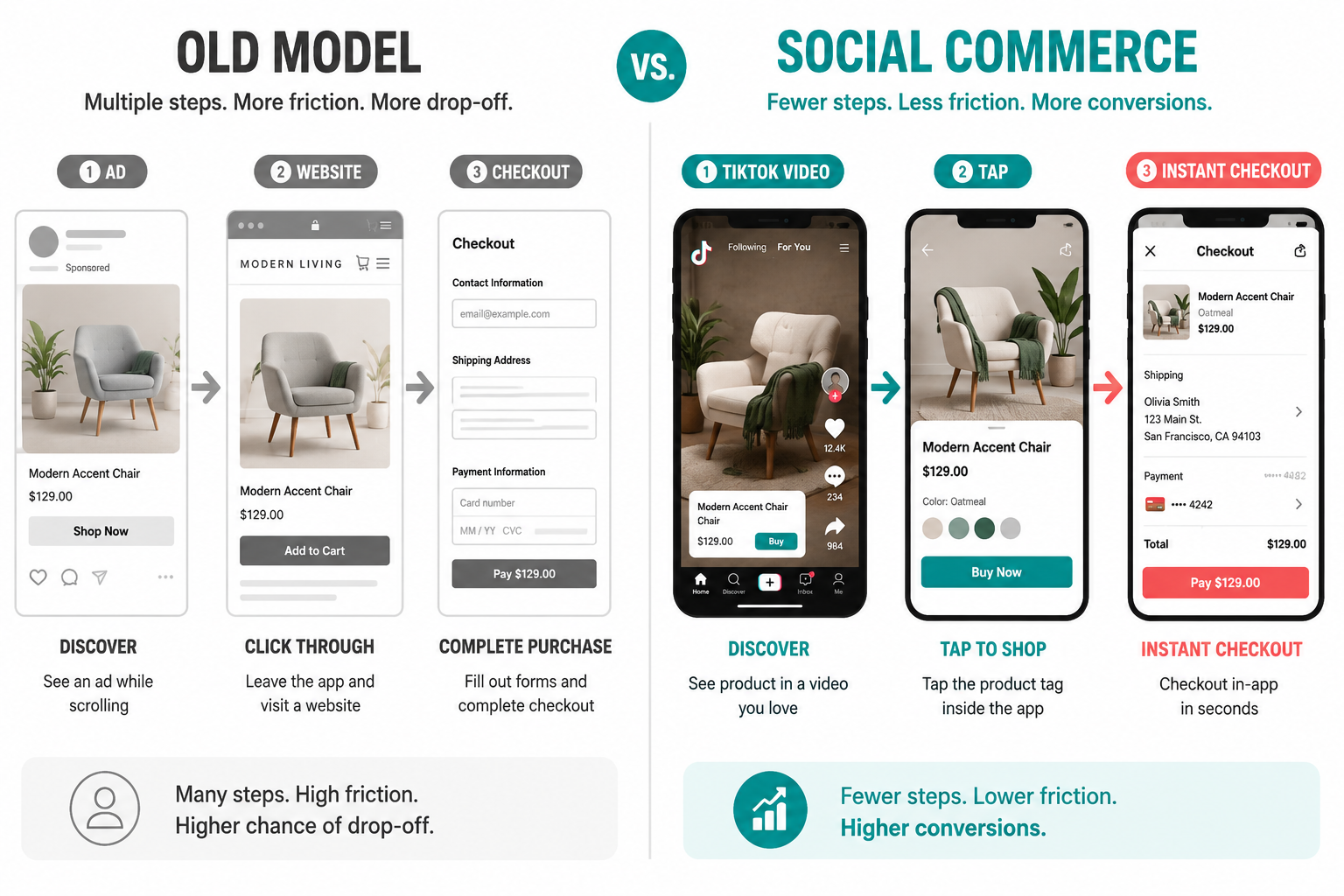
- Old model: You see an ad on Instagram → you click → you land on a website → you browse → maybe you buy.
- Social commerce model: You're watching a TikTok video → you tap a product tag → you checkout inside TikTok → done.
Every step removed from that journey is a percentage of conversions you recover. Friction is the enemy of sales, and social commerce eliminates it.
The numbers back this up. Social commerce in the US alone is projected to reach $80 billion in 2026, growing at 25% year-over-year. TikTok Shop is the fastest-growing channel in that space — and it's not close.
Why TikTok Shop Is the Biggest Opportunity for Shopify Sellers Right Now
TikTok isn't just a place where teenagers do dances anymore. It's a fully-fledged ecommerce engine.
Here's what the data looks like in 2026:
- TikTok Shop is projected to reach $23.41 billion in US sales this year — putting it ahead of massive retailers like Costco and Target in ecommerce terms.
- The platform has over 150 million monthly active buyers worldwide.
- Shopify merchants who integrate with TikTok Shop report an average 34% increase in total revenue within six months.
- 74% of Gen Z users say TikTok influences their purchasing decisions.
- In a 2025 YouGov survey, 45% of respondents said they made a purchase on TikTok because of an ad.
What makes TikTok different from every other social platform is its algorithm. It doesn't care how many followers you have. A brand-new account can post a product video and wake up to thousands of orders if the content resonates. That's a fundamentally different opportunity than Instagram or Facebook, where reach is largely pay-to-play.
TikTok also offers multiple ways for customers to discover and buy your products:
- Shoppable Videos — product links embedded directly into short-form videos
- Live Shopping — real-time sales during livestreams with add-to-cart functionality
- Shop Tab — a dedicated discovery hub where shoppers browse products from multiple sellers
- Shop Ads — paid formats including LIVE Shopping Ads, Product Shopping Ads, and Catalog Ads
All of these feed into a single checkout experience, inside the app, without redirecting the customer anywhere.
Before You Connect: Requirements for TikTok Shop + Shopify Integration
Before you dive into setup, make sure you tick these boxes. Skipping any of these is the number-one reason sellers hit errors during onboarding.
Shopify store requirements:
- An active Shopify store with products published and available for sale
- A verified store address in your Locations settings (no P.O. Boxes)
- Location name must be 35 characters or fewer
- A return policy page displayed on your store
- Store must be based in a supported country: US, UK, Spain, Ireland, France, Italy, Germany, Mexico, Japan, or Brazil
TikTok account requirements:
- A TikTok for Business account
- An approved TikTok Shop account (you can create one during the onboarding process)
- Business and tax documentation ready for verification
- The connection must be made from the main owner account in TikTok Seller Center — staff or sub-accounts will throw an error
Product requirements:
- All products must comply with TikTok Shop's content and product guidelines for your region
- No prohibited or restricted product categories
- High-quality images and complete product descriptions (missing these is the most common reason product syncs fail)
Also note: the integration is region-locked. Your Shopify store country and your TikTok Shop account country must match. If you sell in multiple regions, you'll need separate TikTok Shop entities for each market.
How to Connect Your Shopify Store to TikTok Shop (Step-by-Step)
The good news: the official integration is free and built directly into Shopify's admin. No code required.
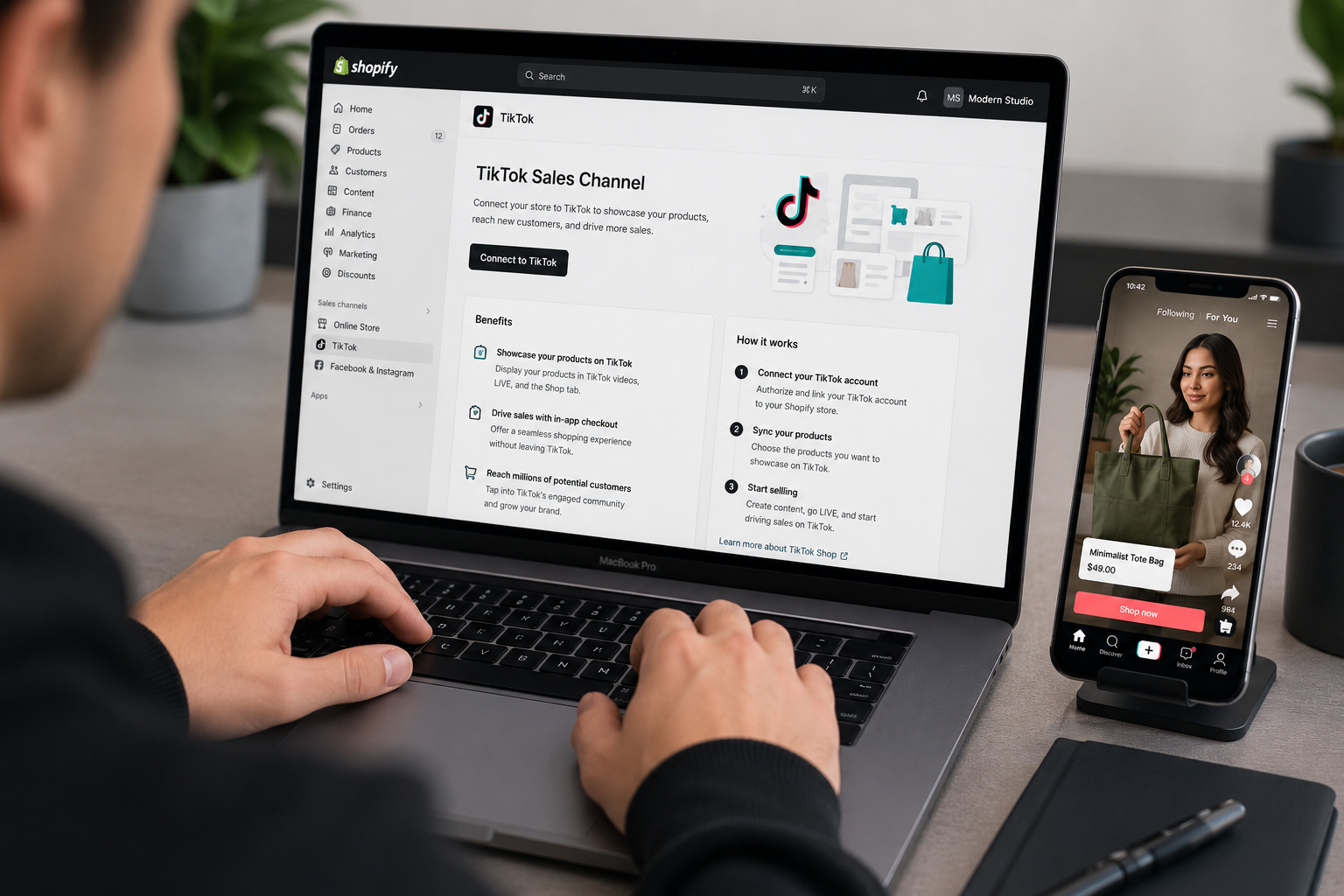
Step 1: Install the TikTok Sales Channel From your Shopify admin, go to Settings → Apps and Sales Channels. Click Shopify App Store, then search for "TikTok". Look for the official app with TikTok as the developer. Click Add channel.
Step 2: Connect Your TikTok Accounts On the setup page, click Connect in the TikTok Shop section. A dialog will appear — log in with your existing TikTok for Business account, or register as a new merchant using your phone number, email, and password.
Step 3: Accept the Terms and Verify Your Shop Review the TikTok Shop Merchant Terms of Service and click Connect. Then go to the **Shop Information **section and click Verify. You'll be prompted to upload business and identity documents. Verification typically takes 2–3 business days.
Step 4: Sync Your Product Catalog Once verified, Shopify and TikTok Shop will begin syncing your product catalog automatically — including product names, images, pricing, variants, and inventory levels. Any update you make in Shopify reflects instantly on TikTok Shop.
If products fail to sync, check that:
- Images meet TikTok's quality standards
- Product descriptions are complete
- The item doesn't fall under a restricted category
- Your warehouse address exactly matches what appears on Google Maps
Step 5: Configure Shipping and Warehouse Settings Go through the warehouse mapping and shipping setup in the TikTok Sales Channel dashboard. TikTok Shop supports up to 45 warehouses. Ensure all warehouse addresses are valid — this is one of the most common points where catalog sync errors originate.
Step 6: Start Selling From this point, your Shopify admin becomes your command center. Orders placed through TikTok Shop — whether from a shoppable video, a livestream, or the Shop Tab — flow directly back into Shopify, where you pack and ship them exactly like any other order. TikTok Seller Center handles payouts and disputes on their side.
How to Actually Sell on TikTok Shop: Content That Converts
Getting the integration live is step one. Step two is creating content that drives people to buy.
TikTok's algorithm rewards authenticity over production value. Polished, ad-like content consistently underperforms against raw, genuine, product-in-use videos. Here's what's working for Shopify sellers right now: 1. Show the product solving a real problem. Don't just showcase what it looks like — show it doing something. Before-and-after, unboxing, "I tried this for 30 days" — these formats consistently generate high engagement and purchase intent. 2. Keep the hook in the first two seconds. TikTok's attention window is brutal. If your video doesn't hook immediately, users scroll. Open with the most interesting thing about your product, not a logo or brand intro. 3. Lean into trends — but stay on-brand. Jumping on a trending sound or format massively increases your reach. The key is adapting the trend to your product naturally rather than forcing it. 4. Use Live Shopping regularly. Live Shopping events on TikTok see dramatically higher conversion rates than passive video content. Schedule weekly or bi-weekly lives where you demonstrate products, answer questions in real time, and offer live-exclusive discounts. 5. Partner with creators through TikTok's Affiliate Program. You don't have to create all the content yourself. TikTok Shop has a built-in affiliate marketplace where creators can apply to promote your products in exchange for a commission. In 2026, brands are investing more in TikTok influencer marketing than on any other platform — because it works.
Common Mistakes to Avoid
Treating TikTok like Instagram. TikTok content is raw, fast-moving, and community-driven. Reposting your Instagram Reels without adapting them for TikTok's style is one of the fastest ways to get ignored.
Not syncing inventory properly. Selling a product on TikTok that's out of stock in Shopify is a guaranteed way to generate negative reviews and refund requests. Enable real-time inventory sync and check your TikTok Seller Center regularly for sync errors.
Ignoring product compliance. TikTok enforces its product guidelines strictly. Review restricted categories before uploading your catalog — having products rejected after setup wastes days of troubleshooting time.
Using a sub-account to connect. Only the main owner account in TikTok Seller Center can complete the Shopify connection. If you hit a "seller not main account" error, you're logged into the wrong profile.
Is TikTok Shop Right for Your Shopify Store?
TikTok Shop works best for products that are visual, demonstrable, and carry a strong "wow" factor on video. Categories that consistently perform well include beauty and skincare, fashion and accessories, home gadgets, fitness equipment, and food products.
If your product is something you can show working — solving a problem, transforming something, or delivering a clear visual result — it has a strong shot on TikTok.
If you sell B2B products or highly technical items that require long explanation cycles, TikTok Shop may not be your primary channel, though it can still work for top-of-funnel brand awareness.
The integration itself costs nothing beyond your existing Shopify subscription, so the barrier to testing it is essentially zero. The only real investment is in creating content — and that doesn't have to be expensive to be effective.
Final Thoughts
Social commerce isn't a trend that's coming — it's already here, already generating billions in sales, and already reshaping how consumers expect to shop. TikTok Shop is the fastest-moving piece of that shift.
For Shopify sellers, the integration is free, the setup takes less than an hour, and the upside is enormous. The stores that treat TikTok as a serious sales channel today — not just a marketing channel — are the ones that will look back in twelve months and be grateful they moved early.
Set up your integration, create content that shows your product working, and meet your customers where they're already spending their time.
Need help setting up your Shopify store for social commerce or optimizing your theme for TikTok-driven traffic? Get in touch with EcomFixify — we specialize in Shopify development and ecommerce growth strategies.