Shopify SEO The Complete Guide to Ranking Your Store on Google
Paid advertising costs for Shopify merchants have risen more than 60% since 2020. Every time Meta changes its algorithm, Apple introduces a new privacy restriction, or Google updates its Quality Score requirements, your ad costs go up and your attributed returns become less reliable.
Organic search does not work that way. A blog post that ranks on page one of Google today will keep driving traffic next month, next quarter, and next year — without a recurring cost per click. A collection page optimized correctly for a high-intent keyword brings in purchase-ready visitors around the clock without a daily budget attached to it.
That is the compounding commercial advantage that makes Shopify SEO one of the highest-return investments available to ecommerce merchants in 2026 — and the reason the stores that prioritize it now are building a structural advantage that paid-only competitors cannot replicate.
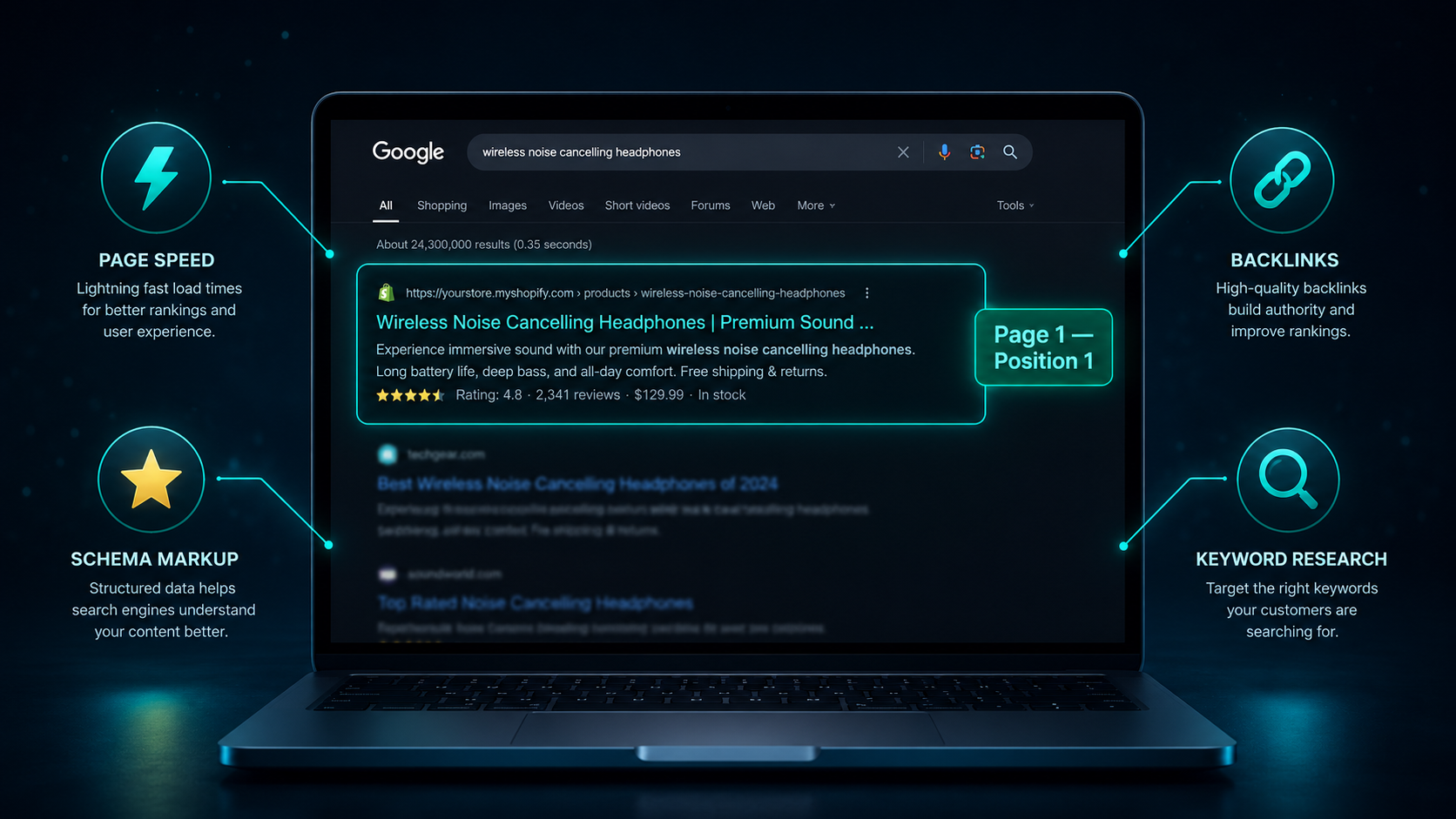
Shopify powers approximately 30% of all US ecommerce websites, making organic search one of the most competitive arenas for online merchants. Google's AI-driven algorithms in 2026 evaluate topical authority, page speed, structured data, entity relationships, and user experience as interconnected ranking signals — not individual ranking factors to be gamed in isolation. This guide covers every layer of that system and what you need to do at each level to rank your Shopify store consistently.
How Google Actually Ranks Shopify Stores in 2026
The SEO landscape has changed significantly in the past two years, and understanding how Google's algorithm actually works in 2026 prevents wasted effort on tactics that no longer move rankings.
Google has shifted from keyword matching — finding pages that contain specific words — to entity-based understanding and topical authority. It reads your store the way a knowledgeable human editor would: does this store demonstrate genuine expertise about the product category it sells? Is the content original and useful? Does the site structure make it easy to navigate? Do other reputable sites link to it as a trustworthy source?
The practical implication is that optimizing one product page in isolation while the rest of your store is thin, slow, or poorly structured produces weak results. Google evaluates your entire domain when deciding how much ranking authority to give individual pages. A store with 50 well-optimized product pages, a structured collection hierarchy, a regularly updated blog, and a healthy technical foundation will rank individual pages significantly faster and higher than a store with one perfectly optimized page surrounded by neglected content.
Google AI Overviews — the AI-generated answer summaries that now appear at the top of search results for many queries — have added a new dimension to Shopify SEO in 2026. Stores that appear in AI Overviews receive significantly higher brand visibility even when users do not click through. Being cited in an AI Overview requires the same signals that earn featured snippets: clear, well-structured answers to specific questions, schema markup, and content that Google judges authoritative on a topic. The blog and FAQ strategy covered later in this guide serves both traditional rankings and AI Overview visibility.
Step 1: Fix Shopify's Built-In SEO Limitations
Before any optimization strategy can work, you need to address the technical SEO issues that Shopify creates out of the box. Most merchants are unaware of these — and they silently undermine every other SEO effort.
The Duplicate URL Problem
Shopify automatically generates two different URLs for every product in your store. The same product appears at both /products/product-name and /collections/collection-name/products/product-name. From Google's perspective, these are two separate pages with identical content — which is a duplicate content problem that dilutes your ranking authority across two URLs rather than concentrating it on one.
Shopify attempts to handle this automatically with canonical tags that point Google to the /products/ version as the authoritative URL. In most cases this works correctly. But you need to verify it is working correctly on your store — particularly if you have made theme modifications, installed apps that inject code, or are running a custom Shopify build.
Check your canonical tags by opening any product page, right-clicking, selecting View Page Source, and searching for "canonical." The canonical tag should read: link rel="canonical" href="yourstore.com/products/product-name" — pointing to the /products/ version. If it points anywhere else or is missing, canonical implementation is a priority fix.
The /collections/ and /pages/ Duplicate Issue
Beyond products, Shopify also creates potential duplicate content issues with collection pages that have multiple sort orders — /collections/shoes?sort_by=price-ascending creates a new URL for each sorting option that Google may attempt to index as a separate page. Ensure your robots.txt file or canonical configuration is correctly handling these parameterized URLs.
Pagination Handling
For collection pages with many products, Shopify creates paginated URLs — /collections/shoes?page=2, /collections/shoes?page=3. These should either be canonicalized to the main collection URL or handled with proper rel="next" and rel="prev" implementation. Shopify 2.0 themes handle this better than older themes, but always verify on your specific setup.
Step 2: Keyword Research for Shopify Stores
Keyword research for Shopify stores requires a different approach than keyword research for blogs or service websites because you are optimizing three distinct page types simultaneously: product pages, collection pages, and blog content.
Each page type targets a different type of search intent, and matching the right keywords to the right page types is where most merchants get this wrong.
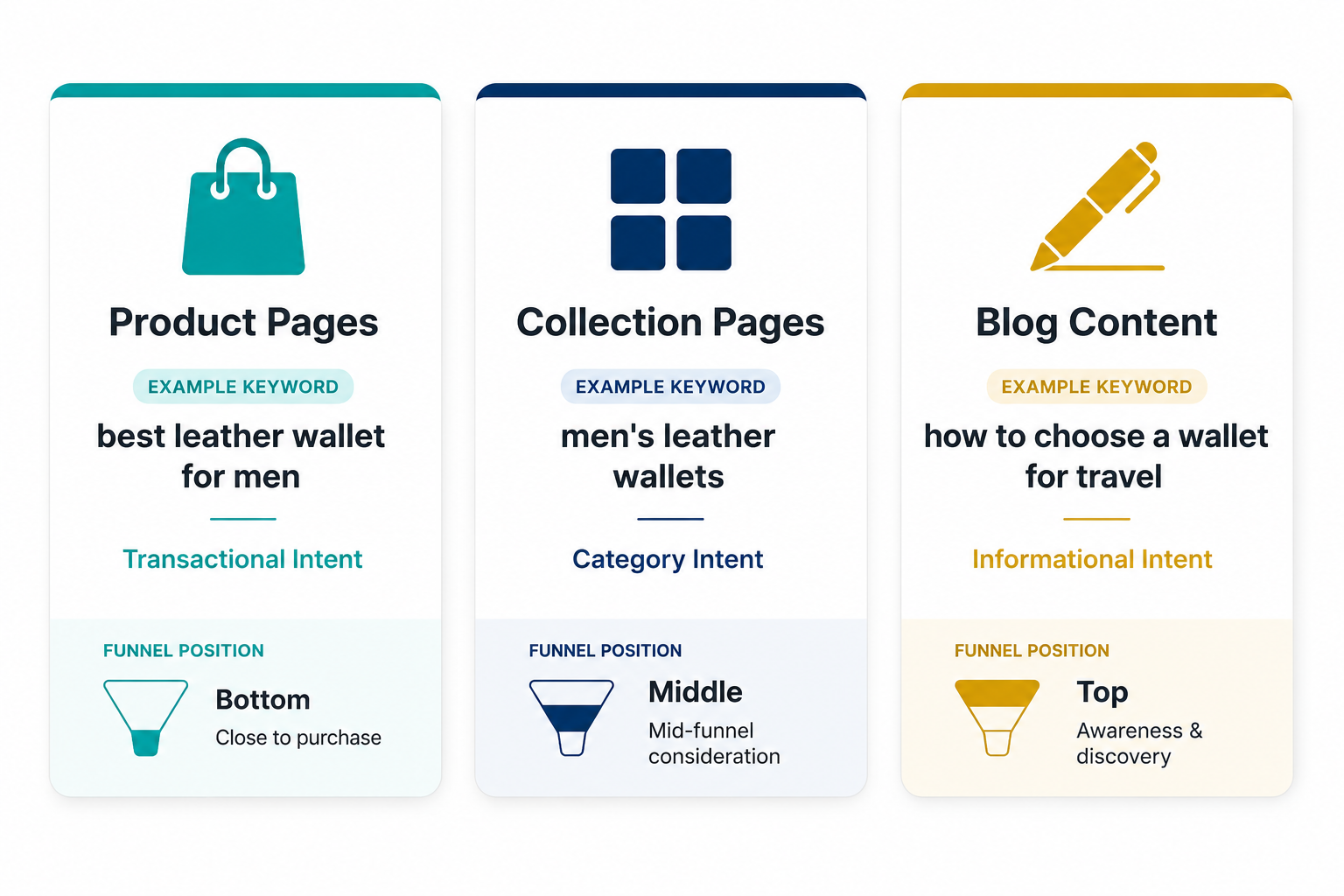
Product pages target transactional keywords — search terms used by shoppers who have already decided what type of product they want and are evaluating specific options. These typically include product-specific modifiers: "best leather wallet for men," "lightweight yoga mat 4mm," "organic collagen supplement powder." The searcher is close to purchasing. Your product page needs to match this intent with clear product information, pricing, and reviews.
Collection pages target category keywords — broader searches from shoppers who are browsing a product category rather than a specific item. "Men's leather wallets," "yoga mats," "collagen supplements." These searchers are in consideration mode. Your collection page needs to show the full range of options available and help them narrow down.
Blog content targets informational keywords — searches from people researching a topic before they are ready to buy. "How to choose a yoga mat," "benefits of collagen for skin," "best wallet for travel." These searchers are at the top of the funnel. Your blog content positions your store as an authority in the category and introduces your brand before the purchase stage.
The tools that work best for Shopify keyword research in 2026 are Google Search Console's Performance report — which shows what keywords your store already ranks for, giving you the fastest optimization wins by improving pages already on page two or three — Google's People Also Ask and auto-complete suggestions, which reveal the exact questions real shoppers are typing, and Ahrefs or Semrush for volume and competition data on specific keyword targets.
For new stores with no existing rankings, long-tail keywords — four to six word phrases with lower competition and higher specificity — are the fastest path to first-page rankings. "Lightweight yoga mat for travel under $50" has dramatically less competition than "yoga mat" while attracting searchers with higher purchase intent and lower price sensitivity.
Step 3: On-Page SEO for Product Pages
Product pages are where the majority of your store's revenue is generated, making them the highest-priority on-page SEO target. Each product page should be optimized for one primary keyword with two to three supporting secondary keywords.
The page title tag — controlled in Shopify through the SEO section of each product — is the most important single on-page SEO element. It should include your primary keyword naturally and be written to earn clicks from search results, not just to satisfy an algorithm. A title like "Merino Wool Running Socks — Lightweight, Odor-Free, Men and Women" tells Google what the page is about and tells the searcher why this result is worth clicking.
Your meta description does not directly influence rankings but significantly influences click-through rate — which does influence rankings over time. Write meta descriptions that describe the product's key benefit, include the primary keyword, and end with a clear reason to click. Keep them under 160 characters so they display fully in search results.
Your H1 tag is the product title displayed on the page. It should match or closely parallel your SEO title and include the primary keyword. Shopify automatically uses your product title as the H1 — which means your product naming convention directly affects your SEO.
Product descriptions are where most merchants either over-optimize with awkward keyword stuffing or ignore SEO entirely and write purely for aesthetics. The right approach is natural keyword integration within genuinely informative, benefit-driven content. Use your primary keyword once in the first paragraph, naturally. Use secondary keywords in the specification section. Write descriptions long enough to answer every question a buyer might have — Google rewards comprehensive content on product pages — but never pad for length.
Image optimization is one of the most consistently overlooked on-page SEO factors in Shopify stores. Every product image needs a descriptive, keyword-relevant alt text — not "image1.jpg" or a blank field. Alt text serves two purposes: it helps Google understand what the image shows, contributing to image search rankings and overall page relevance, and it makes your store accessible to visually impaired shoppers using screen readers. Write alt text as a brief factual description: "merino wool running socks in blue size medium" rather than "blue socks" or a keyword-stuffed phrase.
Step 4: Collection Page SEO — Your Most Neglected Opportunity
Collection pages are consistently the highest-traffic, highest-commercial-intent pages on a Shopify store — and the most neglected from an SEO perspective. Most merchants add products to collections and never write a single word of unique content on the collection page itself.
Google needs unique, relevant content to understand what a collection page is about and rank it for category keywords. A collection page with only a product grid and no descriptive text is essentially an empty page from Google's perspective — indistinguishable from a filter or pagination artifact rather than an authoritative category destination.
The fix is straightforward: add 200 to 400 words of descriptive, keyword-optimized text to each major collection page. This text should explain what the collection contains, what makes your selection distinctive, who the products are for, and key considerations when choosing within this category. Place this text below the product grid using Shopify's theme editor so it does not disrupt the shopping experience — it is there for Google more than for casual shoppers, though engaged researchers will read it.
Optimize each collection page's title tag and meta description for the category keyword it targets. The collection title becomes the H1. Add internal links from collection pages to relevant blog posts and from blog posts back to collection pages — this bidirectional linking structure signals topical authority to Google and passes ranking authority between your most important pages.
Step 5: Technical SEO — The Foundation Everything Else Builds On
Technical SEO ensures Google can crawl, understand, and index your store correctly. Without it, even the best content and the most carefully researched keywords will underperform.
Page speed is Google's most concrete technical ranking factor. Google measures Core Web Vitals — Largest Contentful Paint, Cumulative Layout Shift, and Interaction to Next Paint — as ranking signals for both mobile and desktop. For Shopify stores, the most impactful speed improvements are converting all images to WebP format, implementing lazy loading so images load only when they enter the viewport, removing unused apps that add JavaScript payload to every page, and using a performance-optimized theme. Dawn is Shopify's fastest free theme in 2026. Impulse and Prestige are strong premium options with proven Core Web Vitals performance.
Run your store through Google PageSpeed Insights and target a Largest Contentful Paint under 2.5 seconds on mobile — the threshold Google defines as "good" and where you will see the clearest ranking impact from improvements.
Structured data schema markup helps Google understand your product data at a deeper level than reading page text alone. Product schema communicates your product's name, price, availability, rating, and review data to Google in a standardized format that enables rich results — the star ratings, price ranges, and availability indicators that appear directly in search results and significantly increase click-through rates. Breadcrumb schema helps Google understand your store's navigation hierarchy. FAQ schema on product pages and blog posts enables your content to appear in featured snippet positions and AI Overviews.
For Shopify stores, schema can be added through the theme's Liquid files by developers or through SEO apps including Schema Plus, JSON-LD for SEO, and Smart SEO, which automate the most important schema types without requiring code edits.
Your XML sitemap tells Google which pages exist on your store and should be crawled. Shopify generates a sitemap automatically at yourstore.com/sitemap.xml. Submit this to Google Search Console and recheck it after major catalog changes to ensure new products and collection pages are being discovered promptly. For new blog posts, use the Request Indexing feature in Search Console immediately after publishing rather than waiting for Google to discover the URL through regular crawling.
Mobile-first indexing is the default for all Shopify stores in 2026. Google uses the mobile version of your site for crawling, indexing, and ranking. Every SEO element — page speed, content, schema, navigation — needs to be evaluated on mobile, not just desktop. Test your store on a real smartphone regularly, not just in browser emulation mode.
Step 6: Blog Content Strategy — Building Topical Authority
A Shopify store without a blog is a store competing only for transactional keywords — the searches from people already ready to buy. That is the most competitive segment of every keyword market and the hardest to rank in without significant domain authority.
A blog that consistently publishes informational content targeting the questions your potential customers ask before they are ready to buy builds two things simultaneously: a stream of top-of-funnel organic traffic from informational keywords, and the topical authority that makes your entire domain more competitive for the transactional keywords your product and collection pages target.
Google's topical authority model rewards domains that cover a subject comprehensively. A Shopify store that sells yoga equipment and publishes detailed blog content about how to choose yoga mats, how to care for yoga blocks, the difference between yoga styles, and beginner yoga routines is signaling to Google that it is a genuine authority on the yoga equipment category — not just a store with a product catalog. That authority signal lifts the rankings of product and collection pages across the category.
Each blog post should target one primary informational keyword, support it with three to five related terms, include internal links to relevant collection and product pages, and be comprehensive enough to genuinely answer the question a searcher brought to Google. Publishing consistently — one to two posts per week — matters more than individual post length. Google rewards freshness and consistency alongside quality.
The blog content that generates the most commercial value for Shopify stores in 2026 includes buying guides that compare product options and link to relevant collections, how-to content that demonstrates product use and links to featured products, problem-solution content that addresses specific customer pain points and introduces relevant products as solutions, and comparison content that evaluates similar products with honest, detailed assessments.
Step 7: Link Building for Shopify Stores
Backlinks — links from other websites to your Shopify store — remain one of the strongest ranking factors in 2026. A page with strong content but few external links will consistently rank below a page with comparable content and meaningful backlinks from authoritative sources.
The most effective link building approaches for Shopify merchants in 2026 are:
Product reviews and collaborations with relevant bloggers and content creators in your product category. A detailed review post on a niche blog that includes a backlink to your store product page is more valuable than dozens of directory submissions.
Guest posting on industry publications and ecommerce blogs — writing genuine, valuable content for external sites that link back to relevant pages on your store. The content must be genuinely useful to the publishing site's audience to earn placement and to generate the engagement that makes the link valuable.
Digital PR — creating data, research, or genuinely newsworthy stories about your brand or product category that earn organic coverage from journalists and publications. A study on consumer behavior in your category, a brand milestone, or a compelling founder story all have genuine PR appeal that can generate high-authority backlinks without paid placement.
Business directory listings on relevant directories — Clutch, Trustpilot, industry-specific directories — provide modest but legitimate backlink signals and are worth completing for every Shopify store.
Supplier and partner pages — if you manufacture a product or partner with other brands, requesting that they link to your store from their website provides relevant, authoritative backlinks with zero link-building effort beyond making the request.
Step 8: Google Merchant Center and Shopping Integration
Google Merchant Center syncs your Shopify product catalog to Google Shopping, enabling your products to appear in Google's Shopping tab, in image search results, and in AI-powered shopping features that are becoming increasingly prominent in 2026 search results.
The SEO benefit of Merchant Center extends beyond Shopping placements. A complete, accurate, and regularly updated product feed strengthens your product entities in Google's knowledge graph — helping Google understand your products at a semantic level that improves organic product page rankings alongside paid Shopping visibility.
Connect Shopify to Google Merchant Center through Shopify's Google channel app, which syncs your product catalog automatically. Ensure every product in the feed has a GTIN or barcode, complete attribute data including size, color, and material where relevant, accurate pricing, and real-time inventory availability. Products with incomplete feed data are either excluded from Shopping placements or shown less frequently — directly reducing the SEO and traffic benefit of the integration.
Step 9: Search Console Monitoring — Your Most Important Ongoing Task
Google Search Console is the most important tool in your Shopify SEO toolkit and the one most consistently underused by merchants who set it up once and never open it again.
The Performance report shows which queries your pages are appearing for in search results, what position they rank in, how many impressions they receive, and what click-through rate they generate. This data is the fastest source of SEO optimization insights available to any Shopify merchant because it shows exactly what is working, what has potential to be improved, and where your efforts should focus next.
The most valuable use of the Performance report is finding keywords where your pages rank between position 4 and 15 — the second half of page one and the top of page two. These are the highest-opportunity positions in your entire SEO program. A page ranking position 8 for a keyword that gets 2,000 monthly searches is generating minimal traffic because almost no one clicks below position 3. Moving that page from position 8 to position 3 — through better on-page optimization, additional internal links, and a content update — can increase traffic from that keyword by five to ten times.
The Coverage report identifies indexing issues — pages Google cannot crawl, pages blocked by robots.txt, duplicate content problems, and redirect errors. Review this monthly and address any errors promptly. The Core Web Vitals report shows your performance against Google's speed thresholds. The Enhancements report shows schema markup issues.
Check Search Console weekly in the first six months of an SEO program and monthly once performance has stabilized. The data compounds — each month of performance history gives you better insight into trends, seasonal patterns, and the impact of specific optimizations.
The Shopify SEO App Stack Worth Using
No SEO app can substitute for good strategy, good content, and good technical implementation — but the right apps handle the mechanics efficiently so you can focus on the strategy.
Yoast SEO for Shopify and Plug In SEO are the two most widely used on-page SEO apps for Shopify stores. Both handle bulk meta title and description editing, redirect management, schema markup generation, and SEO audit checklists across your product and collection catalog. For stores with large catalogs where editing individual product meta fields is impractical, bulk editing capability alone justifies the subscription.
JSON-LD for SEO and Schema Plus both handle structured data implementation comprehensively — generating Product, BreadcrumbList, Organization, and FAQ schema automatically from your Shopify data without requiring theme code edits. These apps are particularly valuable for merchants who want rich result eligibility without developer involvement.
Image optimization apps including Crush.pics and TinyIMG handle bulk WebP conversion and alt text optimization for existing product image libraries. For stores with hundreds of product images that have never been optimized, these apps compress and convert your entire library with minimal manual effort.
Smart SEO automates several ongoing SEO tasks including sitemap maintenance, alt text generation for new images, and broken link detection — reducing the manual overhead of keeping your store's technical SEO healthy as your catalog grows.
The Realistic Timeline for Shopify SEO Results
The most important expectation to set before investing in Shopify SEO is timeline. Organic search is not a paid channel where results are immediate and proportional to spend. It is a compounding investment with a delayed but durable return.
New Shopify stores with no existing domain authority typically begin seeing meaningful organic traffic between months three and six of consistent SEO investment. This timeline assumes regular content publishing, correct technical implementation, and active link building from launch.
Established stores with existing domain authority but previously neglected SEO — unoptimized collection pages, no blog content, thin product descriptions — typically see measurable ranking improvements within four to eight weeks of systematic optimization, because the domain already has Google's trust and the improvements are building on an existing foundation.
The stores that see the fastest results are those that combine technical cleanup, collection page content addition, and blog content publication simultaneously — addressing all three SEO layers at once rather than sequentially. Google's algorithm processes these signals together, and the combined signal is stronger than any individual improvement in isolation.
Consistency is what separates stores that build compounding organic traffic from those that see initial improvements plateau. Publishing one to two blog posts per week, requesting indexing for each immediately after publishing, adding internal links between new and existing content, and monitoring Search Console for optimization opportunities creates a flywheel that generates more organic authority with each passing month.
Need help implementing Shopify SEO for your store, or want an expert to audit your current technical setup and identify the highest-priority optimization opportunities? Get in touch with EcomFixify — we specialize in Shopify development and ecommerce growth strategy for brands building long-term organic visibility.