Shopify SEO: How to Get Free Traffic From Google to Your Store in 2026
Paid advertising gives you traffic the moment you start spending and takes it away the moment you stop. SEO gives you traffic that compounds over time, costs nothing per click, and keeps delivering results long after the initial work is done. How to Get Free Traffic From Google to Your Store in 2026
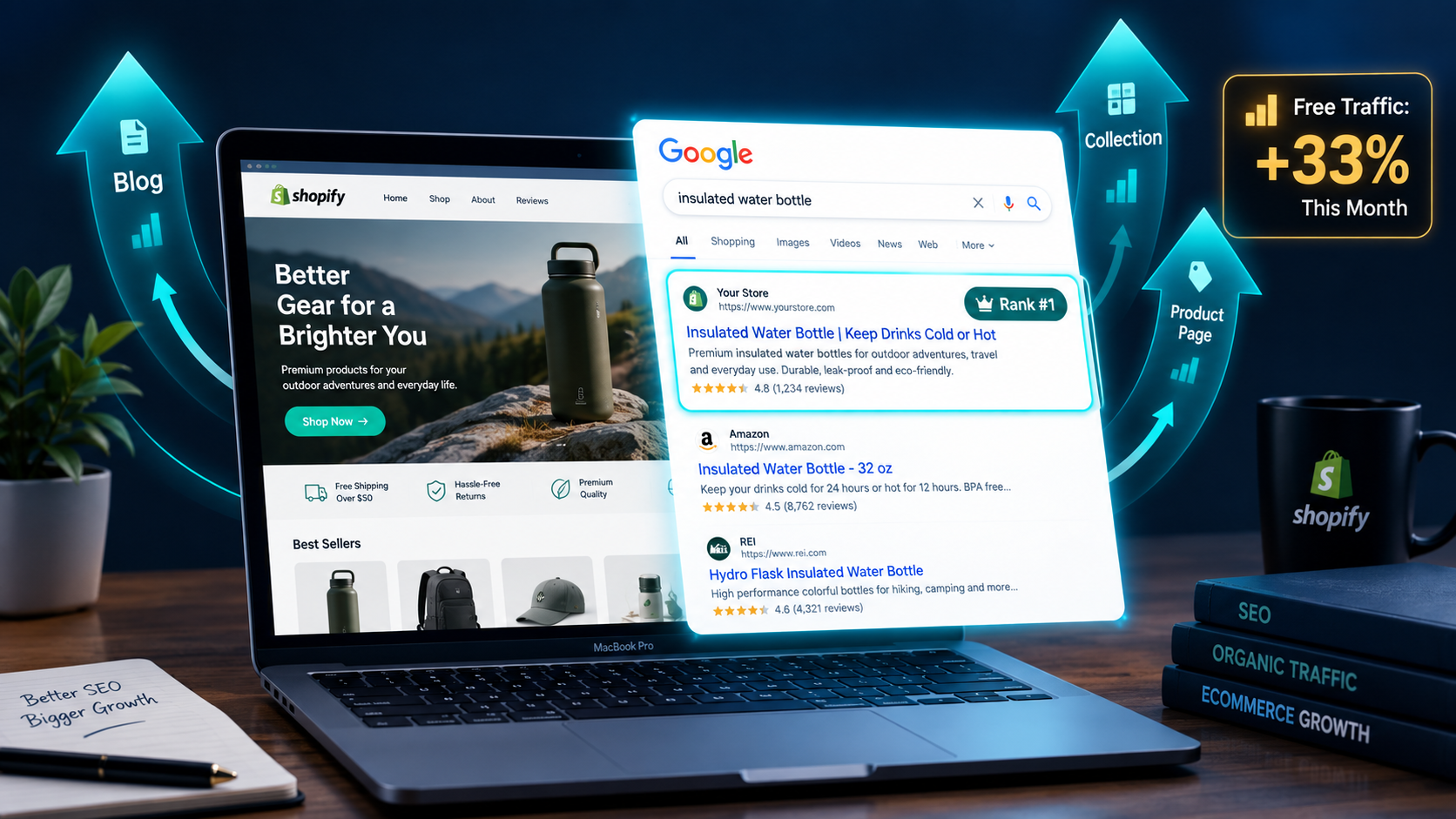
Organic search drives 33% of all ecommerce traffic globally in 2026. Shopify stores with active, optimized blogs get 55% more organic traffic than those without. And the merchants who invested in SEO two years ago are now generating consistent, cost-free traffic from Google while competitors continue paying rising CPCs on Meta and Google Ads just to stay visible.
The gap between what Shopify does for SEO automatically and what actually ranks your store on Google is where the real work lives. Shopify handles the basics — SSL certificates, a sitemap, clean URLs, mobile-responsive themes — but rankings require active, ongoing optimization of your technical foundation, your product and collection pages, and your content strategy. None of that happens by default.
This guide covers the complete Shopify SEO framework for 2026 — from the technical foundation that determines whether Google can even find your pages, through the on-page optimization that makes those pages relevant, to the content and link-building strategy that builds the authority Google requires before it sends you meaningful traffic.
Why Shopify SEO Is Different From General SEO
Shopify makes ecommerce operations easier — but it also creates specific SEO challenges that every merchant needs to understand before optimizing.
The most significant Shopify-specific SEO issue is duplicate content from URL structure. Shopify generates multiple URLs for the same product depending on how it is accessed — through a direct product URL, through a collection URL, or through a blog link. A product accessible at both yourstore.com/products/blue-sneakers and yourstore.com/collections/footwear/products/blue-sneakers creates two pages with identical content, which Google penalizes by splitting ranking signals between the duplicates rather than consolidating them.
Shopify partially handles this with automatic canonical tags that point to the preferred version of each URL — but verifying these are correctly set and not causing unintended duplicate content issues requires active monitoring in Google Search Console.
The second Shopify-specific challenge is app bloat. Every app you install in Shopify adds JavaScript and CSS to your storefront — and most merchants accumulate apps over time without removing the ones they no longer use. Each unused app that continues loading code on your store slows page speed, damages Core Web Vitals scores, and directly reduces organic rankings. A quarterly app audit that removes unused installations is one of the most impactful and most neglected SEO maintenance tasks for Shopify stores.
The third is the collection page opportunity that most merchants leave entirely untapped. Collection pages — your category pages — are among the highest-potential pages in your Shopify store for capturing broad, high-volume keyword traffic. Yet most merchants leave them with no descriptive text, no keyword optimization, and no internal linking structure that passes authority to the product pages beneath them.
Understanding these three Shopify-specific dynamics before optimizing prevents the most common mistakes and concentrates your effort where it generates the most ranking impact.
Step 1: Technical SEO Foundation — Getting Google Into Your Store
Technical SEO is the foundation that determines whether Google can find, crawl, and index your pages in the first place. On-page optimization and content creation built on a broken technical foundation delivers no ranking results — because the pages are either invisible to Google or being evaluated incorrectly.
The technical SEO checklist every Shopify store needs to complete before focusing on anything else:
Submit your sitemap to Google Search Console. Your Shopify store automatically generates a sitemap at yourstore.com/sitemap.xml. Log into Google Search Console, navigate to Sitemaps, and submit this URL. Once submitted, Google re-crawls your sitemap regularly to discover new pages. Without submission, discovery depends on Google finding pages through links — a significantly slower process, particularly for new stores with limited external links.
Verify your pages are indexed. In Google Search Console, the Coverage report shows which pages are indexed and which are excluded, blocked, or encountering errors. Pages marked as excluded with a "Duplicate, submitted URL not selected as canonical" status have canonical tag issues. Pages showing 404 errors have broken links pointing to them. Both require attention before investing in content or link building.
Fix 404 errors and redirect chains. Use the Online Store section of your Shopify admin to create 301 redirects from any URLs that have changed — products that were renamed, collections that were restructured, or blog posts with updated slugs. A 301 redirect preserves the ranking signals from the old URL and passes them to the new one. Without it, those signals are permanently lost.
Verify canonical tags on your product pages. For each product accessible through multiple URLs, confirm the canonical tag points to the primary /products/ URL rather than a collection-specific URL. The Shopify SEO app Simple Sitemap or Smart SEO automates canonical verification and can surface issues across your entire catalog simultaneously.
Configure robots.txt correctly. Shopify allows merchants to edit their robots.txt file from the theme editor in 2026. Verify that your robots.txt is not blocking any pages you want indexed — a misconfigured robots.txt that blocks your product or collection pages can prevent indexing entirely, a mistake that is easy to make and slow to diagnose without active monitoring.
Check structured data implementation. Schema markup tells Google exactly what type of content is on each page — Product schema with price, availability, and review data on product pages; BreadcrumbList schema for site structure; Organization schema on your homepage. Shopify generates some schema automatically, but the completeness varies by theme. Use Google's Rich Results Test to verify what schema is actually being read from each page type and identify gaps.
Step 2: Keyword Research for Shopify — Finding What Your Customers Actually Search
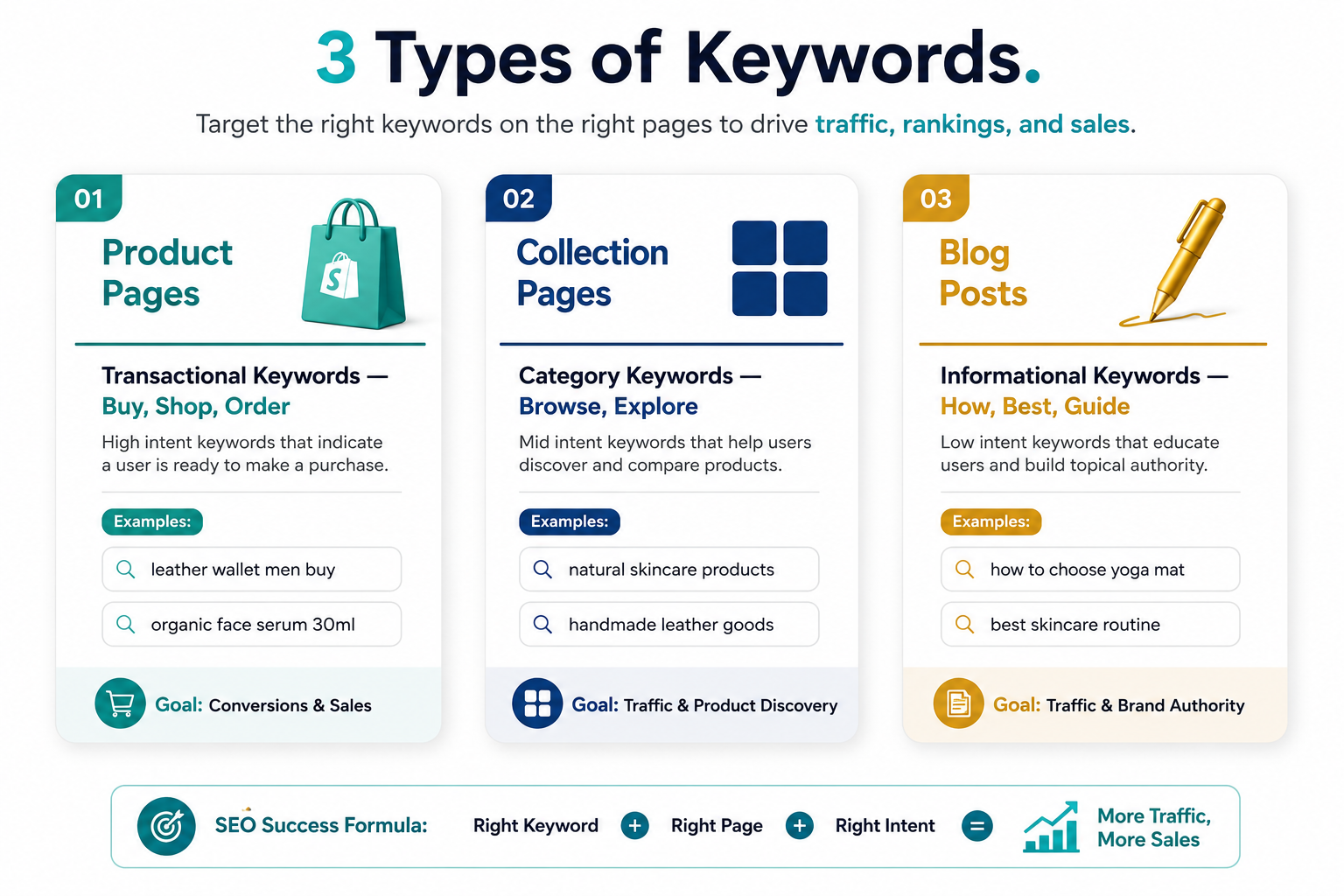
Keyword research for Shopify stores operates across three distinct page types — product pages, collection pages, and blog posts — each targeting different keyword categories with different search intent.
Product pages target transactional keywords — searches that signal purchase intent. "Buy leather wallet men," "organic face serum 30ml," "running shoes for flat feet." These are the keywords buyers use when they are ready to purchase, which means they convert at higher rates than informational keywords but have higher competition from established retailers.
The practical approach to product page keyword research: use Google Keyword Planner to identify the primary search term for each product, verify the search intent by examining what the current top results look like — are they product pages, comparison articles, or informational guides — and target keywords where product pages already rank, confirming that Google views the intent as transactional. Include the primary keyword in the product title, the first paragraph of the description, one image alt tag, and the meta title.
Collection pages target category keywords — broader searches for a type of product rather than a specific item. "Women's yoga wear," "natural skincare products," "handmade leather goods." These terms typically carry higher search volume than individual product terms and represent customers earlier in the purchase journey who are still browsing options rather than ready to buy a specific item.
Collection pages consistently underperform their SEO potential on most Shopify stores because they are left with no text — just a grid of products. Adding 200 to 400 words of descriptive, keyword-rich copy to each collection page explaining what the collection contains, who it is for, and what distinguishes your products in that category gives Google the content signal it needs to rank that collection page for its target keyword. One client who added descriptive copy to their 10 main collection pages increased organic traffic to those pages by 28% within 90 days.
Blog posts target informational keywords — the questions and research queries that buyers search before they are ready to purchase. "How to choose the right yoga mat," "best skincare routine for combination skin," "leather wallet vs canvas wallet." These keywords attract visitors earlier in the purchase journey and serve a dual function: building awareness of your brand and providing Google with content signals that establish topical authority in your product category.
The most powerful keyword strategy for Shopify blogs targets the questions your customers ask before buying the products you sell — because these searchers are exactly the audience you want and the content naturally creates paths to your product pages through internal links.
Step 3: On-Page SEO for Product and Collection Pages
On-page SEO is the optimization of elements on each page that Google uses to understand what the page is about and how relevant it is to a specific search query.
The on-page elements that carry the most ranking weight for Shopify stores:
Page title tags. The title tag is the most important on-page SEO element on any page. Keep it to 55 to 60 characters — Google truncates longer titles in search results, and a cut-off title reads as careless. Include the primary keyword early in the title rather than at the end. Add a differentiator where relevant — "Free UK Delivery," "Bestseller," or a price range — which improves click-through rates from search results independently of ranking position.
Meta descriptions. Meta descriptions do not directly influence rankings but significantly influence click-through rates — and click-through rate is a ranking signal. Write meta descriptions of 120 to 150 characters that describe the page's value clearly and include a call to action. "Shop our full range of natural face serums, formulated for sensitive skin. Free delivery on orders over $50" tells the searcher what they will find and gives them a reason to click.
URL structure. Use clean, keyword-rich URLs for every page. yourstore.com/collections/mens-leather-wallets is better than yourstore.com/collections/accessories for SEO and for the customer who sees the URL in search results. Shopify generates URLs from page titles by default — ensure every page title is written with the target keyword in mind and check that no URL contains unnecessary numbers or session parameters.
Product descriptions. Write unique descriptions for every product — never use manufacturer descriptions, which are often published across multiple retailer sites and create duplicate content issues. The description should include the primary keyword naturally in the first paragraph, address the most common purchase questions in the body, and include two to three secondary keywords in specification sections. Descriptions written for humans that also include relevant keywords consistently outperform keyword-stuffed descriptions that sacrifice readability for SEO.
Image alt text. Every product image should have a descriptive alt tag that includes the product name and primary keyword. "Handmade brown leather bifold wallet for men" is a complete, relevant alt tag. "Image1" is not. In Shopify, alt text is added through the product media editor — set it for every image, not just the hero shot.
H1 and heading hierarchy. Use exactly one H1 per page — the product or collection name — and organize subsequent content with H2 and H3 subheadings that break the content into logical sections. Shopify themes typically render the page title as the H1 automatically. Verify this is the case in your theme and that no theme element is adding a second H1 elsewhere on the page.
Step 4: Blog Content Strategy That Drives Organic Traffic and Product Sales
A Shopify blog is not a marketing afterthought — it is the highest-leverage SEO tool available to independent Shopify merchants for capturing organic traffic at scale.
The reason is structural. Product and collection pages can only rank for transactional keywords — the searches buyers make when they are already in purchase mode. Informational keywords — the questions and research queries that make up the majority of search volume in any product category — can only be captured by content pages like blog posts.
A skincare brand whose product pages rank for "vitamin C serum 30ml" captures buyers who already know what they want. The same brand's blog posts targeting "how to add vitamin C to your skincare routine," "vitamin C serum for beginners," and "best ingredients to combine with vitamin C" capture buyers who are earlier in their research — before they have decided on a product or even a brand — and guide them toward purchase through useful, expert content.
Publishing two to four blog posts per month targeting long-tail informational keywords in your product category is the content cadence that consistently generates compound organic traffic growth for Shopify stores. The posts compound because older posts with established backlinks and engagement signals continue ranking and driving traffic indefinitely — unlike paid ads that stop the moment the budget runs out.
Each blog post should target a specific question or keyword phrase, contain a minimum of 1,200 words to provide the depth Google rewards, include two to three internal links to relevant product or collection pages, and end with a natural transition toward a relevant product purchase. The internal link from a high-performing blog post to a product page passes the blog post's accumulated authority to the product page — improving the product page's ranking on its own target keywords.
Step 5: Internal Linking — Passing Authority to Your Money Pages
Internal linking is the most underused SEO lever in most Shopify stores. It costs nothing, requires no external relationships, and has a direct and measurable impact on how ranking signals flow through your site.
The principle is simple: Google assigns ranking authority to pages based on the quality and quantity of links pointing to them — both from external websites and from other pages within the same site. Pages that receive more internal links are treated as more important. Pages with few or no internal links receive little authority and rank poorly regardless of their content quality.
The internal linking structure that supports Shopify SEO most effectively:
Your homepage — your highest-authority page — links to your main collection pages. Collection pages link to individual product pages within the collection. Blog posts link to relevant products, collections, and other related blog posts. Every new blog post you publish links to at least two existing pages on your store that are relevant to the content.
When you add a new product, add an internal link to it from your most relevant existing blog post and from the collection it belongs to. When you publish a new blog post, go back to two or three older relevant posts and add a link to the new one — this distributes authority from established pages to new content and accelerates the ranking of newly published articles.
Descriptive anchor text — the clickable text of each internal link — tells Google what the linked page is about. "Best vitamin C serum for sensitive skin" as anchor text signals to Google that the linked page is relevant for that phrase. "Click here" signals nothing. Use keyword-relevant anchor text consistently across all internal links.
Step 6: Building Backlinks for Shopify SEO
Backlinks — links from other websites pointing to your Shopify store — remain the most powerful off-page ranking signal available. Google treats each backlink as a vote of confidence from one site in another's content. Sites with more high-quality backlinks consistently outrank equally optimized sites with fewer links.
The challenge for independent Shopify merchants is that backlink building takes time, effort, and often investment. The strategies that work reliably without requiring a large budget:
Product reviews from niche bloggers and content creators in your category. Offer your product for free in exchange for an honest review on an established blog. A single link from a relevant blog with genuine authority in your category carries more SEO value than dozens of links from irrelevant or low-quality sources.
Guest posts on industry-relevant publications. Writing a valuable, expert article for another publication in your product category — with a link back to your Shopify store in your author bio or within the content — builds both backlinks and brand exposure simultaneously.
PR and press coverage. A product that gets featured in a gift guide, a news article, or an editorial review earns backlinks from media publications that carry significant domain authority. Tools like HARO (Help A Reporter Out) and Qwoted connect merchants with journalists actively looking for product recommendations and expert sources in specific categories.
Supplier and partner links. Your product suppliers, manufacturing partners, brand ambassadors, and wholesale stockists are all natural link partners. Ask them to link to your store from their website. These links are easy to earn, highly relevant to your category, and cost nothing beyond the request.
Resource link building. Creating genuinely useful free resources — a size guide, a care instructions page, a comprehensive how-to guide — that other sites in your category naturally want to reference and link to generates backlinks passively over time.
The quantity of backlinks matters far less than their quality and relevance. Five links from genuinely respected publications in your product category will outperform fifty links from unrelated or low-quality sites. Focus your outreach on relevance and authority rather than volume.
Step 7: Google Search Console — Your Free Shopify SEO Command Center
Google Search Console is the single most important free tool for Shopify SEO and the one most commonly underused. It is the direct line of communication between your store and Google — showing exactly which queries bring your pages up in search results, which pages are indexed, which have errors, and which are gaining or losing ranking position over time.
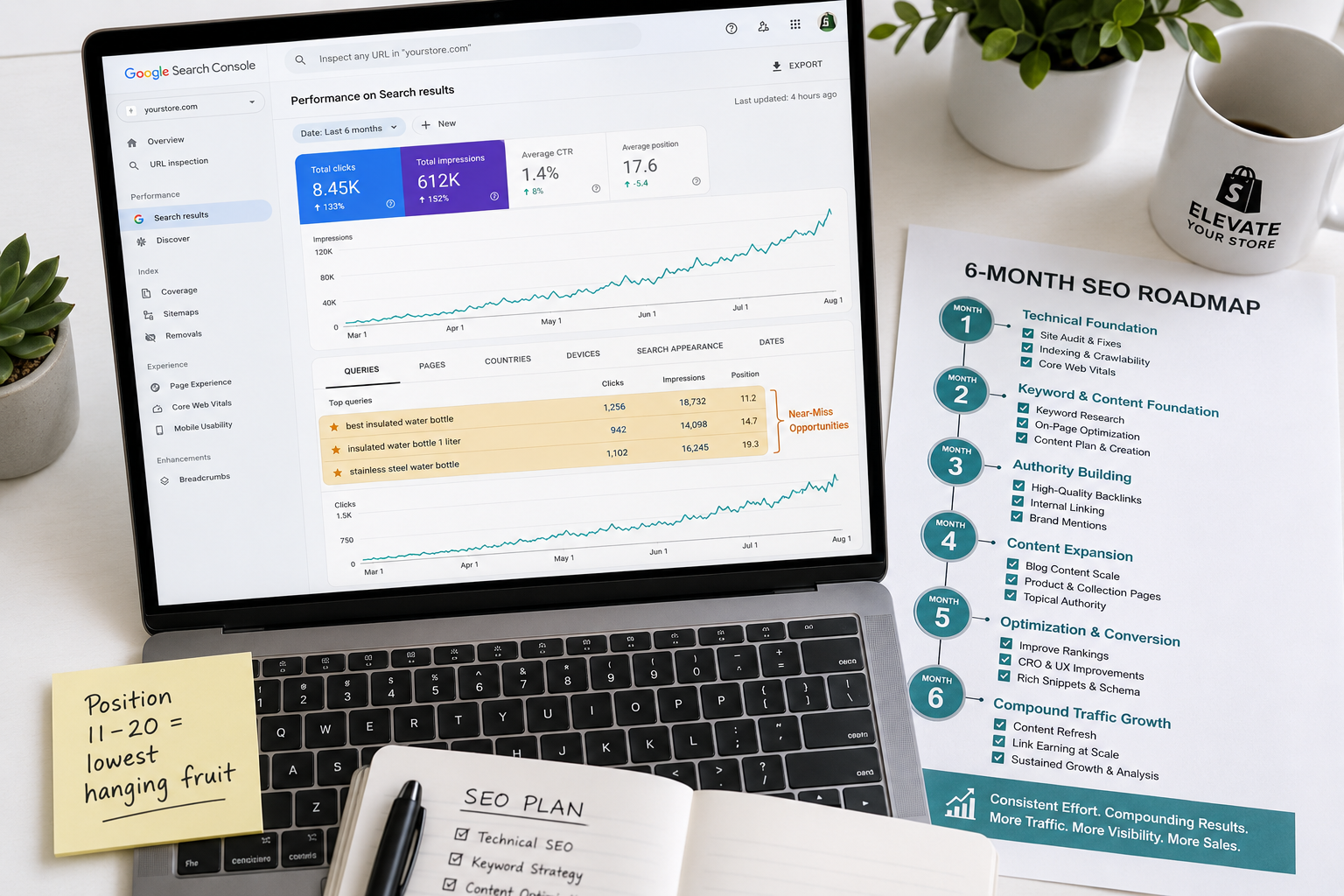
The Search Console reports that generate the most actionable SEO intelligence for Shopify stores:
The Performance report shows every search query that has triggered an impression of your store in Google's search results. Filter by page type — products, collections, blog posts — to see which specific pages are gaining search visibility. Sort by impressions to find pages that are appearing in search results frequently but not generating clicks — which indicates ranking position is low, title tag is not compelling, or the page is not targeting the right keyword for the impression it is receiving.
The most powerful use of Search Console for Shopify SEO is identifying keywords where your store already appears on page two of Google — ranking between position 11 and 20. These are your lowest-hanging ranking opportunities: Google already considers your page relevant for the query, and modest on-page improvements can push it onto page one where the majority of clicks occur. Improving the title tag, strengthening the first paragraph, and adding two or three internal links from relevant pages on your site often generates page-one ranking for these near-miss keywords within 30 to 60 days.
The Coverage report surfaces indexing errors, excluded pages, and canonical tag issues. Review it monthly and address errors before they accumulate into a backlog that requires significant technical remediation.
The Core Web Vitals report shows performance data for your Shopify store's pages on both mobile and desktop, identifying specific URLs that fail the LCP, CLS, and INP thresholds that Google uses to assess page experience. URLs in the "Poor" category are actively disadvantaged in rankings relative to equivalent pages that pass Core Web Vitals — fixing them is both an SEO improvement and a conversion rate improvement simultaneously.
The Shopify SEO Apps Worth Using in 2026
Shopify's native SEO capabilities cover the basics but leave gaps in automation and scale that third-party apps address effectively.
Smart SEO automates meta tag generation for products, collections, blog posts, and article pages, handles image alt text generation across your catalog, delivers JSON-LD structured data for products and reviews, and monitors your sitemap for broken links. For stores with large catalogs where manual meta tag optimization is impractical, Smart SEO's automation covers the fundamentals at scale.
Plug In SEO provides a comprehensive store audit that identifies technical SEO issues, missing meta tags, broken links, and structured data problems in a single diagnostic report. Its ongoing monitoring alerts you when new SEO issues appear — which is particularly valuable when theme updates or new app installations inadvertently introduce technical problems.
TinyIMG handles image optimization — converting images to WebP format, compressing file sizes without visible quality loss, and generating alt text automatically. Given that unoptimized images are the most common cause of poor Core Web Vitals scores on Shopify stores, image optimization is one of the highest-ROI technical SEO investments available.
Schema Plus generates and validates structured data for products, reviews, FAQs, and breadcrumbs across your entire Shopify store. The rich results that schema enables — star ratings in search results, price and availability information, FAQ dropdowns — consistently improve click-through rates from search results, which improves ranking over time through the engagement signal.
The Shopify SEO Timeline: What to Expect and When
SEO is the marketing channel with the longest feedback loop in ecommerce — and managing expectations about that timeline prevents the most common mistake merchants make, which is abandoning SEO investment before it has had time to produce results.
The realistic timeline for Shopify SEO results from a well-executed strategy:
Weeks one to four: technical foundation is established. Sitemap submitted, Search Console verified, canonical issues addressed, speed optimized, and meta tags set for priority pages. No ranking changes yet — this work is invisible in the short term but essential for everything that follows.
Weeks five to eight: initial indexing and ranking data begin appearing in Search Console. New pages and blog posts appear in impressions data, typically at low positions initially. This is the signal that Google has found and is evaluating the content — not yet the result of authority accumulation that drives meaningful traffic.
Months two to four: blog posts published in month one begin gaining ranking traction. Collection pages with added descriptive copy begin moving up for category keywords. Near-miss keywords identified in Search Console start advancing from page two toward page one. Organic traffic begins a measurable upward trend, though volumes remain modest.
Months four to six: compound effects begin. Older blog posts with accumulated engagement signals rank more reliably. Internal links from established posts pass authority to newer product pages. Backlinks earned in the first few months begin contributing to domain authority that improves rankings across all pages simultaneously.
Month six and beyond: significant organic traffic from a well-executed strategy typically begins in this window for stores that have consistently published content, built backlinks, and maintained technical SEO health. The traffic that arrives is genuinely free, genuinely targeted, and genuinely compound — growing month over month as the authority base expands.
The merchants who see the best results from Shopify SEO are not the ones who implemented the most tactics in the first month. They are the ones who implemented the right tactics consistently for six months and trusted the compound nature of the channel to deliver results that paid advertising never can.
Common Shopify SEO Mistakes to Avoid
Targeting search volume over intent. A keyword with 50,000 monthly searches that is primarily searched by researchers, journalists, or students who will never buy your product inflates your traffic without improving your revenue. Every keyword you target should have a clear path from the search query to a product purchase.
Ignoring collection pages. Product pages get all the optimization attention in most Shopify stores while collection pages sit with no text and no keyword focus. Collection pages rank for the high-volume category keywords that drive the broadest organic visibility — optimizing them is one of the highest-impact, lowest-effort SEO improvements available.
Publishing blog content without internal links. Blog content that earns traffic and never directs visitors to a product page is brand awareness without commercial value. Every blog post should include at least two natural internal links to relevant products or collections.
Setting SEO and forgetting it. Rankings decay when competitors improve, when algorithm updates shift evaluation criteria, and when content becomes stale relative to newer competitors. Reviewing and refreshing your top-performing pages twice per year — updating statistics, improving descriptions, strengthening internal links — protects the traffic you have earned and prevents the slow decline that neglect inevitably produces.
Using the same meta title across multiple pages. Every page needs a unique meta title targeting its specific keyword. Duplicate titles signal duplicate content to Google and prevent either page from ranking as strongly as a uniquely optimized version would.
Final Thoughts
Paid traffic stops the moment your budget does. Organic traffic, built correctly on a solid technical foundation with targeted content and genuine backlinks, keeps delivering results for months and years after the initial investment.
Shopify gives you the platform. SEO gives you the audience that arrives without a cost per click, stays longer because they came with specific intent, and converts at rates that paid traffic rarely matches because organic search captures buyers at their highest-intent moment.
The framework in this guide — technical foundation, keyword research, on-page optimization, blog content strategy, internal linking, backlink building, and Search Console monitoring — is not a one-time project. It is an ongoing practice that compounds in value with every month of consistent execution.
Start with the technical foundation. Fix what Google cannot see before optimizing what it can. Then publish content consistently, build links deliberately, and monitor the results in Search Console monthly. The traffic will come — and when it does, it will be the most valuable traffic your Shopify store has ever received.
Need help implementing SEO for your Shopify store, or want a technical audit of your current store's organic search performance and ranking gaps? Get in touch with EcomFixify — we specialize in Shopify development and ecommerce growth strategy for brands ready to build sustainable organic traffic.