
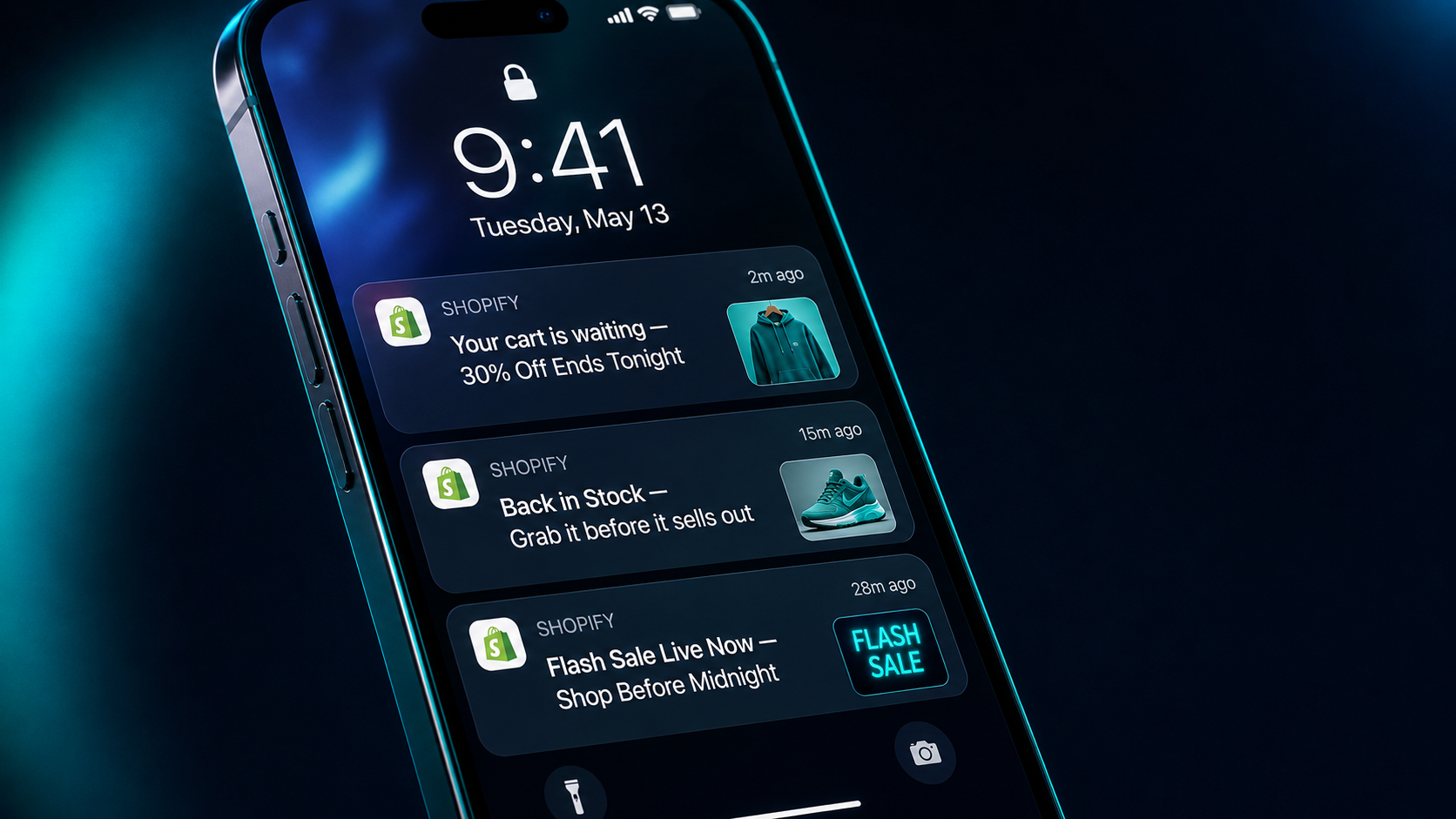
Shopify Notifications How to Get 28% Click-Through Rates on Mobile
Shopify Push Notifications: How to Get 28% Click-Through Rates on Mobile
Every Shopify store owner knows the email open rate problem. You spend hours crafting the perfect campaign, hit send to your entire list, and watch a 20 to 22% open rate trickle in over 48 hours. Of those openers, roughly 2% actually click through to your store. The rest delete, archive, or simply scroll past.
Now consider this: the average push notification click-through rate for ecommerce brands in 2026 sits between 4 and 28% — and mobile app push notifications from Shopify-connected apps consistently outperform every other owned marketing channel in speed, visibility, and immediacy of action.
Push notifications bypass the inbox entirely. They land directly on a customer's lock screen, home screen, or notification tray — interrupting whatever they are doing with a message from your brand that is impossible to miss. When that message is personalized, timely, and action-oriented, the conversion rate data is genuinely remarkable.
Businesses that implement push notifications see up to 40% higher click-through rates compared to email marketing. Push notifications can boost app engagement rates by up to 88%. Users are 3 to 4 times more likely to interact with personalized push notifications than generic broadcasts. And abandoned cart push notifications specifically recover 5 to 15% of carts that email sequences alone cannot reach.
Yet the majority of Shopify store owners have either never set up push notifications at all, or they set them up once, sent a generic broadcast, saw underwhelming results, and abandoned the channel. That gap between what push notifications can do and what most stores are doing with them represents one of the clearest underutilized revenue opportunities in Shopify marketing today.
This guide covers exactly what push notifications are in the Shopify context, why they outperform other channels, which notification types deliver the highest results, and the specific strategies that drive click-through rates toward the top of the benchmark range.
What Are Shopify Push Notifications and How Do They Work?
Push notifications in the Shopify context come in two distinct forms, and understanding the difference matters because the setup, the audience, and the performance benchmarks are different for each.
Web push notifications are delivered through a browser — Chrome, Safari, Firefox — on both desktop and mobile devices. When a visitor lands on your Shopify store, a permission prompt appears asking if they would like to receive notifications from your store. If they accept, you can send them push alerts even when they are not actively browsing your site. Web push requires no app download and works across all devices with a compatible browser.
Mobile app push notifications are delivered through a dedicated branded shopping app — built on platforms like Tapcart, StoreLab, or Appbrew — that connects to your Shopify backend. Customers who download and install your store's mobile app opt into push notifications during the installation process. Mobile app push notifications deliver higher engagement rates than web push because app users are higher-intent customers who have already demonstrated significant brand commitment by downloading a dedicated app.
The technical process is the same for both: your notification platform sends a message to an API, which routes it to the device's operating system, which displays the notification regardless of what the user is currently doing on their device. The message appears within seconds of sending and remains visible in the notification tray until the user either taps it or dismisses it.
The key structural advantage over email is immediacy. An email sent at 10am might be opened at 3pm, or tomorrow, or never. A push notification sent at 10am is seen within minutes by the vast majority of subscribers who have their device nearby — which in 2026 is virtually everyone.
Push Notifications vs. Email vs. SMS: Where They Actually Win
The honest comparison between push notifications and other owned marketing channels is nuanced — push notifications are not better than email in every scenario, but they are significantly better in specific use cases.
Email remains the highest-ROI owned channel for Shopify stores — $42 return per dollar spent, with no equivalent in any other channel. Long-form content, detailed storytelling, editorial newsletters, and complex promotional sequences all belong in email. Email's ability to carry rich content, images, and multi-section layouts makes it the right tool for brand-building communication.
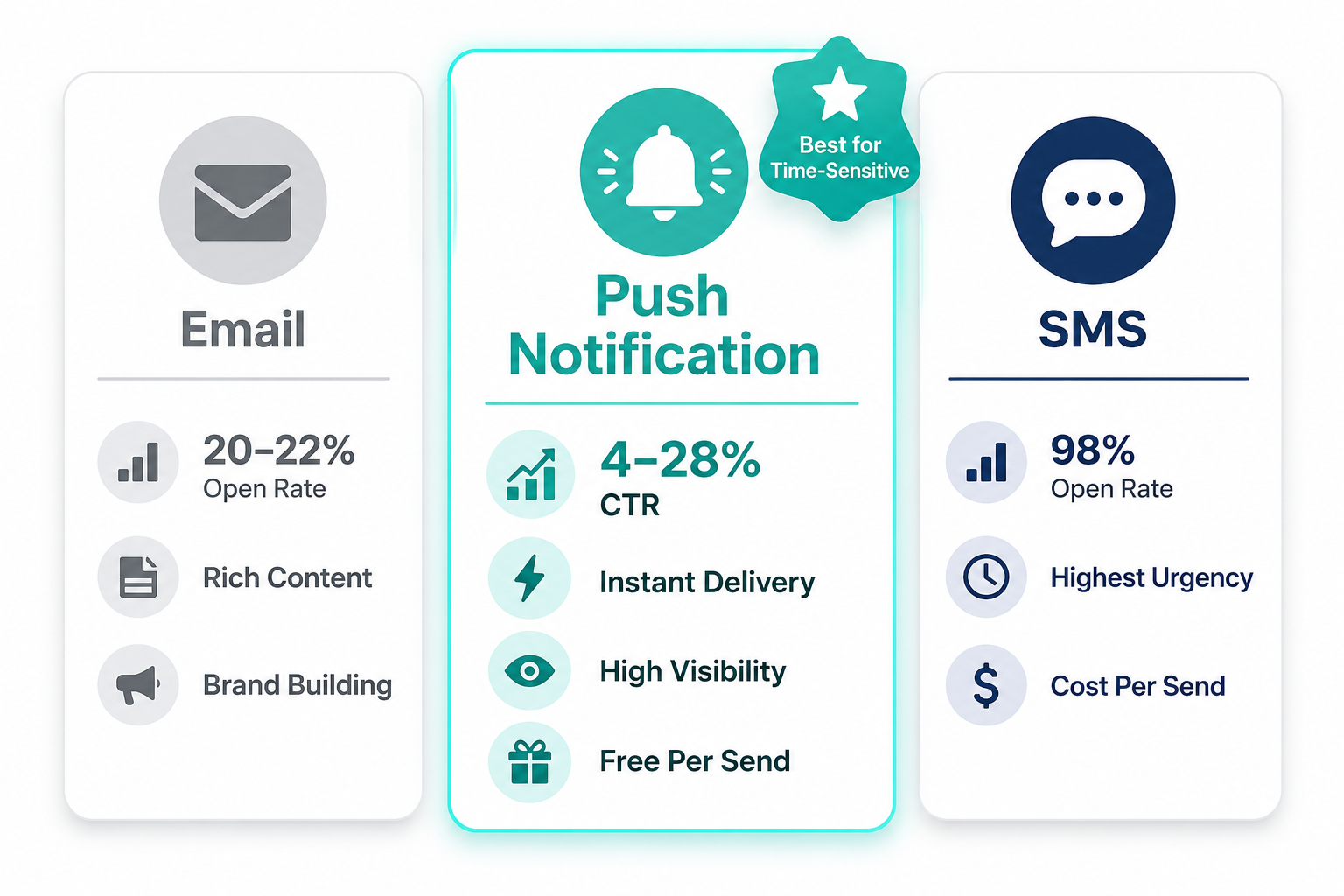
SMS delivers the highest open rates of any channel — 98% open rates compared to 20 to 22% for email — but comes with significant constraints. SMS messages cost per send, which limits the frequency with which brands can communicate. They also carry higher opt-out risk because they arrive in the same inbox as personal messages from friends and family. SMS is most powerful for the highest-urgency communications — flash sales with hours of shelf life, delivery confirmations, and time-sensitive one-to-one service messages.
Push notifications occupy a unique position: they are free per send like email, they are immediate like SMS, and they require no inbox navigation. The opt-in rate for mobile push notifications averages 67.5% among users who install a brand's app — dramatically higher than typical SMS opt-in rates — because the expectation of receiving notifications is clearly established as part of the app installation flow.
Where push notifications decisively outperform both channels is for high-frequency, time-sensitive, action-oriented messages that benefit from immediacy and visibility without the content depth that email provides. Abandoned cart recovery, flash sale announcements, price drop alerts, back-in-stock notifications, and real-time order updates are all push notification native use cases where the channel's immediacy creates conversion advantages that email and SMS cannot replicate.
The 7 Push Notification Types That Drive the Highest Click-Through Rates
Not all push notifications perform equally. The difference between a 4% click-through rate and a 28% click-through rate is almost entirely about which type of notification you send and how well it is personalized. These seven notification types consistently deliver the highest results for Shopify stores in 2026.
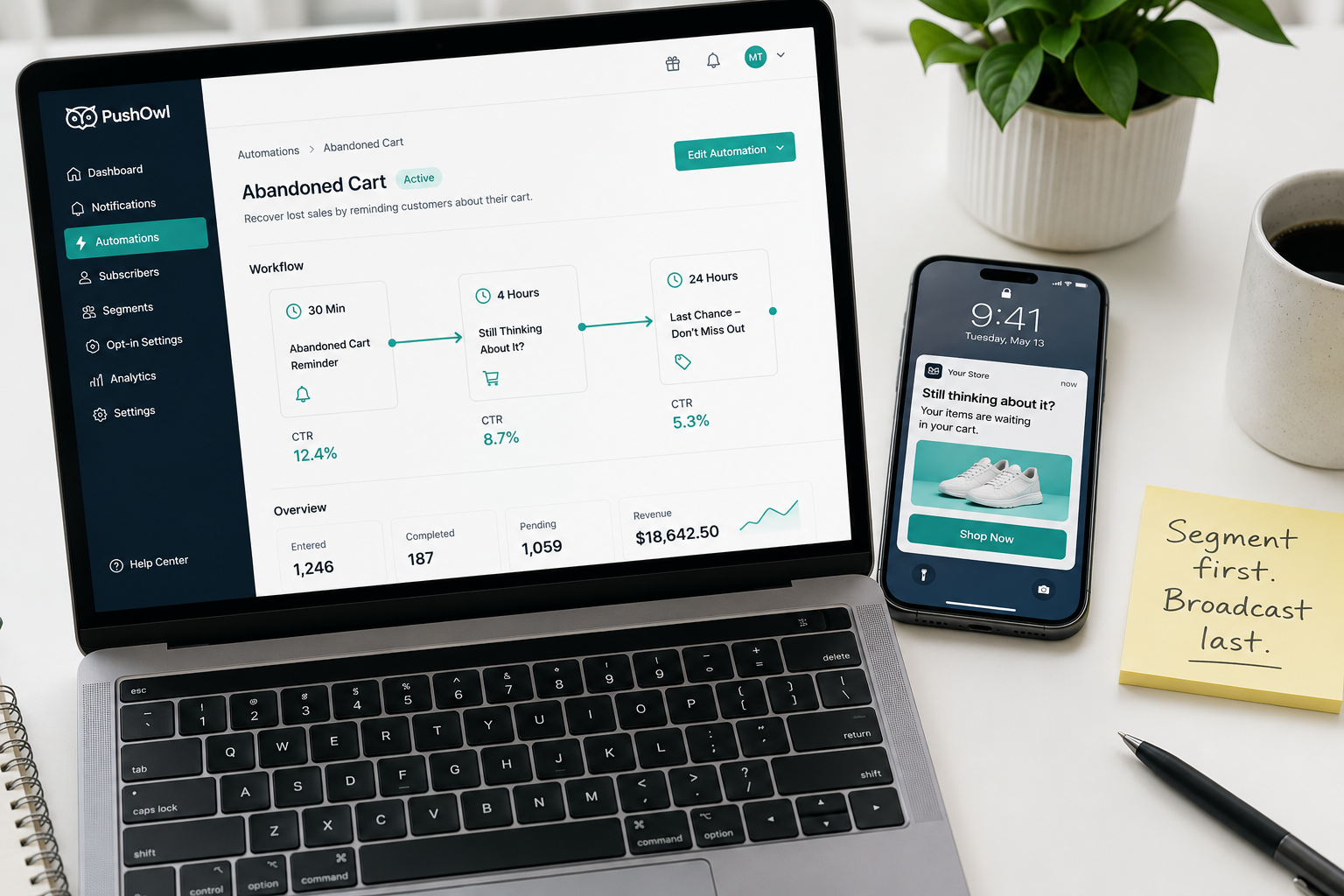
1. Abandoned Cart Push Notifications Abandoned cart push notifications are the highest-ROI single use case for push in Shopify ecommerce. They reach customers at the exact moment their purchase intent is still warm — often within the same browsing session — and remind them of the specific item they left behind.
The sequence that works best is a push notification sent 30 minutes after abandonment, a second notification sent 3 to 4 hours later if no action was taken, and a final notification the following day offering a small incentive — free shipping or a modest discount — for customers who have not returned. This three-touch approach consistently recovers carts that would otherwise be permanently lost, particularly from mobile shoppers who left your store to check a notification, answer a message, or switch apps and simply never returned.
The copy formula that converts for abandoned cart push is simple: reference the specific product by name, remind the customer what they were considering, and include a direct link that takes them straight to the cart — not your homepage, and not a product page. The cart, with their items already waiting.
2. Back-in-Stock Notifications Back-in-stock push notifications target customers who previously viewed or attempted to purchase an out-of-stock product. The intent signal from this behavior is among the strongest available in ecommerce — a customer who tried to buy something that was unavailable has demonstrated purchase intent that persists until the product is available or they find an alternative.
Back-in-stock push notifications typically achieve click-through rates of 15 to 25% because the recipient is not a cold prospect — they are a warm, motivated buyer waiting for exactly this message. The notification copy should be direct and urgent: "Your item is back — get it before it sells out again" with a deep link to the product page.
For Shopify stores, several apps including Back in Stock by Swym and Notify Me by Appikon handle the opt-in capture and notification sending automatically. Customers who click "Notify me when available" on a product page are enrolled, and when inventory is updated in Shopify the notification fires automatically without manual intervention.
3. Flash Sale and Limited-Time Offer Notifications Push notifications are the ideal delivery mechanism for flash sales precisely because the channel's immediacy aligns with the time pressure inherent in flash sale mechanics. A flash sale promotion sent via email reaches its recipients over hours. The same promotion sent via push reaches subscribers within minutes — which is the only timeline on which flash sale urgency is genuinely effective.
The highest-converting flash sale push notifications share three characteristics: they communicate the offer in the notification title itself rather than saving it for the body text, they include a specific end time to create authentic time pressure, and they deep link directly to the sale collection page rather than the homepage.
For example: "Flash Sale — 30% Off Everything Ends at Midnight" in the title, "Your cart is waiting — shop before time runs out" in the body, linking directly to yourstore.com/collections/sale. Subscribers who need to navigate from a homepage to find the sale will abandon at significantly higher rates than those who land directly on the relevant collection.
4. Price Drop Alerts Price drop notifications target customers who have browsed or added a product to their wishlist without purchasing, and alert them when the price of that product decreases. The behavioral targeting makes these notifications highly relevant — you are not interrupting someone with a random promotion, you are delivering information they would genuinely want based on their demonstrated interest.
Price drop push notifications convert at above-average rates because they address the specific hesitation — price — that prevented the customer from purchasing in the first place. When combined with urgency language indicating that the sale price is temporary, they create a compelling reason to act immediately.
5. Loyalty and Reward Notifications Loyalty push notifications — alerting customers when they earn points, reach a new tier, or have rewards available to redeem — drive repeat visit rates and reinforce the habit of returning to your store. These notifications are not selling a product directly; they are selling the act of returning to the store, where subsequent conversion happens naturally.
"You've earned 200 points — you're just 50 away from your next reward" with a link to your loyalty hub creates a clear next action that is relevant, personal, and non-intrusive. Customers who engage with loyalty push notifications consistently show higher repeat purchase rates than those who do not — because the notification serves as both a reminder and a reward in itself.
6. Order and Shipping Updates Transactional push notifications — order confirmed, order shipped, out for delivery, delivered — have the highest open rates of any notification category because customers are actively waiting for them. Using push for order updates rather than relying solely on email means customers receive status information instantly, on the device they are holding, in a format they cannot miss.
The commercial opportunity in transactional notifications extends beyond the update itself. The notification that announces "Your order has been delivered" is the perfect moment to include a call to action for a review, a referral, or a related product recommendation — because the customer's experience with your brand is at its freshest and most positive point.
7. Win-Back and Re-Engagement Notifications Win-back push notifications target subscribers who have not opened a notification or visited your store in a defined period — typically 60 to 90 days. These notifications aim to re-establish the habit of engagement before the customer's relationship with the brand goes permanently dormant.
The most effective win-back push notifications acknowledge the absence directly — "We miss you — here's 15% off to come back" — rather than sending a generic promotional message that looks identical to what the customer has already been ignoring. Personalization in the win-back context means referencing what the customer previously purchased or browsed, demonstrating that the notification is relevant to them specifically rather than a bulk send to inactive users.
How to Write Push Notifications That Actually Get Clicked
The quality of push notification copy is the variable that most separates high-performing stores from average ones. The same notification type sent with strong copy versus weak copy will produce dramatically different click-through rates. Push notifications have two text elements: the title and the body. Both matter differently. The title is the headline — it must communicate the core reason to click in under six words. The body provides supporting context and urgency. Together they have approximately three seconds of attention before the user decides to tap or dismiss. The copy principles that consistently drive higher click-through rates are: Lead with value in the title, not with your brand name. "30% Off Ends Tonight" outperforms "EcomFixify Sale" because the first communicates why the customer should care before they know who is sending it. Use personalization wherever available. A notification that includes the customer's name or the specific product they abandoned converts at 3 to 4 times the rate of a generic broadcast. Most push notification platforms support dynamic personalization tokens that pull customer data from Shopify automatically. Create urgency with specificity, not vague pressure. "Ends at Midnight" outperforms "Limited Time Only" because specific urgency is more credible and more actionable. The customer knows exactly how long they have to decide. Keep the body text under 40 characters on mobile. Many devices truncate notification body text on the lock screen beyond this length. Write for the constrained view, not the expanded notification tray view. Include a clear call to action in the body when character count allows. "Tap to shop now" or "Grab it before it's gone" gives users an explicit next action rather than leaving them to infer what clicking the notification will do.
The Best Shopify Push Notification Apps in 2026
The right app depends on whether you are implementing web push, mobile app push, or both.
For web push notifications — browser-based, no app required — the leading options are PushOwl, FirePush, and Sendvio. PushOwl is the most widely used web push app on Shopify, with a free plan covering up to 500 subscribers and automated abandoned cart sequences built in. Its deep Shopify integration means cart data, product information, and customer segmentation all sync automatically without manual configuration.
For mobile app push notifications — delivered through a branded shopping app — Tapcart, StoreLab, and Appbrew are the three dominant platforms in 2026. Each connects to your Shopify backend and generates a white-label mobile app with push notification capabilities, in-app browsing of your Shopify catalog, and one-tap checkout. Mobile app push notifications deliver significantly higher engagement rates than web push — because app users are higher-intent by definition — but require customers to download your app, which adds an acquisition step.
StoreLab's own data shows that push notifications sent through their platform generate 28% click-through rates for stores with properly segmented audiences and behavioral trigger setups — the benchmark referenced in this post's title. That figure is not a universal average across all stores and all notification types. It is the achievable performance ceiling for well-optimized push campaigns targeting high-intent behavioral segments.
The gap between a 4% CTR and a 28% CTR for the same store using the same platform comes down to three factors: how well the audience is segmented, how precisely the notification is personalized to each segment's behavior, and whether the copy creates a specific, urgent reason to act immediately.
How to Build Your Push Notification Strategy: A Practical Framework
Start with the highest-ROI automated sequences before building out manual campaign capabilities. The automation-first approach generates ongoing revenue from day one without requiring continuous manual effort.
Week one: install your chosen push notification app and set up the subscriber opt-in prompt on your Shopify store. Configure the prompt timing to appear after a visitor has spent at least 30 seconds on your store rather than immediately on landing — opt-in rates are significantly higher when subscribers have had a chance to see your store's value before being asked for permission.
Week two: configure your abandoned cart automation. Set the first notification to fire 30 minutes after cart abandonment, the second at three to four hours, and the third at 24 hours with a small incentive. This single automation will begin generating revenue immediately and requires no ongoing management once configured.
Week three: set up back-in-stock opt-in capture on out-of-stock product pages and configure the automatic notification that fires when inventory is updated.
Week four: set up your order update notifications — order confirmed, shipped, and delivered — replacing or supplementing your default Shopify transactional emails with push equivalents that reach customers faster.
From week five onward: build segmented campaign capabilities. Create audience segments based on purchase history, browsing behavior, and engagement frequency. Configure price drop alerts for wishlist and browsed-not-purchased products. Launch your first manually sent campaign — a flash sale or new product announcement — to your full subscriber base, then review click-through and conversion data to establish your baseline.
What Not to Do: The Mistakes That Kill Push Notification Performance
Sending too frequently is the fastest way to destroy a push subscriber list. Customers who receive daily push notifications from a store opt out within weeks. The benchmark for sustainable push frequency without driving excessive opt-outs is two to four notifications per week for behavioral trigger campaigns and no more than one to two manual broadcasts per week. Exceeding this cadence increases opt-out rates faster than any targeting improvement can compensate for.
Sending generic broadcasts to your full subscriber list rather than segmented sends consistently underperforms. A notification sent to 10,000 subscribers with 3% relevance to the majority of recipients will generate poor click-through rates and accelerate opt-outs. The same message sent to 500 highly relevant subscribers will generate significantly higher click-through rates and protect the opt-in status of your broader list.
Linking to your homepage rather than the relevant page is a conversion killer. Every notification should deep link to the specific product, collection, or cart that is referenced in the message. Any navigation step required after clicking a push notification costs you conversions from mobile users who expect to land exactly where the notification promised.
Sending at the wrong time reduces both click-through rates and the impression your brand makes. Push notifications sent between 8am and 12pm local time consistently outperform those sent at other times for ecommerce brands. Account for time zones in your scheduling — a flash sale notification that arrives at 3am is less a marketing communication and more an alarm clock that reminds customers to opt out.
Measuring What Matters
The three metrics that determine whether your push notification program is working are click-through rate, conversion rate from push click to purchase, and opt-out rate.
Click-through rate tells you whether your copy and targeting are creating relevant, compelling reasons to engage. Monitor this per notification type rather than as an aggregate — your abandoned cart CTR and your broadcast campaign CTR will be very different, and averaging them obscures which parts of your program are working and which need improvement.
Conversion rate from push click to purchase tells you whether the landing experience after the notification is delivering on what the notification promised. A high CTR with a low conversion rate signals a landing page or checkout problem, not a notification problem.
Opt-out rate is the early warning system. If opt-outs are trending up, you are either sending too frequently, targeting too broadly, or sending content that feels irrelevant to your subscribers. Act on rising opt-out rates before they become subscriber list erosion.
Track these metrics per notification type, per audience segment, and over time. Push notification performance improves significantly as you accumulate data about what your specific audience responds to — and deteriorates if you stop paying attention to what the numbers are telling you.
Final Thoughts
Push notifications are not a replacement for email or SMS — they are a third owned channel with unique strengths that complement both. Their immediacy makes them ideal for time-sensitive communications. Their visibility makes them impossible to miss. And their ability to deliver personalized, behavioral triggers automatically makes them one of the most efficient revenue recovery tools available to Shopify merchants in 2026.
The stores achieving 28% click-through rates are not doing anything technically exotic. They have web push or mobile app push configured correctly, they are targeting behavioral segments rather than broadcasting to their full subscriber list, their copy creates specific and credible urgency, and they are sending at the right frequency to stay top-of-mind without triggering opt-outs.
The stores stuck at 4% click-through rates are usually doing one of three things: sending generic broadcasts, sending too frequently, or using push for the wrong use cases — long-form content and brand storytelling that belong in email rather than the constrained format of a push notification.
Fix the targeting, sharpen the copy, trigger on behavior rather than broadcasting by schedule, and your push notification performance will compound with every week of data you accumulate.
Need help setting up push notifications for your Shopify store, or want an expert to audit your current retention marketing setup? Get in touch with EcomFixify — we specialize in Shopify development and ecommerce growth strategy for brands ready to build a real retention system.