
Shopify Inventory Management: How to Stop Stockouts and Overstocking
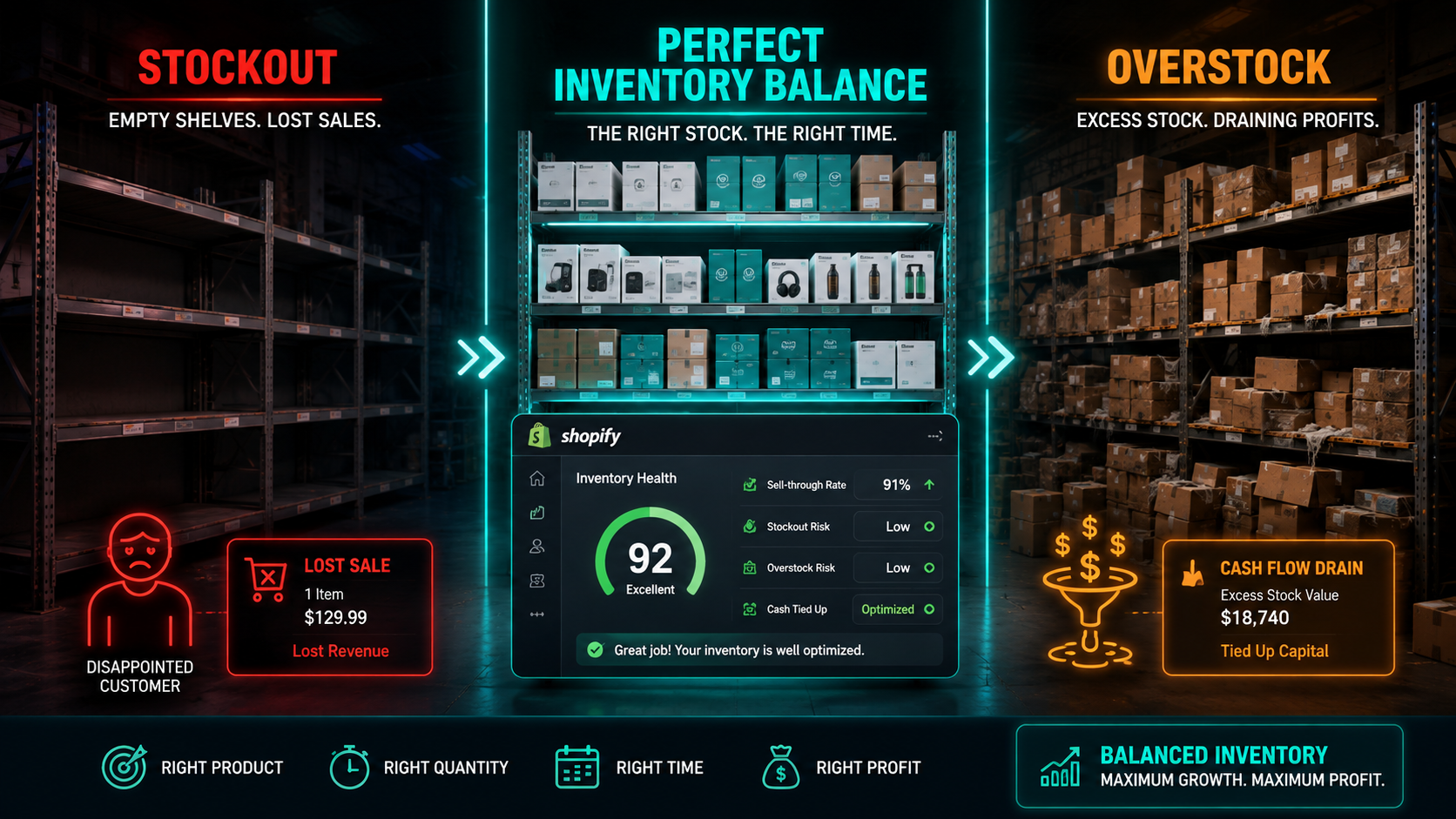
Inventory is the silent killer of Shopify businesses. Not bad products, not poor marketing, not even rising ad costs — inventory mismanagement. And it happens in two directions simultaneously, costing merchants money whether they have too little stock or too much.
Poor inventory management costs retailers an estimated $1.6 trillion globally every year. That figure covers stockouts that send customers to competitors, overstocking that ties up cash in products sitting in warehouses for months, deadstock that eventually gets written off entirely, and the operational chaos that results when a merchant has no reliable picture of what they actually have available to sell.
For Shopify merchants specifically, the problem became more acute in February 2026 when Shopify retired its free Stocky app — the basic inventory planning tool that thousands of merchants had been relying on without realising how limited it was. The retirement was a signal that Shopify recognises its native inventory tools are suitable for early-stage stores but insufficient for merchants managing meaningful scale, multiple channels, or complex product catalogs.
The right inventory management system does not just count stock. It tells you when to reorder, how much to reorder, which products are moving too slowly, which are at risk of running out before your next shipment arrives, and how much cash is currently locked in inventory that is not generating revenue. That intelligence is the difference between an inventory operation that supports growth and one that quietly prevents it.
This guide covers exactly how to build that operation for your Shopify store in 2026 — the core concepts, the formulas that drive smart reordering, and the apps that deliver the most value at each stage of growth.
The True Cost of Getting Inventory Wrong
Before diving into solutions, understanding the full cost of inventory problems prevents the common mistake of treating inventory management as a back-office administrative task rather than a strategic business priority.
Stockouts — running out of a product while demand exists — cost more than the immediate lost sale. A customer who finds your product out of stock does not simply wait. They go to a competitor, discover that competitor's product, potentially prefer it, and may never return. The lifetime value of that lost customer is the real cost of the stockout, not just the single missed transaction.
68% of shoppers say they will not return to a retailer after experiencing a stockout. For a Shopify store with a 30% repeat customer rate and a customer lifetime value of $180, losing a single customer to a stockout does not cost the $60 average order value — it costs the full $180 CLV plus any future referrals that customer would have generated.
Overstocking carries equally serious costs that are less visible but financially significant. Cash tied up in excess inventory is cash unavailable for advertising, product development, or operational expenses. Storage costs — whether warehouse fees, fulfillment center charges, or just the physical space in your facility — compound over time for stock that is not moving. And products that have been sitting for six or more months typically require markdowns to move, which destroys the margin contribution you planned when you placed the original purchase order.
The inventory sweet spot — having the right product in the right quantity at the right time — is not a static target. It moves constantly as demand fluctuates, suppliers change lead times, seasons shift, and your marketing creates unexpected demand spikes. Managing toward that moving target is what a robust inventory management system enables.
The Four Core Inventory Concepts Every Shopify Merchant Needs to Understand
You do not need to be a supply chain specialist to manage Shopify inventory effectively. You do need to understand four concepts that drive every smart reordering decision.
Safety Stock
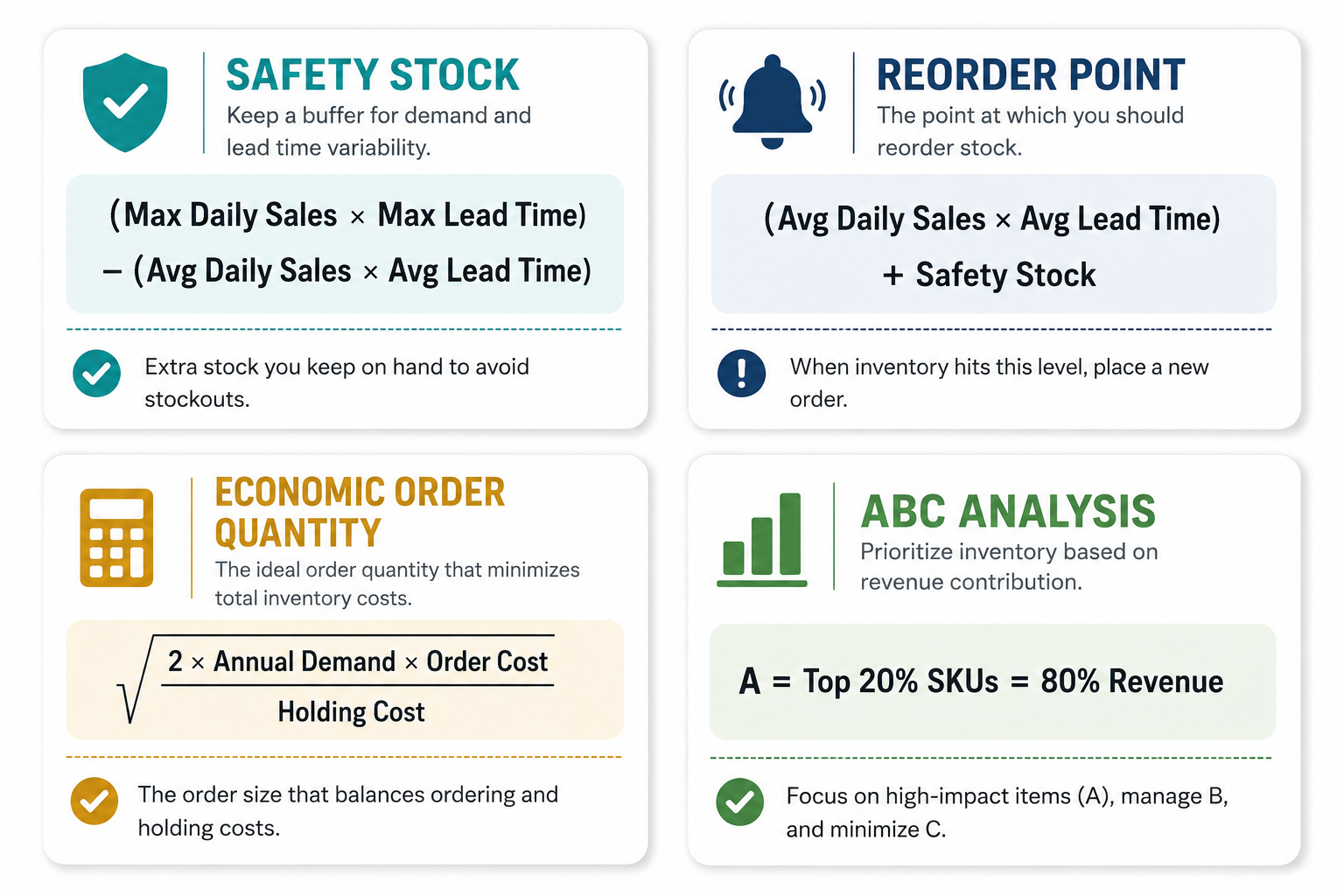
Safety stock is the buffer inventory you hold above your expected demand to protect against variability — in supplier lead times, in customer demand, or in both simultaneously. It is the inventory equivalent of a financial emergency fund: you hope you never need it, but the cost of not having it when you do is severe.
The basic safety stock formula is:
Safety Stock = (Maximum Daily Sales × Maximum Lead Time) − (Average Daily Sales × Average Lead Time)
If your average daily sales are 15 units, your maximum daily sales are 25 units, your average supplier lead time is 14 days, and your maximum lead time is 21 days — perhaps reflecting the occasional delayed shipment — then:
Safety Stock = (25 × 21) − (15 × 14) = 525 − 210 = 315 units
This means you should always have at least 315 units on hand as a buffer before you need to place a reorder. Without this buffer, any combination of higher-than-expected demand and longer-than-expected lead time triggers a stockout.
Most Shopify merchants who experience stockouts do so not because they failed to reorder, but because they failed to account for lead time variability in their reorder planning. Safety stock is the solution.
Reorder Point
The reorder point is the inventory level at which you need to place a new purchase order to avoid stocking out before the new shipment arrives. It is calculated as:
Reorder Point = (Average Daily Sales × Average Lead Time) + Safety Stock
Using the same example: (15 × 14) + 315 = 210 + 315 = 525 units
When your stock level hits 525 units, you place a reorder. The new shipment will arrive in approximately 14 days, during which you will sell approximately 210 units — leaving you with 315 units of safety stock as your buffer against variability.
Setting reorder points per SKU — rather than managing by gut feel or periodic manual checks — is the single most impactful operational change most Shopify merchants can make to their inventory practice.
Economic Order Quantity
Economic Order Quantity (EOQ) answers the question of how much to order when you place a purchase order. The goal is to minimize the combined cost of ordering (the fixed costs associated with each purchase order) and holding (the cost of storing inventory until it sells).
The EOQ formula is:
EOQ = √((2 × Annual Demand × Order Cost) / Holding Cost Per Unit Per Year)
For a product selling 3,600 units annually, with an order cost of $50 per purchase order and a holding cost of $2 per unit per year:
EOQ = √((2 × 3,600 × 50) / 2) = √(180,000) = 424 units per order
Ordering in quantities close to your EOQ minimizes total inventory cost. Ordering much more than EOQ ties up excess cash in holding costs. Ordering much less means paying the fixed order cost more frequently than necessary.
ABC Analysis
ABC analysis categorizes your entire product catalog by revenue contribution and guides where to focus your inventory management attention.
Category A products — typically the top 10 to 20% of SKUs by revenue — account for 70 to 80% of total sales. These products deserve the most rigorous inventory management: precise safety stock calculations, tight reorder points, and close supplier relationship management.
Category B products — the middle 30% of SKUs — account for approximately 15 to 20% of revenue and warrant standard inventory management attention.
Category C products — the bottom 50% of SKUs — account for only 5 to 10% of revenue. Many of these are candidates for discontinuation, reduced safety stock, or on-demand sourcing strategies that eliminate the holding cost entirely.
Running ABC analysis on your Shopify product catalog — which most third-party inventory apps automate — reveals that most merchants are spending equal time and attention on products that contribute very different amounts to their business. Rebalancing that attention toward Category A products alone typically improves inventory efficiency significantly.
When Shopify's Native Inventory Tools Are No Longer Enough
Shopify's built-in inventory management handles the basics effectively for stores in their early stage: tracking stock levels, updating quantities when orders are placed, and showing current availability across locations. For a store with under 50 SKUs, a single sales channel, and straightforward supplier relationships, the native tools are adequate.
The native system becomes a constraint when any of the following apply:
You sell on multiple channels — Amazon, Etsy, TikTok Shop, or a physical retail location — and need real-time inventory sync across all of them to prevent overselling on one channel while stock sits allocated on another.
You manage multiple warehouse locations and need to understand stock positioning across facilities and intelligently route fulfillment based on proximity and availability.
You experience frequent stockouts or overstocking and need demand forecasting that goes beyond the 180-day sales history Shopify's native admin retains.
You sell bundles or kits where a single order depletes inventory from multiple component SKUs simultaneously, which Shopify's native system does not handle accurately.
You need purchase order management — creating, sending, and tracking purchase orders with suppliers — integrated with your inventory planning rather than managed in a separate system.
Shopify's own guidance acknowledges that growing merchants typically need a dedicated third-party app for multi-location, multi-channel, or complex inventory needs. The question is which app fits your specific situation.
The Best Shopify Inventory Management Apps in 2026
Shopify retired its free Stocky app in February 2026, which prompted a wave of merchants to evaluate third-party alternatives for the first time. Here is a practical breakdown of the leading options.
Prediko — Best for AI-Powered Demand Forecasting
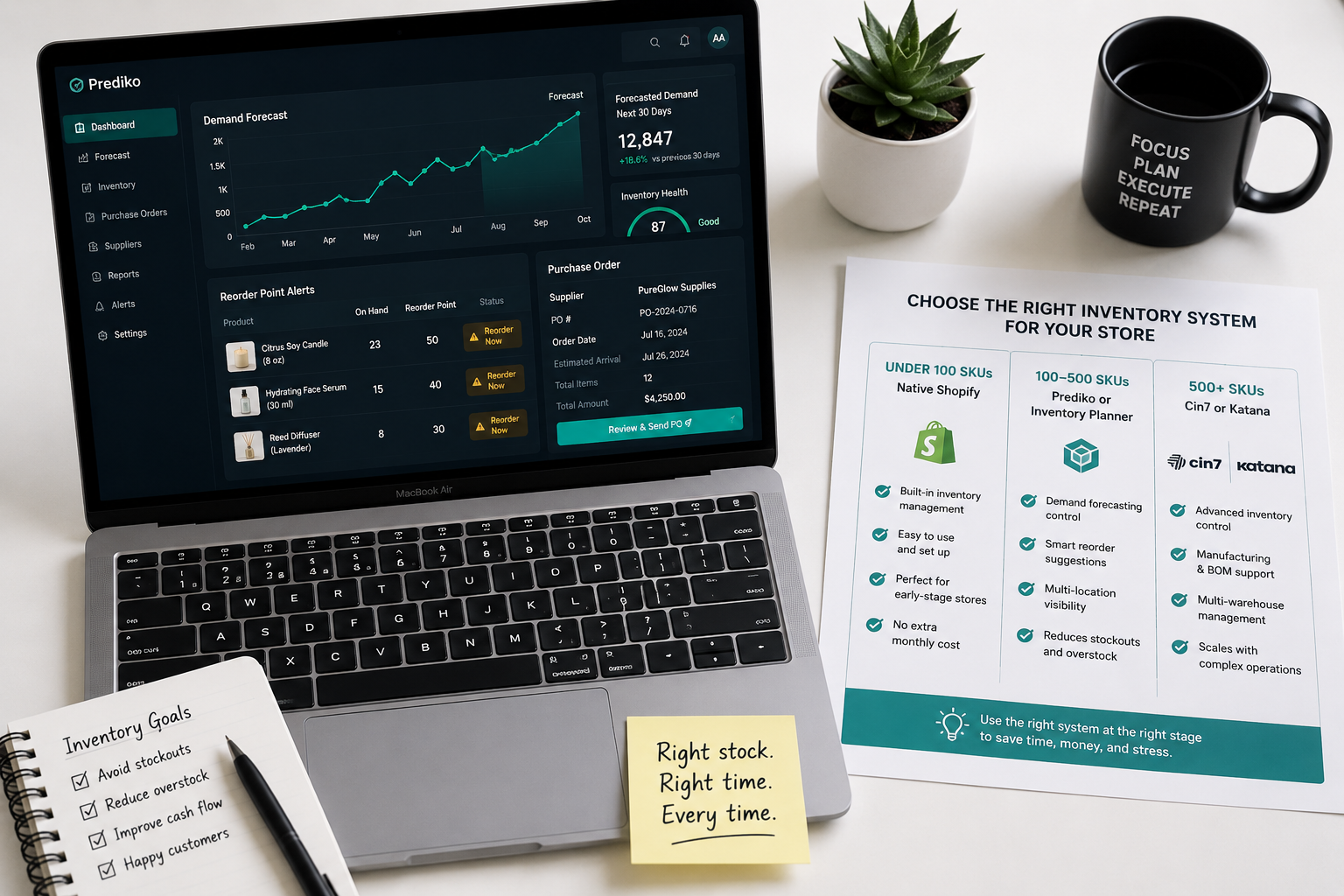
Prediko is an AI-powered inventory forecasting and purchase order management app built specifically for data-driven Shopify brands. Its core capability is demand forecasting — analyzing your sales velocity, seasonality, and trends to generate smart restock recommendations that account for variability rather than simply extrapolating flat average sales.
The standout feature is that Prediko's velocity calculations deliberately exclude out-of-stock days from demand calculations. This matters enormously for accurate forecasting: if a product was out of stock for 15 days during a 90-day analysis window, its actual daily sales velocity is higher than the raw average suggests — because the days with zero sales were forced zeros, not real demand signals. Including them would cause the app to underestimate future demand and produce a too-small reorder recommendation, perpetuating the stockout cycle.
Prediko suits Shopify merchants who have moved beyond basic stock tracking and need intelligent forecasting to replace manual reorder decisions.
Inventory Planner by Sage — Best for Replenishment Accuracy
Inventory Planner has been a trusted replenishment app for Shopify merchants for years, and Sage's backing adds enterprise-grade stability to what was already a reliable platform. Its core value is replenishment accuracy: it reads your sales history and supplier lead times, then tells you exactly when to reorder and at what quantity to balance overstock prevention with stockout avoidance.
Purchase order management is handled directly inside the platform, which eliminates the disconnect between inventory analysis and supplier communication that creates errors in systems where those functions live separately. Detailed multi-dimensional reporting covers product lines, seasonal performance, and supplier reliability in ways that support strategic inventory decisions rather than just operational ones.
Inventory Planner suits mid-market Shopify stores with established supplier relationships, meaningful SKU depth, and a need for reliable automated replenishment recommendations.
Stockful — Best for Analytics and Reporting
Stockful tops several independent app comparison lists in 2026 for its combination of analytics depth and practical forecasting. It takes daily inventory snapshots and retains up to two years of detailed data — dramatically more than the 180-day window Shopify's native admin provides — and uses that extended history to produce more accurate long-term forecasting, particularly for products with strong seasonality that requires more than six months of data to model correctly.
Its ABC analysis, dead stock detection, and 11 built-in report types make it particularly strong for merchants who need to understand not just when to reorder but which products deserve continued investment and which are candidates for discontinuation.
Katana — Best for Makers and Manufacturers
Katana is purpose-built for Shopify merchants who manufacture their own products — whether in a home workshop, a small production facility, or a larger manufacturing operation. It manages both raw material inventory and finished goods inventory simultaneously, handling the bill of materials calculations that standard inventory apps cannot process.
A Katana user who makes candles can see how many units of wax, fragrance, and containers they have on hand, how many finished candles that translates into, and when they need to reorder raw materials based on current production schedules and finished goods demand. That level of manufacturing-aware inventory management is unavailable in general-purpose inventory apps.
Trunk — Best for Affordable Multi-Channel Stock Control
Trunk is the most cost-effective solution for merchants selling across multiple channels — Shopify, Etsy, Amazon, eBay, or others — who need real-time inventory sync to prevent overselling without paying for enterprise-level functionality they do not need.
When a unit sells on Etsy, Trunk deducts it from available inventory across every connected channel simultaneously. The result is accurate, channel-consistent stock counts that prevent the overselling situations that generate negative reviews, difficult refund conversations, and marketplace account warnings.
Cin7 Core — Best for Enterprise and B2B Operations
Cin7 Core is the full-stack solution for Shopify merchants who have outgrown mid-market inventory apps — typically at significant SKU depth, multi-warehouse operation, or B2B wholesale alongside DTC ecommerce. It covers inventory management, warehouse management, order management, B2B portal functionality, and 3PL integration in a single platform.
The complexity and cost of Cin7 Core are justified at scale — it replaces multiple separate systems and eliminates the data reconciliation overhead that comes with managing inventory, orders, and fulfillment in disconnected tools. Below that scale, simpler apps deliver better ROI.
Practical Inventory Management Strategies for Shopify in 2026
Beyond choosing the right app, the operational practices that prevent stockouts and overstocking are worth establishing as systematic disciplines.
Supplier Lead Time Management
The most common cause of preventable stockouts is assuming supplier lead times are constant when they are variable. A supplier who typically delivers in 14 days will occasionally take 21 or 28 days due to production delays, shipping disruptions, or capacity constraints. Safety stock buffers for this variability, but only if the buffer is calculated using maximum lead time — not average lead time.
Maintain a supplier lead time log that records actual delivery performance over time. When a supplier consistently delivers in 10 days rather than the quoted 14, update your reorder point calculations to reflect the real lead time — which allows you to hold less safety stock for that SKU without increasing stockout risk.
Seasonal Demand Planning
Seasonal products require inventory planning that looks further forward than standard replenishment calculations. A product that peaks in November needs its inventory purchased in September or October — which means the demand analysis driving that order needs to happen in August, using historical seasonal data that identifies the peak period, the rate of demand increase leading into it, and the rate of decline following it.
Most inventory forecasting apps handle seasonality automatically once they have sufficient historical data — typically two or more full seasonal cycles. In your first year with a seasonal product, manual analysis of comparable products and market data is necessary to supplement limited store-specific history.
Dead Stock Identification and Resolution
Dead stock — inventory that has not sold in 90 or more days — is a capital allocation problem that compounds over time. Every month a dead stock unit sits in storage, it costs holding fees and represents capital that could be deployed in faster-moving inventory.
Review your dead stock position monthly. Resolution strategies in order of margin preservation: run targeted promotions or bundle the dead stock with popular products, offer it at a discount to your email list with urgency framing, reduce the price on the product page to find the clearance price point, or liquidate through a secondary marketplace. Writing off dead stock entirely is a last resort — even partial recovery of cost is preferable to a full write-off.
Multi-Channel Inventory Allocation
Merchants selling across multiple channels face an allocation decision: how much inventory to commit to each channel. Over-allocating to one channel while another runs out creates the worst of both worlds — unsatisfied customers on the depleted channel and idle stock on the over-allocated one.
The optimal allocation strategy uses weighted demand forecasting per channel — allocating inventory to channels proportional to their historical sales velocity — with a shared reserve pool that any channel can draw from dynamically. Real-time sync apps like Trunk implement this approach automatically, preventing channel-specific stockouts without requiring manual allocation decisions.
Shopify Native Features Worth Using Before Adding Third-Party Apps
Before evaluating third-party inventory apps, several Shopify native capabilities are worth configuring correctly — because they provide meaningful inventory management value at zero additional cost.
Low stock alerts through Shopify Flow trigger automatically when inventory falls below a defined threshold for any product. Setting these alerts per SKU — calibrated to your reorder point for each product — creates an automated early warning system that prompts purchase orders before stockouts occur.
Shopify Sidekick, the AI-powered store assistant, can surface inventory insights in response to natural language queries. Asking Sidekick "which products are at risk of stocking out in the next 30 days?" or "what is my current inventory value by collection?" provides actionable data without navigating multiple admin reports.
Purchase order management within Shopify admin allows you to create, send, and track purchase orders with suppliers natively, and to receive inventory against those orders — updating stock levels automatically when shipments arrive. For merchants with straightforward supplier relationships and moderate SKU depth, this native capability may be sufficient without a third-party app.
Inventory transfers between locations, demand analysis by location, and inventory history reports round out Shopify's native offering — all accessible in the Inventory section of your admin and worth reviewing before concluding that a third-party app is necessary.
Building Your Inventory Management System: A Stage-by-Stage Approach
The right inventory management setup varies dramatically by business stage. Matching your system to your current scale prevents both under-investing in tools you genuinely need and over-investing in complexity you cannot yet use.
For stores under 100 active SKUs with a single warehouse and channel, Shopify's native inventory tools plus Shopify Flow low-stock alerts plus a manually maintained reorder point spreadsheet covers the majority of inventory management needs. The spreadsheet should track safety stock, reorder point, and EOQ for each SKU — calculated quarterly and updated when sales velocity or supplier lead times change meaningfully.
For stores between 100 and 500 SKUs or adding a second sales channel, a dedicated inventory app becomes cost-justified. Prediko or Inventory Planner at this stage automates the reorder calculations that are impractical to maintain manually at this SKU depth, and the app cost is typically recovered within weeks through reduced stockout losses and better purchase order timing.
For stores above 500 SKUs, multiple channels, or manufacturing operations, a full-stack solution — Cin7 Core, Katana for manufacturers, or SKULabs for complex warehouse operations — delivers ROI through systematic inventory optimization across a catalog and operation too complex for mid-market apps to handle accurately.
Final Thoughts
Inventory management is not glamorous. It does not generate the excitement of a viral TikTok campaign or the satisfaction of a clean new store design. But it is the operational foundation that determines whether a Shopify business is profitable or perpetually cash-constrained — whether it can scale or is constantly firefighting stockouts and markdowns.
The merchants whose businesses compound in value year over year are not necessarily the ones with the best products or the cleverest marketing. They are often the ones whose operations are disciplined enough to have the right stock in the right place at the right time — consistently, systematically, without drama.
That discipline starts with understanding your safety stock, your reorder points, and your demand patterns. It is supported by tools that automate the monitoring and alert systems that are impossible to run manually at scale. And it is maintained by treating inventory decisions with the same strategic seriousness as marketing and product decisions — because the cost of getting them wrong is just as high.
Need help setting up inventory management systems for your Shopify store, or want an expert to audit your current stock operations for efficiency gaps? Get in touch with EcomFixify — we specialize in Shopify development and ecommerce operations optimization for growing brands.