
Shopify Checkout Optimization: 10 Changes
Shopify Checkout Optimization: 10 Changes That Recover Lost Sales in 2026
Here is the most expensive problem most Shopify store owners are not treating as a priority: 7 out of every 10 shoppers who add a product to your cart leave without buying.
The average Shopify cart abandonment rate in 2026 sits at 70.2%. That means the traffic you are paying for, the product pages you have spent hours optimizing, and the ads you are running are all sending people to a finish line most of them never cross.
But here is what makes that number genuinely alarming — and genuinely fixable. The shoppers abandoning your checkout are not disinterested browsers. They found your store, chose a product, and started the purchase process. They were 90 seconds from completing a transaction. The reason they left almost never has anything to do with the product itself. It has to do with your checkout experience.
Most Shopify stores live in a 35–55% checkout-completion band. Moving from 38% to 48% completion is a 26% revenue lift on the same traffic, with zero additional ad spend. That is not a marginal improvement — it is a structural change in how much money your store generates every month from the visitors already arriving.
This guide covers the 10 specific checkout changes that move that number most in 2026, drawn from conversion data across thousands of Shopify stores.
Why Shoppers Actually Abandon Checkout
Before diving into the fixes, it is worth understanding exactly what is driving your abandonment — because generic "reduce friction" advice misses the specificity needed to actually change behavior.
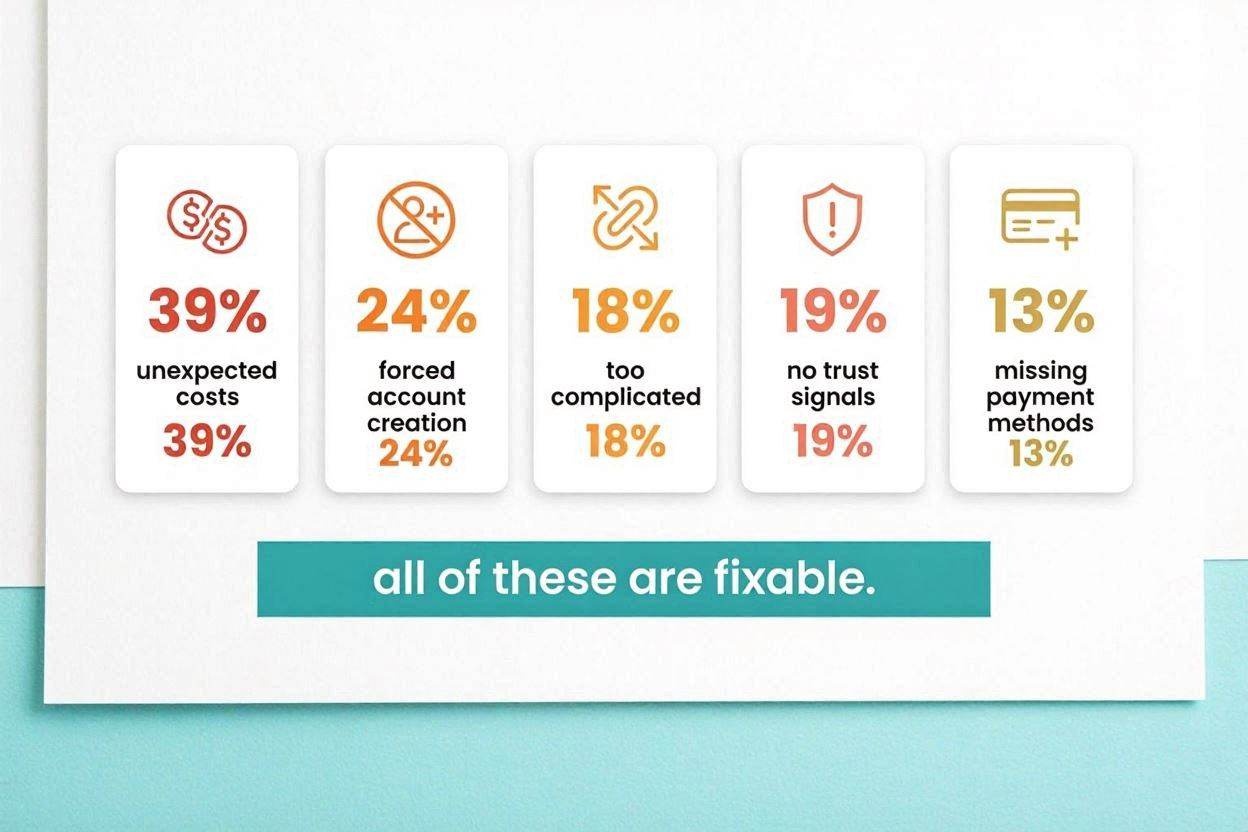
The Baymard Institute, which aggregates checkout research across 50+ studies, identifies the top fixable reasons shoppers abandon Shopify checkout in 2026. Unexpected costs including shipping, tax, and fees account for 39% of abandonment. Being forced to create an account before purchasing drives 24% of abandonment. A checkout process that felt too long or complicated causes 18% of abandonments. Insufficient trust signals around payment security account for 19%. And not enough payment methods available drives 13%.
Notice that none of these reasons relate to the product. Every single one is a fixable checkout problem. The 10 changes below address each of these categories directly.
Change 1: Enable Express Checkout Options at the Top of the Page
This is the single highest-leverage change available to most Shopify stores — and it takes less than five minutes to implement.
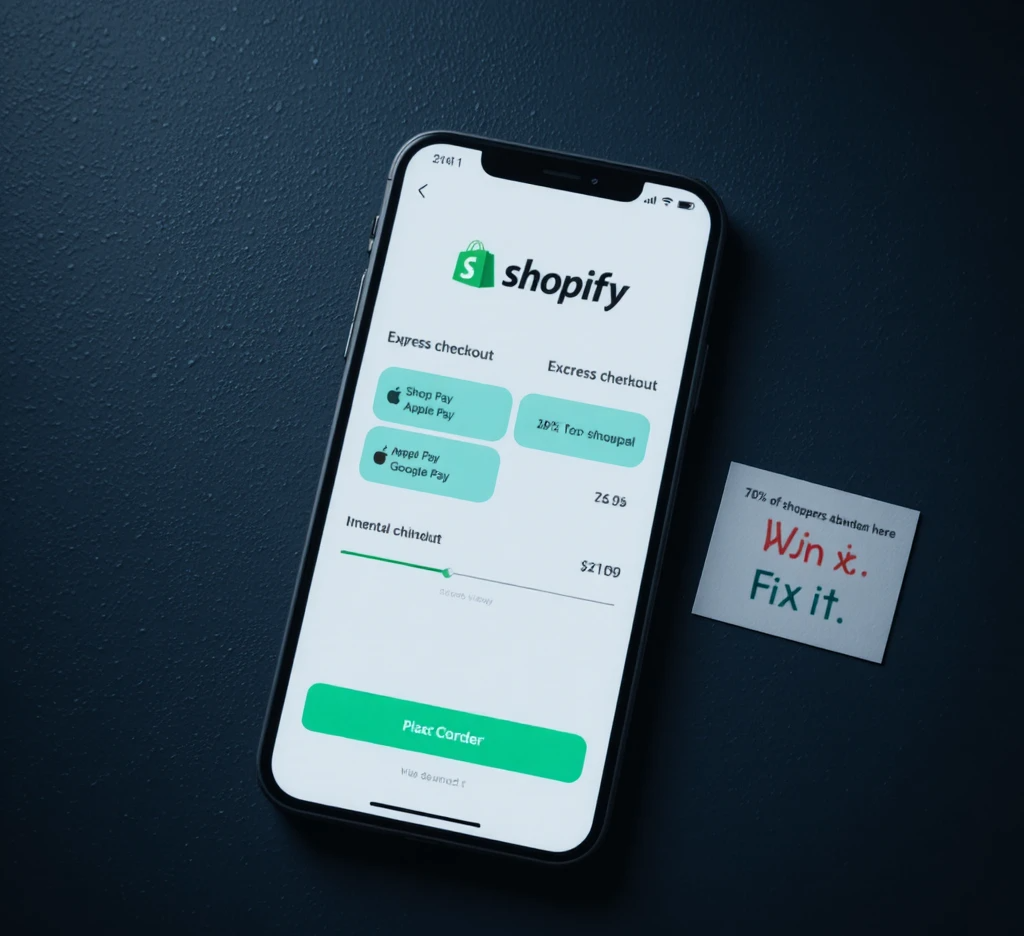
Shop Pay, Apple Pay, and Google Pay should appear above the email field on both desktop and mobile checkout pages. These express payment methods allow returning customers to complete a purchase in a single tap without typing a single form field. Shop Pay customers complete their purchases 4 times faster than those using traditional checkout, and 75% of Shop Pay users complete purchases with a single tap.
The impact is significant. Shopify merchants that optimize checkout by enabling Shop Pay achieve a 72% higher checkout completion rate compared to guest checkout. On mobile, the improvement reaches 91% uplift. With over 150 million registered Shop Pay users globally, a meaningful percentage of your customers already have their details saved — you are simply making it easy for them to use them.
To enable these options, go to Settings → Payments in your Shopify admin. Enable all accelerated checkout methods — Shop Pay, Apple Pay, and Google Pay — and verify they are appearing prominently at the top of your checkout page, not buried below the contact form.
Change 2: Enable Guest Checkout Immediately
Forced account creation before purchase is documented as one of the top three causes of checkout abandonment across all ecommerce platforms. Baymard Institute research shows forced account creation drives 25% of checkout abandonment. Making accounts optional rather than required can recover a meaningful portion of those lost sales.
In Shopify admin, go to Settings → Checkout and look for the Customer accounts section. Set this to "Accounts are optional" rather than "Accounts are required." Customers who want to create an account can still do so — but you are no longer forcing a registration barrier on shoppers who simply want to buy.
If you are concerned about losing email capture, use a pre-checkout popup or a post-purchase account creation prompt instead. You will capture the same email addresses without the friction that costs you completed orders.
Change 3: Show All Costs Before the Payment Step
Unexpected costs at the final stage are the single most common cause of cart abandonment worldwide. When a shopper reaches the payment page and discovers their $45 order now costs $62 with shipping and taxes, the trust damage is immediate and the abandonment is almost certain.
The fix is transparency at every stage of the funnel, not just at checkout. Display your shipping cost policy on the product page, in the cart drawer, and at the start of checkout. If you offer free shipping above a threshold, show that threshold prominently with a dynamic progress bar in the cart — "Add $12 more for free shipping" — so customers know what to expect before they even begin checkout.
On the checkout page itself, ensure the order summary panel shows the itemized total including shipping and taxes before the customer reaches the payment form. Shopify's native checkout enables this in the order summary panel. Make sure this section is not collapsed by default, especially on mobile.
Over 60% of abandoned checkouts happen on step one — the contact information form — largely because shoppers see the shipping cost for the first time at that step and immediately exit. Moving that disclosure earlier prevents the shock.
Change 4: Switch to One-Page Checkout
Shopify moved to one-page checkout as the default starting in 2024, consolidating contact information, shipping, and payment onto a single view rather than spreading them across three separate pages. If your store is running an older checkout version, updating is one of the most impactful changes you can make.
The one-page layout reduces clicks, reduces perceived effort, and reduces the number of opportunities for a shopper to decide to leave. Progress through the checkout feels faster because everything is visible at once rather than each step feeling like a new commitment.
To verify your checkout version, go to Settings → Checkout in your Shopify admin and confirm you are using the latest version. Older stores that have not updated may still be running the multi-page flow.
For Shopify Plus merchants, Checkout Extensibility — which replaced the legacy checkout.liquid system — opens additional customization options including custom upsell blocks, loyalty point displays, and personalized content inside the checkout without affecting conversion performance.
Change 5: Reduce Form Fields to the Minimum Required
The average checkout contains 23.48 form elements according to Baymard Institute research, while an optimized checkout needs only 12 to 14. That gap alone explains why 18% of shoppers leave because a checkout felt too long or complicated.
Audit every field in your checkout and ask one question: do I actually need this to fulfill the order? Common fields that can be removed or made optional without operational impact include the second address line for most orders, the phone number field unless required for delivery confirmation, and the company name field for non-B2B stores.
Never ask for email confirmation as a separate field — it is redundant and adds friction with no benefit. Never re-ask for an address that was previously saved for a returning customer. Every duplicate field is friction that costs you a percentage of completions.
On mobile specifically, every additional field represents a meaningful typing burden. The smaller the keyboard, the greater the abandonment cost of each unnecessary input.
Change 6: Add Trust Signals at the Payment Step
19% of shoppers abandon checkout because they do not trust the site with their credit card details. This is entirely preventable with the right trust signals placed at the exact moment money is about to change hands.
The four highest-impact trust signals at the payment step are a secure checkout badge near the payment field, a return policy line close to the call-to-action button, payment method logos showing all accepted cards and digital wallets, and visible contact information confirming a real business is behind the store.
Each of these addresses a specific shopper concern at the highest-anxiety moment of the purchase journey. A shopper who has never bought from you before is assessing risk right before they click Pay Now — these signals reduce that perceived risk directly.
For Shopify Plus merchants, Checkout Extensibility makes adding custom trust badges, guarantee statements, and social proof elements to the checkout page straightforward with no code required. For standard Shopify merchants, several apps in the Shopify App Store add trust badge blocks to the checkout with one-click installation.
Change 7: Offer Multiple Payment Methods Including BNPL
In 2026, offering only credit card payments is a significant conversion limiter. Shoppers have strong payment method preferences, and a checkout that does not support their preferred method loses the sale immediately.
The essential payment methods to have active in 2026 are Shopify Payments for card transactions, Shop Pay for accelerated checkout, Apple Pay for iPhone users, Google Pay for Android and Chrome users, and PayPal for shoppers who prefer not to enter card details on-site.
Buy Now Pay Later options — Klarna, Afterpay, and similar services — deserve particular attention for stores selling products above $50 average order value. BNPL adoption among shoppers has grown substantially, and offering installment payment options can directly increase both conversion rate and average order value for higher-priced products by reducing the perceived financial commitment of a single purchase.
Change 8: Optimize the Entire Checkout for Mobile
Mobile abandonment in 2026 runs at 76.8% versus 62.4% on desktop — a gap of 14 percentage points. Most of that gap is fixable with configuration changes that take under an hour.
The most impactful mobile checkout fixes are ensuring express payment options — Shop Pay, Apple Pay, Google Pay — appear above the email field on mobile so customers can complete a purchase before they ever touch a form; using a collapsed order summary that shows the total but expands on tap rather than taking up the full screen; ensuring all tap targets including buttons and links meet the 48×48 pixel minimum size for thumb accuracy; and avoiding modals and popups that cover the form on small screens.
Test your checkout on an actual iPhone and an actual Android device — not browser emulation — and walk through the complete purchase as a first-time customer. You will identify friction points within two minutes that no analytics tool surfaces clearly.
Change 9: Set Up a 3-Email Abandoned Checkout Recovery Sequence
Even a perfectly optimized checkout loses 45–55% of shoppers who start it. That is not a failure of optimization — it is normal human behavior. The shoppers who leave are not necessarily gone. Many are comparison shopping, got distracted, or hesitated at a normal decision point. A well-timed recovery sequence brings a meaningful percentage back.

Open rates on Shopify abandonment emails average 45–55% — dramatically higher than promotional emails because the shopper just visited your store minutes or hours ago. A three-email sequence consistently recovers 8–15% of abandoned checkouts.
Structure it as follows:
Email 1, sent 1 hour after abandonment: keep it simple. Show the exact product left in the cart, include a clear button to return to checkout. No discount yet — many shoppers simply needed a moment and will return without an incentive.
Email 2, sent 12–24 hours later: add social proof. Show customer reviews of the specific product they were about to buy. Address hesitation with evidence that other customers were satisfied.
Email 3, sent 24–48 hours later: add an incentive. A small discount, free shipping offer, or a note that stock is running low. Use this sparingly — training customers to always wait for the discount email erodes your margins over time.
Klaviyo integrates natively with Shopify and handles all three emails automatically once configured. If you are not yet running this sequence, it is the highest-ROI email automation available to any Shopify store.
Change 10: Add an Exit-Intent Offer on the Checkout Page
Before a shopper leaves your checkout page, give them one final reason to stay. An exit-intent popup triggered when cursor movement or scroll behavior indicates an imminent exit can recover a meaningful percentage of would-be abandoners by addressing their hesitation in real time.
The most effective exit-intent offers at checkout are a free shipping offer if the shopper is close to a threshold, a small discount with a short expiry window to create urgency, a reassurance message reinforcing your return policy and money-back guarantee, or a "We'll save your cart" message that gives permission to leave without losing progress.
One important rule: set the exit-intent popup only for the checkout page, not every page on your site. A popup on product pages or your homepage will hurt conversions there. The checkout-specific popup intercepts shoppers at the exact moment of highest hesitation and gives you one more opportunity to convert before the session ends.
Several Shopify apps including OptiMonk, Privy, and Justuno handle exit-intent popups with checkout-page targeting built in.
How to Prioritize These 10 Changes
Not all ten changes deliver equal impact. If you are starting from zero, this is the sequence that delivers the fastest and most measurable ROI:
Week 1 — do these immediately at zero cost: enable guest checkout, activate all express payment options, and verify your one-page checkout is live. These three changes together address the top three causes of abandonment and require no development work.
Week 2 — shipping cost transparency: ensure shipping costs are visible on product pages and in the cart drawer before checkout begins. If you can implement a free shipping progress bar, do so.
Week 3 — trust signals and payment methods: add trust badges to your checkout page and enable BNPL options if your AOV supports it.
Week 4 — recovery flows: set up the three-email abandoned checkout sequence in Klaviyo. This single automation will generate ongoing revenue recovery permanently once live.
Weeks 5–8 — mobile optimization and exit-intent: test your full checkout on real mobile devices and fix the specific friction points you find, then add an exit-intent popup targeted specifically to the checkout page.
What Happens When You Stack All Ten Changes
The compounding effect of multiple checkout optimizations is what makes this work genuinely transformative. Removing one form field, adding one trust badge, or enabling one express payment option each contribute 0.5–2 percentage points to checkout completion rate. Stack all ten and the combined lift pushes most stores from average to top-quartile performance.
A Shopify store with 30,000 monthly sessions, a 2.5% overall conversion rate, and an $85 average order value generates roughly $63,750 per month in revenue. The same store typically sees around 3,500 checkout starts per month. With a 50% checkout abandonment rate, roughly 1,750 orders walk away. At $85 each, that is $148,750 per month in unrealized revenue — more than twice the revenue the store is actually capturing.
Recovering even 15% of that abandoned revenue — well within reach with the full stack of optimizations above — adds $22,300 per month from zero additional traffic.
The shoppers are already there. The intent is already there. Checkout optimization is the discipline of getting out of their way.
Need an expert to audit your Shopify checkout and identify exactly where you are losing sales? Get in touch with EcomFixify — we specialize in Shopify development and conversion rate optimization for growing brands.