
Shopify B2B: How to Sell Wholesale Directly From Your Shopify Store
Shopify B2B: How to Sell Wholesale Directly From Your Shopify Store
Most Shopify store owners think of their store as a direct-to-consumer channel. A customer finds the store, buys a product, and receives it at their home. That model is familiar, well-documented, and increasingly competitive.
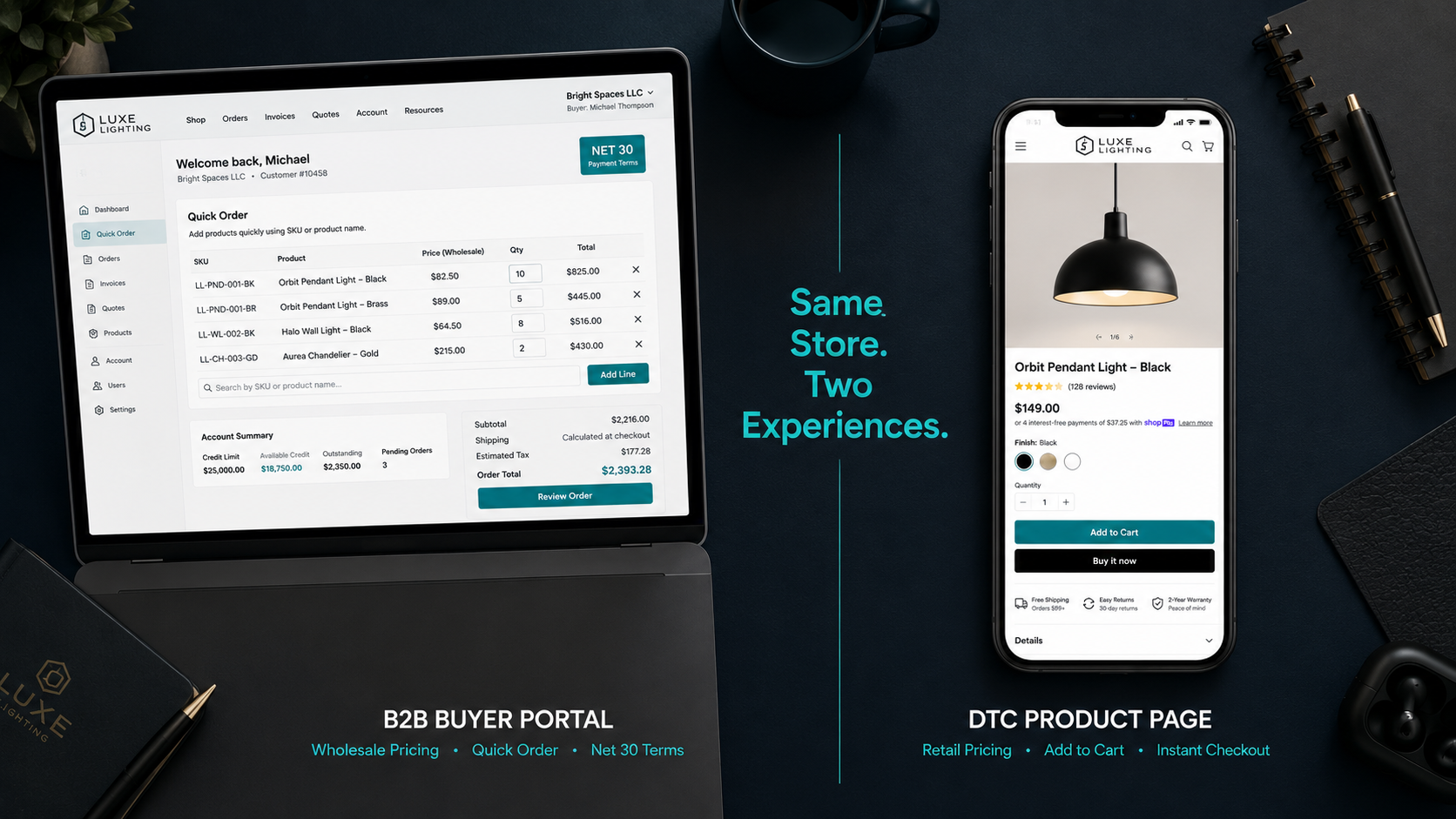
What fewer merchants realize is that the same Shopify store powering their DTC operation can simultaneously run a professional wholesale channel serving retailers, distributors, and business buyers — with separate pricing, custom payment terms, dedicated buyer portals, and company-specific catalogs — all from a single admin without rebuilding anything.
The global B2B ecommerce market is projected to reach $35 trillion by 2027, growing at more than twice the rate of B2C ecommerce. B2B buyers increasingly expect self-service online purchasing with the same experience quality they get as consumers — custom pricing visible after login, the ability to place orders without calling a sales rep, net payment terms handled automatically, and reorder functionality that respects their purchase history.
In 2026, Shopify has made this more accessible than ever. A significant platform update in April 2026 extended native B2B features — company accounts, custom catalogs, quantity rules, net payment terms, and purchase order support — to all paid Shopify plans, not just Shopify Plus. For merchants on standard plans considering whether wholesale is even feasible without an enterprise subscription, the answer changed meaningfully earlier this year.
This guide covers everything you need to add a wholesale channel to your existing Shopify store — which plan and approach fits your operation, how to set up pricing and payment terms, how to manage buyers without operational chaos, and how to run B2B and DTC from the same store without the two channels conflicting.
Why Adding Wholesale to Your Shopify Store Makes Strategic Sense
The standard DTC playbook of paying to acquire every customer individually through Meta, Google, and TikTok is getting more expensive every year. Customer acquisition costs have risen over 60% since 2020 and continue climbing as platforms compete for the same diminishing pool of trackable audiences.
Wholesale flips the acquisition math entirely. Instead of acquiring individual consumers one at a time at rising cost, you acquire one retail buyer who then sells your products to hundreds of their customers at zero additional acquisition cost to you. A single wholesale account with a mid-size retailer can generate the equivalent revenue of hundreds of DTC orders per year — at lower customer service overhead, more predictable order timing, and higher per-order volume.
The margin trade-off is real and worth being clear about upfront. Wholesale pricing typically runs 40 to 60% below your retail price — the standard keystone markup means a product you sell DTC for $60 typically wholesales for $30. The lower per-unit margin is offset by larger order sizes, more predictable inventory planning, zero marketing cost for repeat wholesale orders, and the brand exposure that comes from your products appearing in retail environments your DTC advertising cannot reach.
For many Shopify merchants, wholesale also provides the revenue stability that DTC alone struggles to deliver. Wholesale buyers place orders on predictable schedules — monthly, quarterly, or seasonally — which gives you the inventory and cash flow predictability that individual consumer orders never provide.
The Three Approaches to Shopify B2B: Choosing What Fits Your Operation
Before diving into setup, understanding the three available approaches prevents you from choosing a solution designed for a different scale than yours.
Approach 1: Native Shopify B2B Features (All Plans from April 2026)
Shopify expanded its native B2B feature set to all paid plans in April 2026, a significant change from the previous Plus-only restriction. On all paid plans, you now have access to company accounts, up to three product catalogs with custom pricing, quantity rules and minimum order amounts, quantity price breaks, net payment terms (Net 7, 15, 30, 60, and 90), purchase order number fields, and easy reorder functionality for returning buyers.
For merchants with a straightforward wholesale operation — a limited number of wholesale buyers, simple pricing tiers, and standard payment terms — native features on standard Shopify plans now handle the basics without any additional apps.
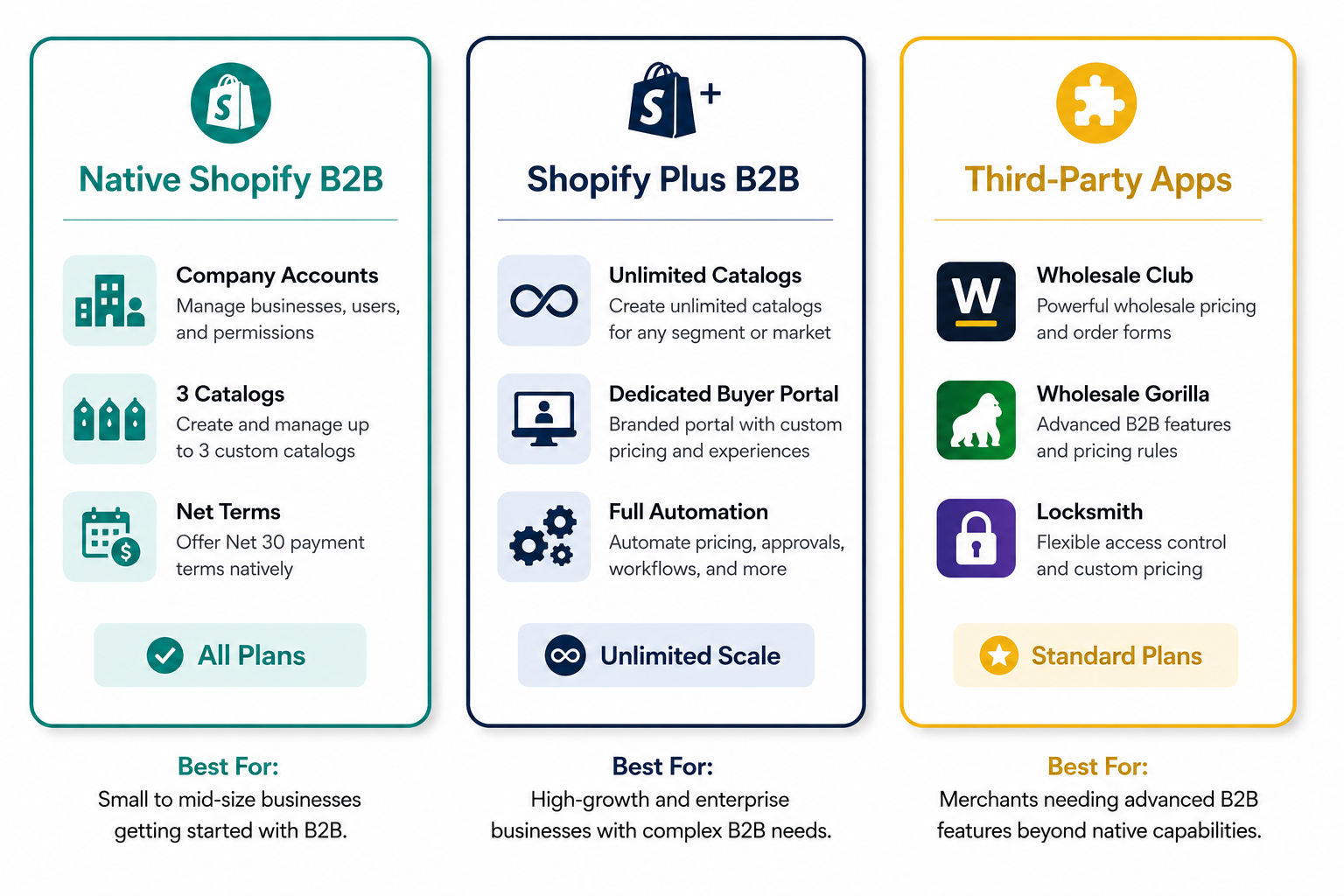
The constraints become relevant as complexity increases. The three-catalog limit on standard plans is the most immediately binding: a merchant selling to Bronze, Silver, and Gold distributor tiers has exhausted all three catalogs before touching international pricing or regional variations. Beyond three catalogs, the only native path is Shopify Plus.
Approach 2: Shopify Plus Native B2B (The Full Feature Set)
Shopify Plus remains the most complete native B2B solution on the platform. It removes the catalog limit, adds dedicated B2B storefront capabilities, enables more advanced checkout customization for wholesale buyers, provides deeper API access for ERP integration, and includes the full Shopify Flow automation suite for B2B workflows.
For brands doing meaningful wholesale volume — typically above $50,000 in monthly wholesale GMV — or managing complex buyer structures with multiple tiers, international pricing, or enterprise buyers requiring custom terms, Plus is the recommended foundation.
The ability to run both DTC and B2B from a single Plus store, with B2B buyers seeing their wholesale pricing after login while retail customers see standard prices, is one of the most operationally compelling features of the Plus B2B setup. No separate store, no separate checkout, no inventory synchronization headaches — one catalog, one backend, two distinct buyer experiences.
Approach 3: Third-Party Wholesale Apps on Standard Plans
For merchants on standard plans who need more than three catalogs or more flexible pricing than native features currently allow, third-party wholesale apps extend B2B capabilities without requiring a Plus upgrade.
Wholesale Club (by Orbit) is one of the most widely used options — it enables customer-tag-based wholesale pricing, automatic discounts at checkout for approved wholesale buyers, and a clean buyer application process that gates wholesale access behind an approval workflow.
Wholesale Gorilla adds wholesale-specific features including minimum order requirements, case pack quantities, wholesale-only product collections, and a dedicated wholesale order form that makes the buying experience significantly faster for large-catalog wholesale buyers placing routine replenishment orders.
Locksmith is the access control layer that enables private wholesale sections — restricting specific collections, products, or pages to approved wholesale buyers while keeping your DTC store fully visible to retail customers.
The best setup for a standard plan wholesale operation combines one wholesale pricing app (Wholesale Club or Wholesale Gorilla) with Locksmith for access control. This combination handles 80% of wholesale use cases below $50,000 per month in wholesale GMV without a Plus subscription.
Setting Up Shopify B2B: Step by Step
The following setup guide covers the native Shopify B2B approach, which applies to all paid plans from April 2026 with the feature depth noted by plan tier.
Step 1: Enable B2B in Your Shopify Admin
Navigate to Settings and look for the Wholesale and B2B section in your Shopify admin. Enable B2B selling. On Shopify Plus, you will see the full B2B configuration panel immediately. On standard plans, you will see the expanded native feature set introduced in April 2026.
Before configuring anything else, make the foundational decision about your store structure: do you want B2B buyers to shop the same storefront as your retail customers (with their wholesale prices visible after login), or do you want a dedicated B2B storefront on a separate subdomain with its own navigation and experience?
For most merchants starting wholesale for the first time, the combined storefront approach — B2B buyers log in and see wholesale pricing while retail customers see standard prices — is simpler to operate and requires no additional theme development. The dedicated B2B storefront approach makes sense for Plus merchants with large wholesale operations where the buyer experience needs to be substantially different from the retail experience.
Step 2: Create Company Profiles for Your Wholesale Buyers
In Shopify B2B, each wholesale relationship is represented as a Company. A company profile can have multiple locations — useful for national retailers with regional distribution centers placing orders for different warehouses — and multiple contacts, allowing different buyers at the same company to have individual login credentials while sharing the same company pricing and payment terms.
To create a company, go to the Customers section in your Shopify admin, select Companies, and click Create company. Enter the company name, add the primary contact with their email address (Shopify will send them an invitation to set up their buyer portal access), assign their price list, and configure their payment terms.
The information you configure at the company level — price list, payment terms, shipping address defaults, and any tax exemption status — applies to all buyers associated with that company. Individual contacts can have different permission levels: some buyers can place orders freely, others may require manager approval before an order is confirmed.
Step 3: Build Your Wholesale Price Lists
Price lists are the pricing engine of your B2B operation. They determine what each company pays for your products and how volume affects that pricing.
Shopify B2B supports two types of price lists: percentage-off lists, which apply a blanket discount from your retail prices across all products in the catalog, and fixed-price lists, which set specific wholesale prices per product regardless of retail price.
Percentage-off lists are operationally simpler — if your wholesale tier offers 40% below retail, a single rule handles all products and new products are automatically included at the correct wholesale price without manual configuration. Fixed-price lists give more precise margin control per SKU, which matters when your products have different cost structures that make a blanket discount percentage unprofitable across some items.
For merchants with multiple wholesale tiers — different pricing for different buyer types — create a separate price list for each tier. Basic plans support three catalogs (and therefore three price lists). Plus supports unlimited price lists and catalogs.
Volume pricing rules — quantity price breaks where larger orders receive progressively lower unit prices — are configured within price lists and displayed transparently to buyers during the ordering process. A buyer who sees that adding 12 more units drops the per-unit price by 15% will frequently adjust their order to reach the tier, increasing your average wholesale order value without any additional effort on your part.
Step 4: Configure Payment Terms
Net payment terms are the operational expectation of B2B buyers. A retailer who would never buy from you personally without paying at checkout expects to receive invoice terms when placing a wholesale order. Without net terms, you are not a viable wholesale supplier for most established retail buyers.
Shopify B2B supports Net 7, Net 15, Net 30, Net 60, and Net 90 payment terms, configurable per company. Net 30 is the most common standard in most markets — buyers receive their order and have 30 days to pay the invoice.
Payment terms are set at the company or location level in the company profile, not on individual orders. This means your configuration for a specific wholesale buyer automatically applies to every order they place without requiring manual per-order setup.
Shopify also allows buyers to submit a purchase order number with their order — a standard requirement for enterprise buyers whose accounting systems need a PO number to process a payment. The PO field appears in the B2B checkout and is visible in your admin alongside the order details.
One critical operational note: offering net terms means you are extending credit to wholesale buyers. Before enabling net terms for a new company, establish a basic credit approval process — even an informal one — to verify the buyer's business legitimacy and payment history. Starting new wholesale relationships on Net 15 or Net 30 and extending to Net 60 after a track record of timely payment is a reasonable risk management approach.
Step 5: Set Up the Buyer Portal
The buyer portal is the self-service dashboard where your wholesale buyers log in to place orders, view their custom pricing, check order history, and manage their account. On Shopify Plus, the buyer portal is a dedicated B2B storefront experience with its own URL and navigation. On standard plans, buyers log into your store with their wholesale account credentials and see their tagged pricing applied throughout the store.
The buyer experience quality matters more than most B2B sellers initially expect. Wholesale buyers are increasingly making purchasing decisions based on how convenient a supplier makes the ordering process. A buyer who can log in, find products instantly, see their contracted pricing without calling a sales rep, and place a reorder in under five minutes will consistently give preference to that supplier over one requiring manual email ordering, phone confirmations, or PDF price lists.
On Shopify Plus, the B2B portal supports quick order forms — a grid interface showing all products with quantity fields where buyers can enter quantities for multiple products simultaneously and add everything to their order in a single action. For wholesale buyers ordering large assortments, this format reduces order time from 30 minutes to 5, which is a measurable operational advantage that builds loyalty through convenience alone.
Step 6: Configure Minimum Order Requirements and Quantity Rules
Minimum order amounts prevent uneconomical small orders from cluttering your wholesale operation and consuming fulfillment resources for orders that generate little margin. Set minimum order values or minimum quantity requirements at the catalog or product level depending on your operational needs.
Quantity rules — case pack requirements where products must be ordered in multiples of a minimum unit count — reflect the reality of how wholesale inventory is typically packed and shipped. If your products are packed 12 to a case, a quantity rule preventing orders that are not multiples of 12 eliminates the operational complexity of breaking cases, saves picking time, and reduces packaging waste.
Both minimum orders and quantity rules are configured in your B2B catalog settings and displayed transparently to buyers during the ordering process. A buyer who knows upfront that this product ships in cases of 6 can plan their assortment accordingly rather than discovering the constraint after placing an order.
Running B2B and DTC From the Same Store Without Conflict
The operational question most merchants have before launching wholesale is how to prevent B2B pricing and DTC pricing from conflicting — ensuring wholesale buyers see their contracted prices while retail customers see standard retail prices without either group seeing the wrong information.
On Shopify's native B2B system, this is handled automatically through the company account structure. B2B buyers log in with their company credentials and Shopify applies their assigned price list to every product they view. Retail customers who are not logged in, or who are logged into standard consumer accounts, see your default retail pricing with no visibility into wholesale pricing.
The combined DTC and B2B store works cleanly when product collections and navigation are organized so wholesale buyers can find what they need without the DTC-focused homepage experience confusing them. Some merchants create a dedicated "Wholesale Login" page linked from the footer that speaks directly to B2B buyers and provides the login prompt. Others create a specific wholesale collection navigation for logged-in buyers that presents the catalog in the bulk-oriented format B2B buyers prefer.
What does not work cleanly is running DTC flash sales, promotional discount codes, and email marketing campaigns without considering how those promotions interact with wholesale pricing. A blanket 20% off promotion applied to your entire store should explicitly exclude wholesale company accounts or it will stack with their already-discounted pricing in ways that eliminate margin. Test your promotional mechanics against wholesale buyer accounts before running site-wide campaigns.
Wholesale Buyer Acquisition: Finding Your First Accounts
Setting up your wholesale infrastructure is the technical work. Filling it with actual buyers is the commercial work — and for most merchants launching wholesale for the first time, this is where the real effort lives.
The most effective wholesale buyer acquisition channels in 2026 are wholesale marketplace directories, direct outreach to targeted retailers, and inbound enquiry capture from your existing DTC traffic.
Wholesale marketplaces including Faire, Tundra, and Abound connect independent brands with independent retailers actively looking for new wholesale suppliers. Listing on Faire specifically is one of the fastest paths to initial wholesale buyers for DTC brands with established product lines, because Faire handles the buyer discovery problem by surfacing your brand to retailers browsing the platform.
Direct outreach to retailers who sell complementary products — finding stores where your product would fit naturally among their existing inventory — is more time-intensive but generates higher-quality relationships with specific buyers who have demonstrated interest in your category through their existing assortment.
Your existing DTC traffic is an underestimated wholesale acquisition channel. Retailers and boutique buyers frequently discover brands through consumer channels before reaching out about wholesale. A "Wholesale Enquiries" link in your store footer with a simple application form captures this inbound interest at zero cost. The application form should ask for business name, website, estimated monthly order volume, and a brief description of their store — enough to qualify serious buyers from general enquiries.
Managing Wholesale Orders: The Operational Reality
Wholesale order management requires a different operational rhythm than DTC fulfillment. DTC orders fulfill daily and ship individually. Wholesale orders may arrive in batches, require coordination with production schedules, and ship in bulk quantities that involve different packaging and carrier considerations.
The operational elements to get right before your first wholesale order ships:
Wholesale-specific packaging should protect bulk quantities in transit without the branded retail packaging that adds unnecessary cost to orders going directly to a retailer rather than an end consumer. Brown kraft boxes or plain mailer boxes with a simple packing slip reflecting the wholesale invoice are standard.
Lead time communication sets expectations that prevent the complaints that damage wholesale relationships. A buyer who knows your standard wholesale lead time is 7 to 10 business days plans accordingly. A buyer who expected 3-day DTC shipping and receives their order in 10 days feels let down regardless of whether 10 days is reasonable for the order volume.
Inventory allocation between DTC and wholesale channels requires explicit management. If your DTC store shows a product as in stock and a wholesale buyer places a bulk order that depletes your inventory, you need a system for either reserving inventory for wholesale commitments or clearly communicating that wholesale orders are subject to availability.
Shopify's inventory management handles the basic allocation automatically — a wholesale order reduces the same inventory pool as DTC orders. For merchants managing significant wholesale volume, a more explicit pre-selling and purchase order workflow that commits inventory before the wholesale order ships becomes increasingly important.
The Best Shopify B2B Apps Worth Adding in 2026
For merchants on standard plans or Plus merchants wanting capabilities beyond native features, these apps address the most common gaps in Shopify's native B2B setup.
Wholesale Club by Orbit is the most widely deployed wholesale app on Shopify. It uses customer tags to apply wholesale pricing at checkout, supports percentage and fixed-price wholesale tiers, and includes a buyer application form with manual approval workflow. Pricing starts at $49 per month.
Wholesale Gorilla specializes in the wholesale buyer experience — quick order forms, bulk discount tables, wholesale-specific navigation, and a cleaner interface for buyers placing large assortment orders. Particularly strong for merchants with large product catalogs where the standard Shopify product grid creates an inefficient buying experience for wholesale buyers ordering many SKUs.
Locksmith handles access control — restricting wholesale pricing pages, collections, or entire sections of your store to logged-in wholesale accounts. Used alongside either native B2B or a wholesale pricing app, it creates clean segmentation between your retail and wholesale experiences.
B2B Ninja is worth considering for larger operations needing custom quote functionality — allowing buyers to request quotes on large or complex orders that do not fit standard price list pricing. Supports PO workflows, custom approval chains, and integration with ERP systems through its API.
For Plus merchants needing ERP or accounting system integration, the Shopify Plus Certified App list includes enterprise-grade connectors for NetSuite, QuickBooks, and SAP that handle the inventory, accounting, and order management synchronization that high-volume B2B operations require.
Pricing Your Wholesale Offer: The Margin Framework
Getting wholesale pricing right before you launch prevents the margin compression that causes most wholesale operations to quietly stop being profitable six months after they start.
The standard keystone markup — wholesale price at 50% of retail — exists for a reason. It gives retailers enough margin to run promotions, handle returns, and maintain profitability while leaving you margin above your cost of goods. The math that makes keystone work: your wholesale price should be at least 2 times your fully loaded cost of goods (including packaging, inbound shipping, and your allocation of overhead), and your retail price should be at least 2 times your wholesale price.
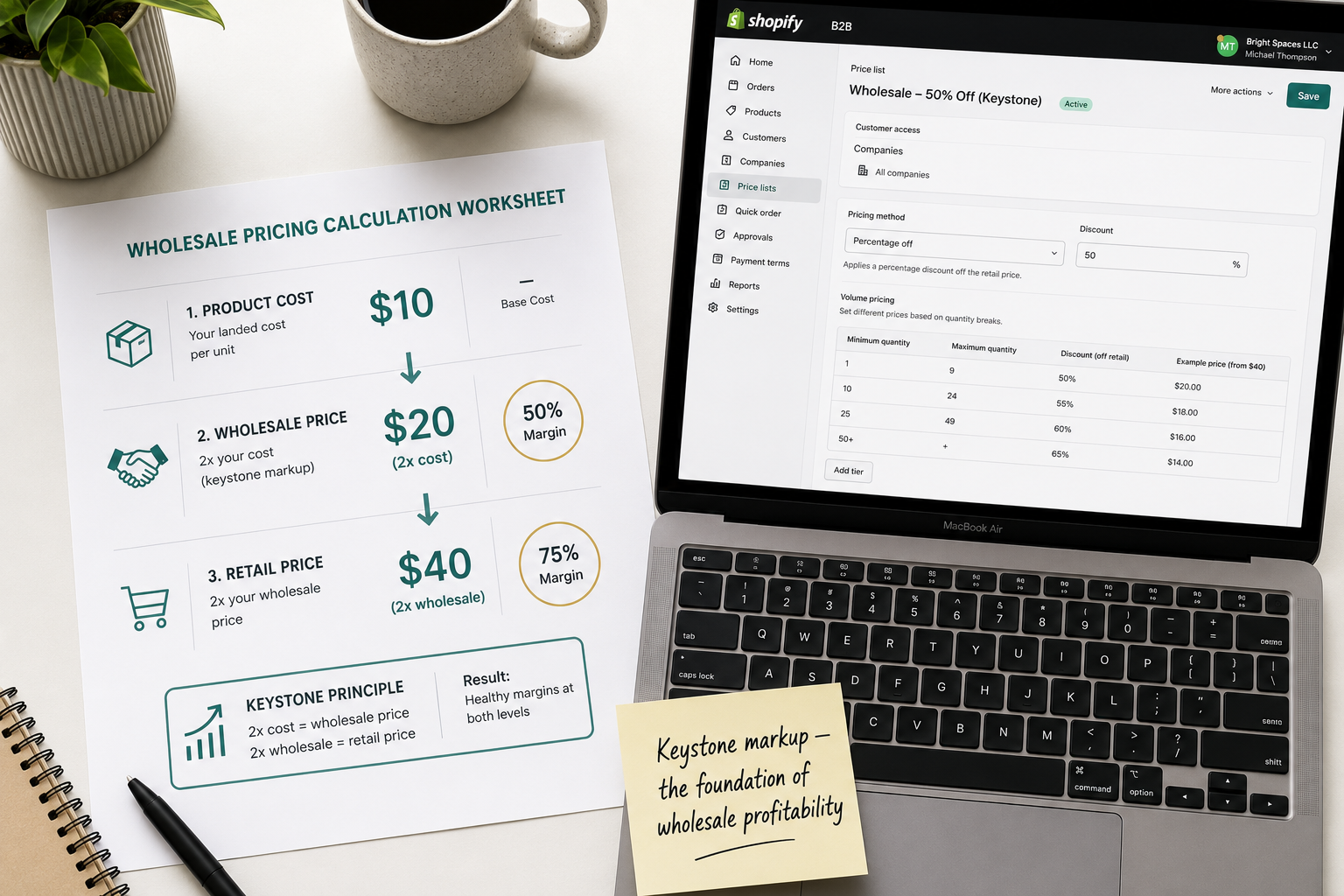
If your product costs $10 to produce, your wholesale price should be at least $20, and your retail price should be at least $40. This leaves room for both your wholesale margin and your retailer's margin while maintaining DTC profitability.
Where the calculation gets more complex is with shipping costs. DTC shipping is paid by the consumer. Wholesale shipping is typically either free above a certain order value, charged at cost, or built into the wholesale pricing. Decide which approach you are taking before you publish price lists, because wholesale buyers will ask and the answer affects their perception of your actual landed cost.
Minimum order values should be set at a level that makes wholesale economically rational given your picking, packing, and shipping overhead. If it costs you $25 to pick, pack, and ship a wholesale order regardless of size, a minimum order of $50 wholesale barely covers that overhead. A minimum order of $150 to $200 is more realistic for most small-batch wholesale operations.
Final Thoughts
Adding a wholesale channel to your Shopify store in 2026 is more accessible than at any previous point in the platform's history. The April 2026 expansion of native B2B features to all paid plans removes the Plus-only barrier that previously excluded most growing merchants from a serious wholesale setup.
The commercial logic is compelling regardless of your current revenue level. Wholesale buyers generate predictable, high-volume orders without individual customer acquisition cost. The infrastructure investment is primarily time — configuration, pricing setup, and buyer portal testing — rather than ongoing operational overhead once the system is running.
The brands building wholesale channels now are adding a revenue stream that does not depend on rising ad costs, algorithm changes, or consumer sentiment. That kind of revenue diversification is not just attractive — in 2026's ecommerce environment, it is becoming a strategic necessity.
Need help setting up Shopify B2B for your store, or want an expert to configure your wholesale pricing, buyer portal, and company accounts correctly from the start? Get in touch with EcomFixify — we specialize in Shopify development and ecommerce growth strategy for brands ready to scale.