
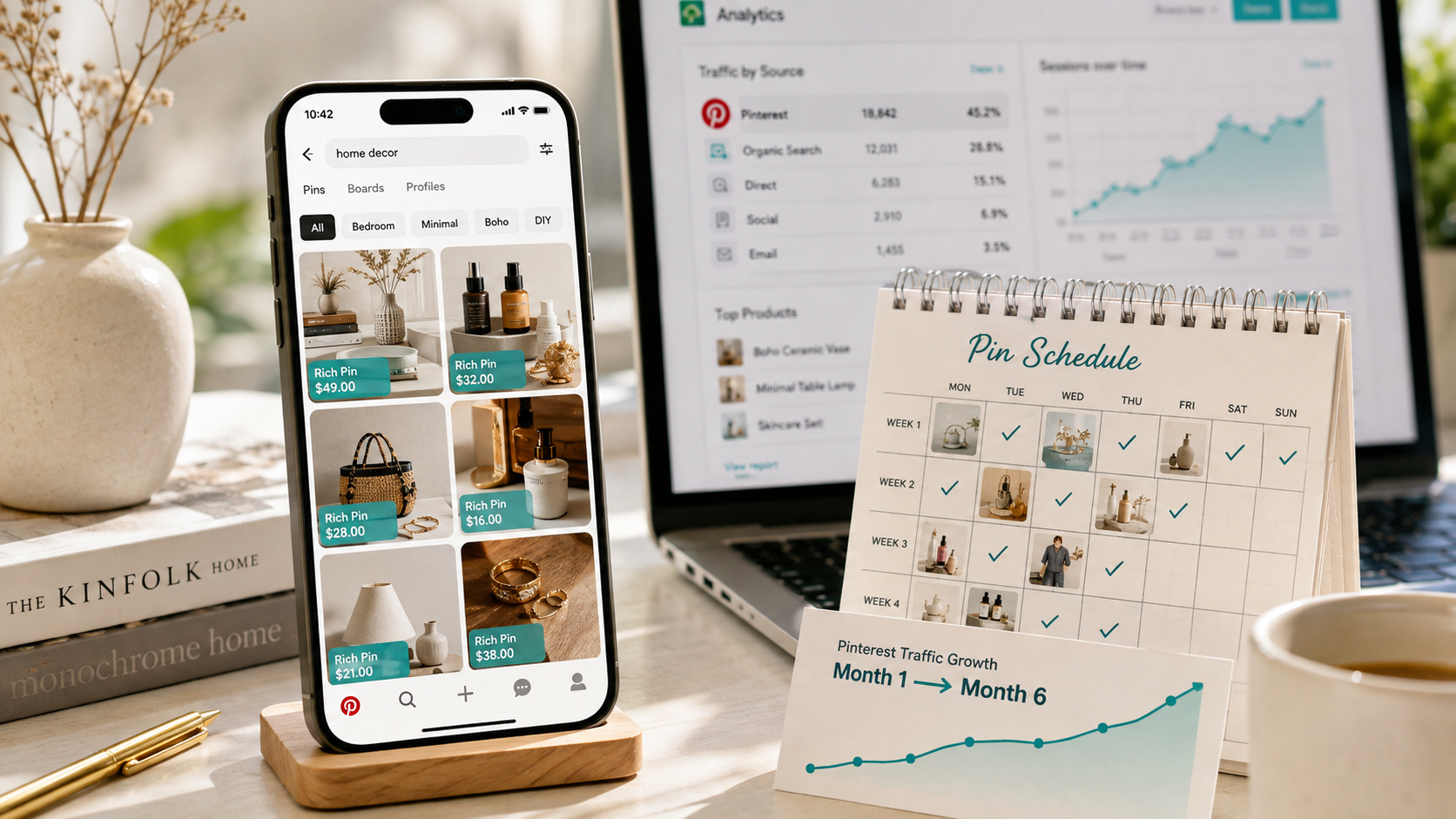
Pinterest SEO for Shopify: How to Get Free Traffic That Lasts
Most Shopify merchants chase traffic on platforms that forget them within 48 hours. A TikTok video peaks and decays. An Instagram Reel gets 24 hours of algorithmic attention then disappears into the feed. A Facebook post is dead by tomorrow morning. The traffic spikes, the traffic drops, and the cycle of creating more content to maintain visibility starts again immediately.
Pinterest works differently from every other platform you use for your Shopify store — and that difference is commercially significant in a way most merchants have not yet recognized.
A single well-optimized pin can drive traffic to your Shopify store for 6 to 12 months and sometimes years after it was published. Pinterest sits at approximately 482 million monthly active users, with women aged 18 to 44 driving the highest-intent shopping behavior on the platform. It drives 33% more referral traffic to shopping sites than Facebook. And ad CPMs on Pinterest run 30 to 60% cheaper than Instagram or TikTok in most ecommerce verticals — making it the rare paid channel where small budgets compete effectively, even before you invest a dollar.
The catch — and it is the same catch that keeps most merchants from using Pinterest effectively — is that Pinterest is a search engine wearing social network clothes. The merchants who treat it like Instagram post pretty pictures and wonder why nothing happens. The merchants who treat it like Google, apply keyword strategy to every element of their presence, and pin consistently over three to six months build a compounding free traffic asset that delivers results long after the work was done.
This guide covers exactly how to build that asset for your Shopify store in 2026.
Why Pinterest Is Different From Every Other Platform
The fundamental distinction between Pinterest and every other social platform is content lifespan. On Instagram, TikTok, and Facebook, the algorithm serves new content to followers and deprioritizes anything older than a day or two. Your content's relevance is almost entirely determined by how recently it was posted.
Pinterest's algorithm works on search relevance rather than recency. When someone searches "minimalist home office ideas" or "natural skincare routine for dry skin" on Pinterest, the algorithm serves the most relevant, well-optimized pins regardless of when they were published. A pin you created six months ago that is well-keyword-optimized, has accumulated saves and clicks, and links to a high-quality landing page will outrank a pin published yesterday that lacks those signals.
This is what Pinterest marketers mean when they say content compounds on the platform. Each pin you publish is not a post that expires — it is a search result that grows in ranking authority as it accumulates engagement signals over time. A pin that ranks well in Pinterest search also has a significant probability of appearing in Google Images for the same query, creating a second free traffic channel from a single piece of content.
Pinterest users also arrive with higher purchase intent than users on entertainment-first platforms. People use Pinterest actively to plan — home renovations, wardrobes, weddings, fitness routines, meal plans. They are researching products they intend to buy, not passively consuming content. That intent gap between a Pinterest user browsing "natural face moisturizer recommendations" and an Instagram user scrolling a feed for entertainment translates directly into higher conversion rates from Pinterest referral traffic compared to most other social sources.
For Shopify stores selling in categories with strong visual identity — home décor, fashion, beauty, food, fitness, wellness, craft supplies, or any lifestyle-adjacent product — Pinterest is arguably the highest-ROI free traffic investment available in 2026.
How Pinterest SEO Actually Works
Pinterest SEO follows the same fundamental logic as Google SEO — match the right content to the right search queries — but the signals that determine ranking are specific to Pinterest's platform.
The four primary ranking signals Pinterest's algorithm uses are keywords, visual content quality, engagement signals, and domain authority.
Keywords tell Pinterest what your content is about and which search queries it should appear for. Pinterest reads keywords from your pin title, pin description, board name, board description, and your profile description. Keyword placement in all five locations is not redundant — each location serves a different function in how Pinterest categorizes and surfaces your content.
Visual content quality is assessed by Pinterest's image recognition system, which identifies what is depicted in your pin image and matches it against the queries it understands. A pin that depicts a minimalist wooden desk with a laptop and a plant will be understood by Pinterest's visual system as relevant to home office, desk setup, and workspace queries regardless of the text. This means your pin images need to clearly depict what you want to rank for — abstract or highly stylized images that do not clearly show the subject matter are harder for Pinterest's visual algorithm to categorize correctly.
Engagement signals — saves, clicks, and close-up views (called long clicks) — tell the algorithm that users find the pin relevant and valuable. Saves carry the most weight because they indicate a user wanted to bookmark the content for future reference, which is Pinterest's native user behavior. Clicks to your Shopify store indicate purchase or research intent. Both signal positive relevance and improve the pin's ranking over time.
Domain authority on Pinterest is determined by the quality and consistency of your linked website — your Shopify store. Claiming your website in your Pinterest business account settings (a verification process that takes under five minutes) tells Pinterest that your pins are associated with a legitimate, established website. Verified accounts consistently outperform unverified accounts in search ranking and receive preferential distribution in the smart feed.
Setting Up Your Pinterest Business Account for Shopify
Before creating a single pin, the foundation needs to be correct. A well-configured Pinterest business account sets the algorithm context that makes every subsequent pin perform better.
Create or convert to a Pinterest business account at pinterest.com/business. Business accounts have access to analytics, rich pins, and the catalog upload features that standard personal accounts do not provide.
Claim your Shopify store website in the account settings. Go to Settings, then Claimed Accounts, and follow the process to verify your domain. Shopify users can verify via the HTML tag method — Pinterest provides the tag, you add it to your Shopify theme's head section, and verification completes automatically. This step is not optional — unclaimed website accounts receive significantly less distribution and have no access to rich pin functionality.
Connect your Shopify product catalog to Pinterest via the Pinterest app in the Shopify App Store. The official Pinterest app syncs your product catalog — including product titles, descriptions, images, pricing, and availability — to your Pinterest catalog automatically. Products in your synced catalog become eligible for Product Pins, which display real-time pricing and availability directly in Pinterest search results and can be purchased through Pinterest's in-app checkout in eligible markets.
Configure your profile with strategic keyword placement. Your display name can include keywords — "EcomFixify | Shopify Development" communicates both brand identity and topical relevance to Pinterest's indexing. Your profile description should include two to three of your most important category keywords in natural language — not a keyword list, but a readable sentence or two that naturally incorporates the terms your target audience searches.
Pinterest Keyword Research for Shopify Merchants
Before creating boards or pins, identifying the keywords your target customers use on Pinterest gives you the content map that drives every subsequent decision.
The fastest keyword research method for Pinterest requires no paid tool. Open Pinterest search and type the beginning of a query relevant to your product category — "natural face moisturizer" or "minimalist living room" or "yoga accessories." Pinterest autocomplete suggests the most searched completions for that phrase. These autocompletions are real search queries with real search volume on the platform — they are Pinterest telling you exactly what people are looking for.
For each of your product categories, collect ten to twenty keyword phrases using this autocomplete method. Group them by intent: informational keywords ("how to build a capsule wardrobe"), discovery keywords ("minimalist wardrobe ideas"), and commercial keywords ("best minimalist clothing brands"). All three types belong in your Pinterest strategy — informational and discovery pins build awareness and accumulate saves, commercial pins convert browsers into buyers.
The Pinterest Trends tool, available free inside your Pinterest business account, shows search volume trends for specific queries over time. Use it to identify seasonal peaks for your product categories — knowing that "cozy home décor" searches spike in September and October allows you to create and publish pins targeting those queries six to eight weeks before the peak, giving them time to accumulate saves and ranking signals before the highest-traffic window arrives.
Long-tail keywords — four to six word phrases that are highly specific — consistently outperform broad terms for driving qualified traffic in Pinterest SEO, exactly as they do in Google SEO. "Minimalist wooden desk accessories for home office" drives less total traffic than "desk accessories" but the traffic it drives arrives with significantly higher purchase intent and converts at higher rates.
How to Structure Your Boards for Maximum SEO Impact
Pinterest boards are the organizational structure that tells both Pinterest and your audience what your account is about. They function like category pages in Google SEO — well-optimized boards rank in Pinterest search independently, driving traffic to your account even from users who have not previously engaged with your brand.
Create boards around the specific keyword phrases your target audience searches rather than the product categories you sell. A board named "Natural Skincare Products" is less searchable than "Natural Skincare Routine for Dry Skin" — the latter matches the exact phrasing of a real search query and will appear in Pinterest results when users type that phrase.
Create eight to fifteen boards that collectively cover your full product category landscape and the lifestyle content adjacent to your niche. For a Shopify store selling home décor, relevant boards might include "Minimalist Living Room Ideas," "Small Space Home Office Inspiration," "Scandinavian Interior Design," "Sustainable Home Décor," and "Budget-Friendly Home Styling Tips." Each board is a separate SEO opportunity that can rank independently in Pinterest search.
Write board descriptions of 200 to 500 words for each board, incorporating the primary keyword phrase naturally throughout. Board descriptions are indexed by Pinterest and contribute to the board's search ranking — a blank or single-sentence board description is a missed SEO opportunity. The description should read naturally, address the topic the board covers, and incorporate related keyword phrases that a user interested in this category would also search.
Add three to five keywords as Pinterest-recommended topics when creating each board. These topic tags help Pinterest categorize your board content and surface it in relevant category browsing feeds beyond direct search.
Creating Pins That Rank and Drive Clicks
Pinterest in 2026 favors two primary content formats: static image pins and native video pins. Idea Pins — the multi-frame format Pinterest pushed in 2022 and 2023 — have been replaced by collages and are no longer a strategic priority. Static pins are the primary format for driving website traffic, and native video pins perform well for demonstrating products in action.
The static pin design principles that drive the highest saves and clicks in 2026:
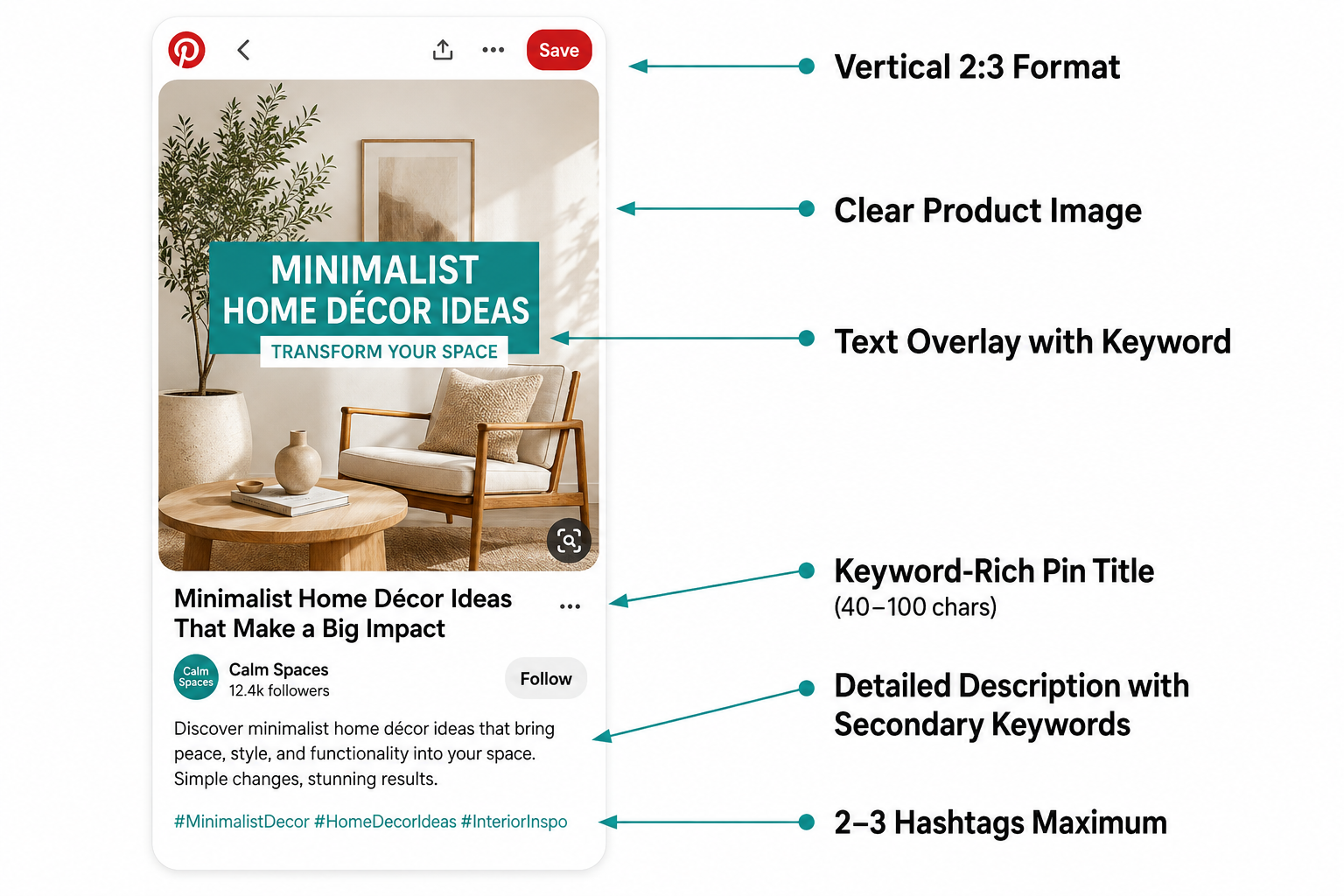
Vertical format with a 2:3 aspect ratio (1000 x 1500 pixels) fills the most feed space on mobile, which represents the majority of Pinterest traffic. Horizontal images and square images are displayed smaller in the feed and consistently generate fewer clicks than full-vertical pins.
High-contrast, visually clear imagery that clearly depicts the subject matter without excessive styling or abstraction. Pinterest's visual recognition system needs to understand what is in your image — and human users need to immediately understand what they are looking at on a small mobile screen. Clean, bright product images on lifestyle or neutral backgrounds consistently outperform overly artistic or conceptual compositions.
Text overlay that communicates the pin's value proposition within the first half second of viewing. A pin for a minimalist desk organizer that displays "5 Desk Organization Ideas for Small Home Offices" as a text overlay is more likely to stop a scroll and generate a click than the same image with no text, because the text overlay tells the viewer immediately what they will find if they click.
A keyword-rich pin title of 40 to 100 characters that incorporates your primary keyword phrase naturally. The title is the first text element Pinterest's algorithm reads to understand what the pin is about — it should be readable and keyword-rich simultaneously, not keyword-stuffed. "Minimalist Wooden Desk Organizer — Small Home Office Storage" works. "Desk Organizer Wood Small Office Minimalist Buy" does not.
A detailed pin description of 100 to 500 characters that elaborates on the pin's content, incorporates secondary keyword phrases naturally, and includes a clear call to action directing users to your Shopify store. Descriptions are read by Pinterest's algorithm for indexing and by users who hover over or expand the pin — they serve both audiences simultaneously.
Two to three hashtags that mirror your primary keywords, added to the description field rather than the title. Pinterest's own benchmark data shows that two to three tightly relevant hashtags produce a marginal positive engagement effect, while more than eight hashtags is associated with a meaningful drop in clicks. Use them sparingly and strategically rather than building your strategy around them.
Connecting Pinterest to Your Shopify Product Pages
The technical connection between your Pinterest pins and your Shopify product pages determines how much of your Pinterest traffic converts into revenue.
Rich Pins — enhanced pin formats that automatically pull metadata from your linked web page — are the most important technical setup for Shopify merchants on Pinterest. Product Rich Pins display your product's title, description, price, and availability directly on the pin without requiring the user to click through to your store. When a user saves a Product Rich Pin, that information stays current — if you change the price in Shopify, the Rich Pin updates automatically.
Enable Rich Pins by adding Open Graph meta tags to your Shopify store (Shopify adds these automatically for most themes) and validating your domain through Pinterest's Rich Pin Validator tool. Once validated, all pins linked to your Shopify store automatically become Rich Pins.
Deep link every pin directly to the most relevant product page or collection page on your Shopify store — never to your homepage. A user who clicks a pin for a specific minimalist desk organizer should land on that exact product's page, not on your homepage where they need to search for it themselves. Every navigation step between the Pinterest click and the product page costs you a percentage of that traffic.
Configure the Pinterest tag — Pinterest's equivalent of the Meta Pixel — on your Shopify store through the Pinterest app. The Pinterest tag tracks which of your pins are driving not just clicks but conversions, allowing you to identify your highest-performing content and optimize your pinning strategy based on actual revenue data rather than impressions alone.
Building a Pinterest Pinning Schedule That Grows
Consistency is the single most important behavioral driver of Pinterest SEO performance. Accounts that pin consistently over time accumulate more ranking signals, build broader board authority, and achieve higher average impressions per pin than accounts that pin in bursts followed by inactivity.
The 2026 Pinterest benchmark for optimal posting frequency is five to ten fresh pins per day. The previous approach of pinning 25 or more times daily — a strategy popularized by Tailwind in earlier years — is now actively penalized by Pinterest's algorithm, which interprets extremely high daily pin volumes as spammy behavior and reduces distribution accordingly. Five to ten well-crafted, keyword-optimized pins per day is the sweet spot between consistency and quality.
Fresh pins — newly created pin images linking to your content — consistently outperform repins of existing content in the algorithm's current weighting. In previous years, repinning others' content was a recommended strategy for maintaining posting frequency. In 2026, the algorithm strongly favors original content and distributes fresh pins to a broader audience than repins.
Scheduling tools make the five to ten daily pins achievable without manual daily posting. Tailwind remains the most widely used Pinterest scheduling tool for Shopify merchants, offering Smart Schedule functionality that automatically distributes your pins across the highest-engagement time windows for your specific audience. Pinterest's own native scheduler, available free inside the Pinterest business account, handles scheduling for up to 30 days in advance without a third-party subscription.
Create pins in batches — spending two to three hours once per week creating 35 to 70 pins — then schedule them to publish at the optimal frequency throughout the week. This approach maintains the consistent daily pinning that the algorithm rewards without requiring daily creative work.
What to Pin: The Content Mix That Drives Shopify Sales
A Pinterest strategy limited exclusively to direct product pins consistently underperforms a content mix that combines product pins with lifestyle content and educational content. The reason mirrors the logic of a full-funnel marketing strategy — users at different stages of their purchase journey engage with different content types.
Product pins — pins that link directly to specific Shopify product pages — convert the highest percentage of clicks into sales because they take high-intent users directly to a purchase point. Pin your full product catalog through the catalog integration, and create manually designed pins for your highest-priority products that feature compelling lifestyle imagery and keyword-optimized descriptions beyond what the catalog sync generates automatically.
Lifestyle and inspiration pins — content that shows your products in use in aspirational contexts — accumulate the highest save rates because users bookmark inspiration for future reference. A pin showing a perfectly styled home office featuring your desk organizer generates saves from users who are planning a home office refresh, potentially months before they are ready to purchase. Those saves improve the pin's ranking and bring the user back to your content when their purchase moment arrives.
Educational pins — how-to guides, tips, tutorials, and informational content — generate strong impressions and saves from users in the awareness and consideration stage of their purchase journey. A Shopify skincare brand that pins "5 Skincare Layering Mistakes That Are Ruining Your Routine" reaches an audience that is engaged with skincare education, links to a blog post on their Shopify store, and builds brand authority with users who have not yet discovered the specific products being sold.
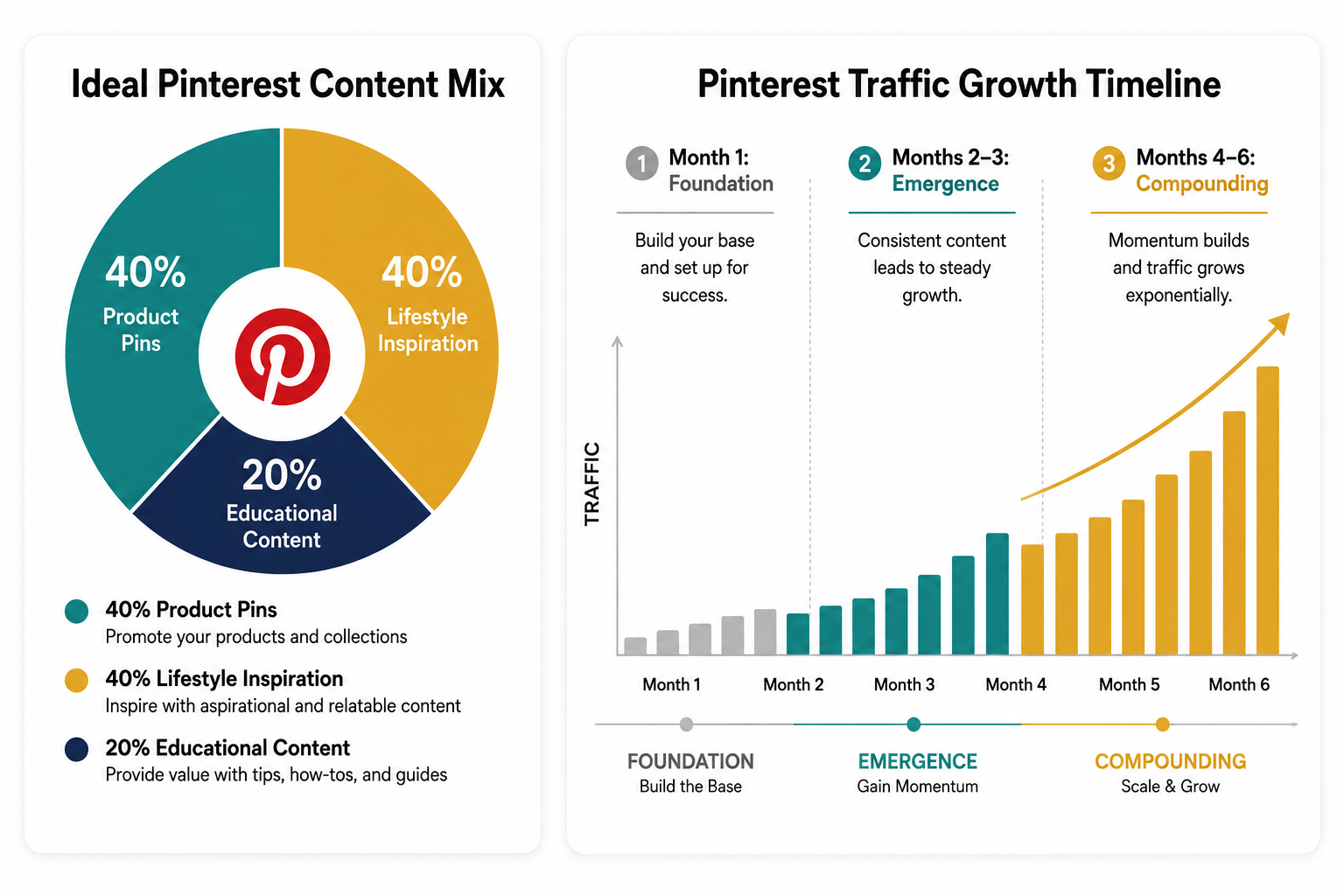
The content mix that consistently performs best for Shopify merchants is 40% product pins linked directly to product pages, 40% lifestyle and inspiration pins that show products in use or create aspirational brand imagery, and 20% educational pins that build audience and brand authority with users earlier in the purchase journey.
The Pinterest SEO Timeline: What to Expect and When
Pinterest is not an instant traffic channel. Understanding the realistic timeline prevents the most common Pinterest marketing mistake — abandoning a strategy that was weeks away from producing results.
The first 30 days are foundation building. Your pins are being indexed and slowly accumulating their first saves and impressions. Traffic to your Shopify store from Pinterest during this period will be minimal — typically under 100 visitors per month for a new account. This is normal and expected. The work done in this period is building the ranking signals that deliver traffic in months two and three.
Months two and three represent the emergence phase. Accounts posting consistently at five to ten pins per day see their per-pin impression average increase by approximately 22% after 90 days compared to their first 30 days. Traffic to your Shopify store begins accumulating meaningfully — typically 500 to 2,000 monthly visitors from Pinterest for a consistently active account in a visual category. Some pins begin ranking consistently in Pinterest search results for their target keywords.
Months four through six are the compounding phase where the investment begins paying measurable returns. Well-optimized pins from months one and two have accumulated enough saves and clicks to rank consistently in Pinterest search. New pins benefit from the account authority built by earlier pins. Monthly Pinterest referral traffic typically reaches 3,000 to 10,000 visitors for active accounts in competitive categories, with higher-performing accounts in visual niches exceeding this range significantly.
Beyond six months, the compounding effect becomes fully visible. Pins published in month one continue driving traffic in month seven. Each new pin benefits from a higher baseline of account authority. The monthly traffic your Shopify store receives from Pinterest grows month over month without a proportional increase in content creation effort — which is the compounding dynamic that makes Pinterest fundamentally different from every other traffic channel available to ecommerce merchants.
Pinterest Analytics: The Numbers That Guide Your Strategy
Pinterest Analytics, available free inside your business account, provides the performance data that tells you which content is working and where to focus your pinning efforts.
The metrics that matter most for Shopify merchants are outbound clicks — the number of users who clicked from your pin to your Shopify store — and saves — the number of users who bookmarked your pin for future reference. Impressions measure how many times your pin was displayed, which is useful for understanding reach but less directly correlated with revenue than outbound clicks.
Sort your pins by outbound clicks monthly to identify which specific pins are driving the most Shopify traffic. Create more content similar to your highest click-driving pins — same subject matter, similar visual style, adjacent keyword territory. Pinterest rewards pattern recognition: when a specific type of content consistently performs well from your account, creating more of that type of content generates above-average performance faster than testing entirely new formats.
Sort by saves to identify your highest-inspiration content — the pins that users are bookmarking for future reference. These pins have the highest long-term compounding potential because saves continue accumulating over time and improve ranking. Invest in creating variations and expansions of your highest-save content to build clusters of ranking content around your most resonant themes.
Connect your Pinterest Analytics to Google Analytics by ensuring your Shopify store's UTM parameters are configured correctly in your pin links. This allows you to see not just clicks from Pinterest but the full purchase journey of Pinterest-referred visitors — how long they stay on your site, which products they view, and whether they convert to buyers. Pinterest-referred visitors who convert are your most valuable data for understanding which pin content generates not just traffic but revenue.
Final Thoughts
Pinterest is the rare free traffic channel where the work you do today is still delivering results two years from now. Every well-optimized pin is a search result that grows in authority over time, a visual asset indexed by both Pinterest and Google, and a potential entry point to your Shopify store for a user who is actively planning to buy something in your category.
The merchants who have built Pinterest into a serious traffic channel for their Shopify stores did not do anything technically complicated. They set up their accounts correctly, researched their keywords thoroughly, created visually clear content at consistent frequency, and stayed patient through the three to six month foundation period that precedes the compounding phase where results become unmistakably visible.
Pinterest is a search engine wearing social network clothes. Treat it like SEO — with keyword strategy, content consistency, and a long-term compounding mindset — and the free traffic it sends to your Shopify store will still be arriving long after every TikTok you posted this month has been forgotten.
Need help building a Pinterest SEO strategy for your Shopify store, or want an expert to optimize your product catalog for maximum Pinterest and organic search visibility? Get in touch with EcomFixify — we specialize in Shopify development and ecommerce growth strategy for brands building sustainable traffic.