
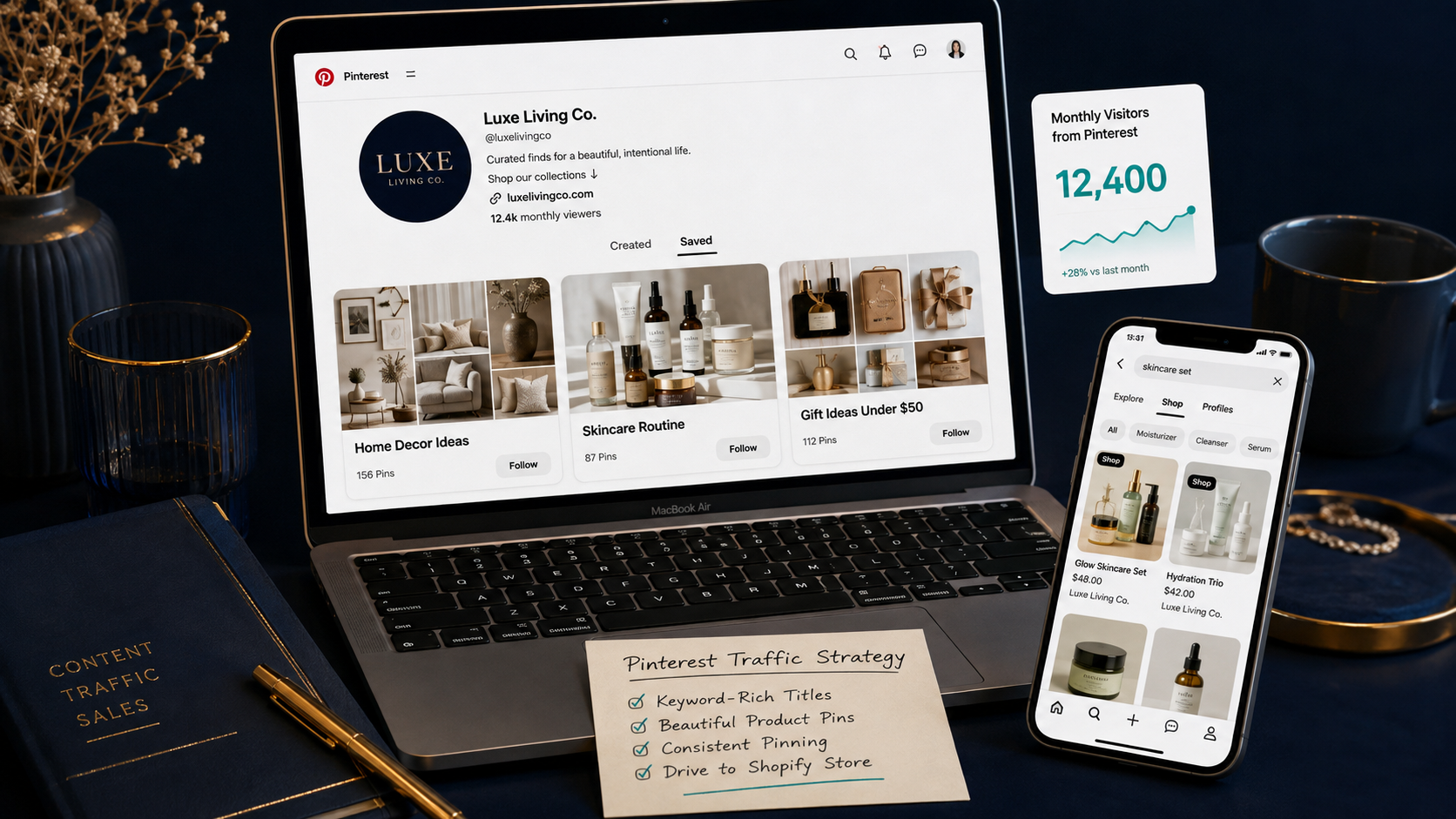
How to Use Pinterest to Drive Free Traffic to Your Shopify Store
Most Shopify store owners think of Pinterest the same way they think of Instagram — a social media platform where you post pretty pictures and hope people notice. That mental model is costing them one of the most powerful free traffic channels available to ecommerce brands in 2026.
Pinterest is not a social media platform. It is a visual search engine — and that distinction changes everything about how it works, why it works, and why it is fundamentally different from every other platform you are currently using to drive traffic.
When someone opens Instagram, they are looking at what their friends and favorite creators are doing. When someone opens Pinterest, they are planning. They are searching for a product to buy, a room to decorate, an outfit to build, a recipe to make, a gift to find. The purchase intent on Pinterest is structurally higher than any other social platform because searching on Pinterest is an act of discovery with a destination in mind.
The numbers in 2026 reflect exactly that. Pinterest has 631 million monthly active users — an all-time high recorded in Q1 2026. 85% of weekly Pinterest users have bought something they found on the platform. 96% of top searches on Pinterest are unbranded, meaning new stores with zero followers can be discovered by buyers who have never heard of them. And Danish jewellery brand Pilgrim, using Pinterest's Shopify integration, achieved its highest-ever online sales revenue over Black Friday and Christmas with an 80% lower cost per acquisition than other social platforms.
For Shopify stores with limited advertising budgets, Pinterest represents a free traffic opportunity that compounds in value over time — unlike paid ads that stop the moment you stop spending — and that most of your competitors are leaving completely untapped.
This guide covers everything you need to know to set up, optimize, and scale Pinterest as a genuine traffic and revenue channel for your Shopify store in 2026.
Why Pinterest Works Differently From Every Other Platform
The core insight that unlocks Pinterest's value for Shopify merchants is understanding the difference between a social platform and a visual search engine.
On Instagram or TikTok, content has a lifespan measured in hours. A post that does not get engagement in the first 24 to 48 hours is effectively dead — the algorithm stops showing it, the feed moves on, and the content generates no further value. You are on a constant treadmill of creating to stay visible.
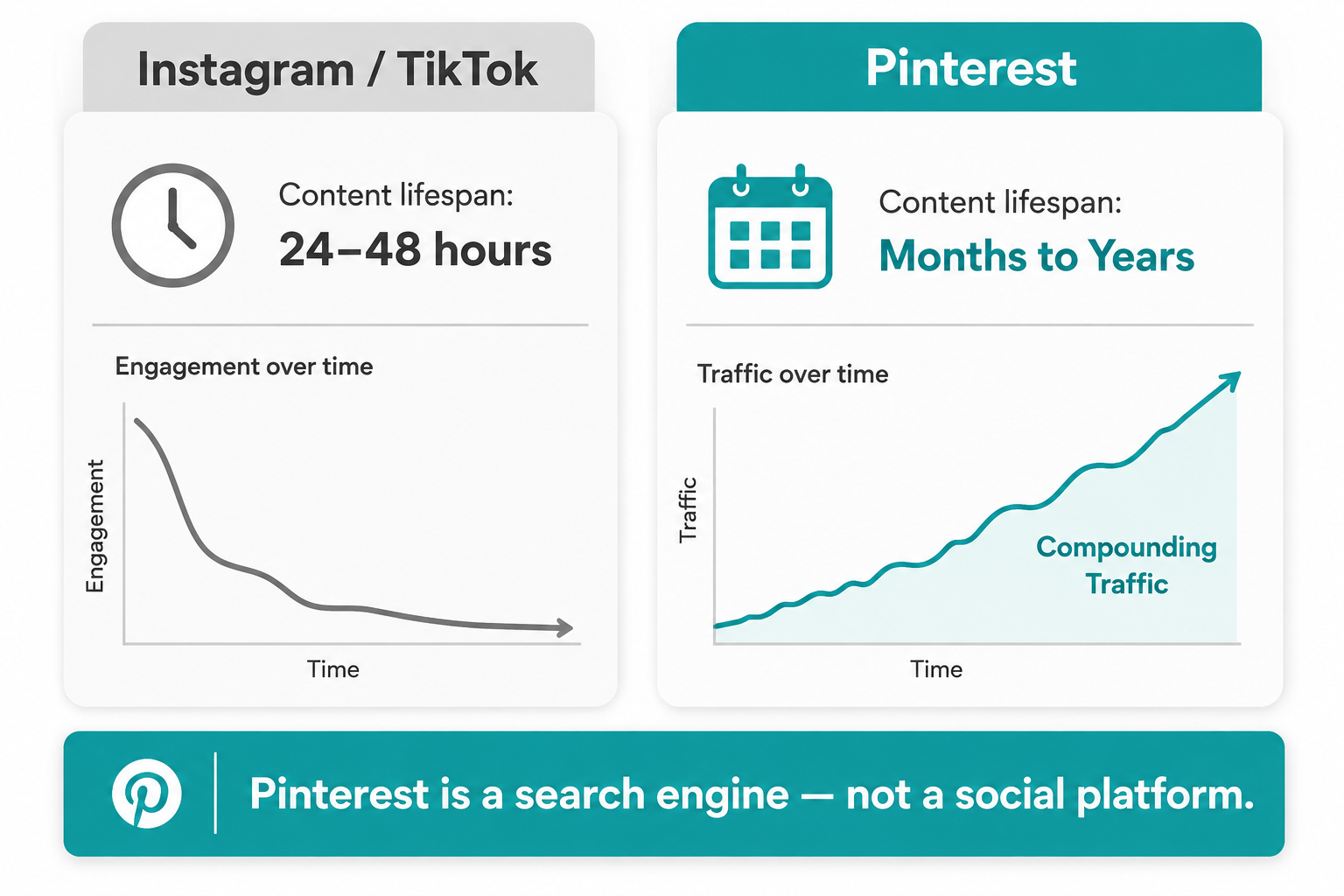
Pinterest operates on a completely different time horizon. Pins do not expire. A well-optimized pin published today can continue driving traffic to your Shopify store for months or years, because it is indexed in Pinterest's search results and surfaces whenever someone searches for a relevant term — regardless of when it was created. The top 1% of pins drive over 50% of all impressions and clicks on the platform. Five well-optimized pins consistently outperform 25 rushed ones because Pinterest's search algorithm rewards quality and relevance over volume and recency.
This compounding dynamic is what makes Pinterest categorically different from every other free traffic strategy available to Shopify merchants. The effort you invest this month continues generating traffic next month and the month after that — building a traffic asset rather than a content treadmill.
The buyer intent difference is equally significant. By Q3 2025, two-thirds of Pinterest's revenue came from driving actual sales — not awareness or consideration, but direct purchase behavior. The platform's own data shows that people come to Pinterest to shop even when they do not know exactly what they want yet. That combination of high intent and open-minded discovery is the ideal environment for ecommerce product exposure.
Setting Up Pinterest for Shopify: The Technical Foundation
Before creating a single pin, getting the technical foundation right determines whether your Pinterest traffic actually converts and whether you can measure it.
Step 1: Create a Pinterest Business Account
A personal account limits your access to analytics, rich pins, and the Pinterest tag. Go to business.pinterest.com and create a business account using your store's name. If you already have a personal Pinterest account, you can convert it to a business account without losing your existing content.
Complete every section of your business profile. Upload a professional logo as your profile image, write a keyword-rich bio that describes what your store sells and who it serves, and add your Shopify store URL. The bio is indexed by Pinterest's search algorithm — include the primary product category keywords your target customers would search.
Step 2: Claim Your Shopify Website
Claiming your website on Pinterest is a critical technical step that most merchants skip. It enables attribution — any pin saved from your Shopify store automatically links back to your claimed website, giving you credit and analytics visibility for all content your customers and visitors share from your store.
In Pinterest settings, go to Claimed Accounts, click Claim and enter your Shopify store URL. Pinterest gives you a meta tag to add to your Shopify theme's header — this takes less than five minutes through Shopify's theme editor. Once claimed, a globe icon appears on your profile confirming your website is verified.
Step 3: Install the Pinterest Sales Channel on Shopify
The official Pinterest Sales Channel app on Shopify syncs your entire product catalog to Pinterest automatically. Every product in your Shopify store — with its images, price, availability, and description — becomes a shoppable product pin that can appear in Pinterest's shopping feeds and search results.
Navigate to the Shopify App Store, search for Pinterest, and install the official app. Connect your Pinterest business account, approve the catalog sync, and enable the Pinterest Tag — the equivalent of a tracking pixel — on your store. The tag fires on key events including page views, add-to-carts, and purchases, giving you the data to measure which pins are driving actual revenue rather than just traffic.
Step 4: Enable Rich Pins
Rich Pins automatically pull real-time product data — price, availability, and product name — from your Shopify store and display it directly on the pin. When your product sells out or goes on sale in Shopify, the pin updates automatically. When inventory comes back in stock, the pin reflects it.
Rich Pins are enabled through your Pinterest business account settings after you have claimed your website. They require your Shopify store to have Open Graph meta tags implemented — which Shopify does automatically. Enable them through the Rich Pins validator at developers.pinterest.com/tools/url-debugger and validate with a product page URL from your store.
Pinterest SEO: How to Get Found in Search
Pinterest is a search engine, which means the same principles that apply to Google SEO apply here — with one important difference. Pinterest's algorithm weighs visual quality alongside keyword relevance. A beautifully designed pin with strong keywords outperforms a poorly designed pin with identical keywords every time.
Keyword Research for Pinterest
The Pinterest search bar is your most valuable keyword research tool. Type any product category term into the search bar and Pinterest auto-completes with the most common related searches. Below the search results, a row of colored keyword tiles appears — these are Pinterest's own category refinements showing the most popular search variations for that term.
For a Shopify store selling skincare, searching "skincare routine" in Pinterest's search bar reveals refinements including "skincare routine for beginners," "skincare routine for oily skin," "skincare routine morning and night," and "Korean skincare routine." Each of these is a high-intent search with a specific audience behind it — and each represents a potential pin topic that addresses exactly what those searchers are looking for.
Build a keyword list of 20 to 30 primary and secondary terms relevant to your product categories using this method. These keywords belong in three places: your board titles and descriptions, your pin titles, and your pin descriptions.
Board Structure and Optimization
Boards are Pinterest's organizational system — collections of pins grouped by topic. Your board structure should mirror the way your target customers search, not the way you organize your internal product catalog.
A kitchen accessories store should not have a board called "Products." It should have boards called "Small Kitchen Organization Ideas," "Aesthetic Kitchen Decor," "Budget Kitchen Upgrades," and "Holiday Cooking Essentials." Each board title is a searchable phrase that attracts a specific intent — and every pin in that board inherits some of the board's topical relevance.
Create ten to fifteen keyword-rich boards before you begin pinning content. Write a two to three sentence description for each board that naturally includes the board's primary keyword and one to two secondary keywords. Fill each board with a minimum of 20 to 30 pins before it becomes meaningful in Pinterest's search results — boards with only a handful of pins receive minimal algorithmic distribution.
Writing Pin Titles and Descriptions That Rank
Every pin has a title and a description field. Both are indexed by Pinterest's search algorithm and both appear in search results — making them the primary text-based ranking signals for your content.
Pin titles should be 40 to 100 characters, lead with the primary keyword, and communicate what the pin contains clearly and specifically. "Minimalist Living Room Decor Ideas — Affordable Shopify Finds Under $50" outperforms "Living Room" or "Home Decor" because it matches the specific search intent of a shopper planning a room refresh on a budget.
Pin descriptions can run up to 500 characters and should read naturally while incorporating three to five relevant keywords. The first 50 to 60 characters are displayed in the feed before the "more" truncation point — put your most important information there. Include a gentle call to action at the end of the description — "Shop the full collection at the link" — to direct engaged viewers toward your Shopify store.
Creating Pins That Drive Clicks to Your Shopify Store
The content of your pins determines whether someone scrolls past or stops, saves, and clicks through to your store. Pinterest is an intensely visual platform — design quality directly influences both algorithm distribution and user engagement.
Image Specifications That Perform
Vertical images with a 2:3 aspect ratio — 1000 x 1500 pixels — consistently outperform square and horizontal images on Pinterest. The vertical format takes up more space in the feed, stops the scroll more effectively, and performs better in Pinterest's mobile interface where the majority of users browse.
Use high-resolution product photography as the primary image. Lifestyle images that show the product in context — a throw blanket draped over a sofa, a skincare product on a clean bathroom counter, jewelry worn in a natural outdoor setting — consistently outperform product-on-white images for Pinterest because the platform's audience is shopping with a vision of their life in mind, not evaluating product specifications.
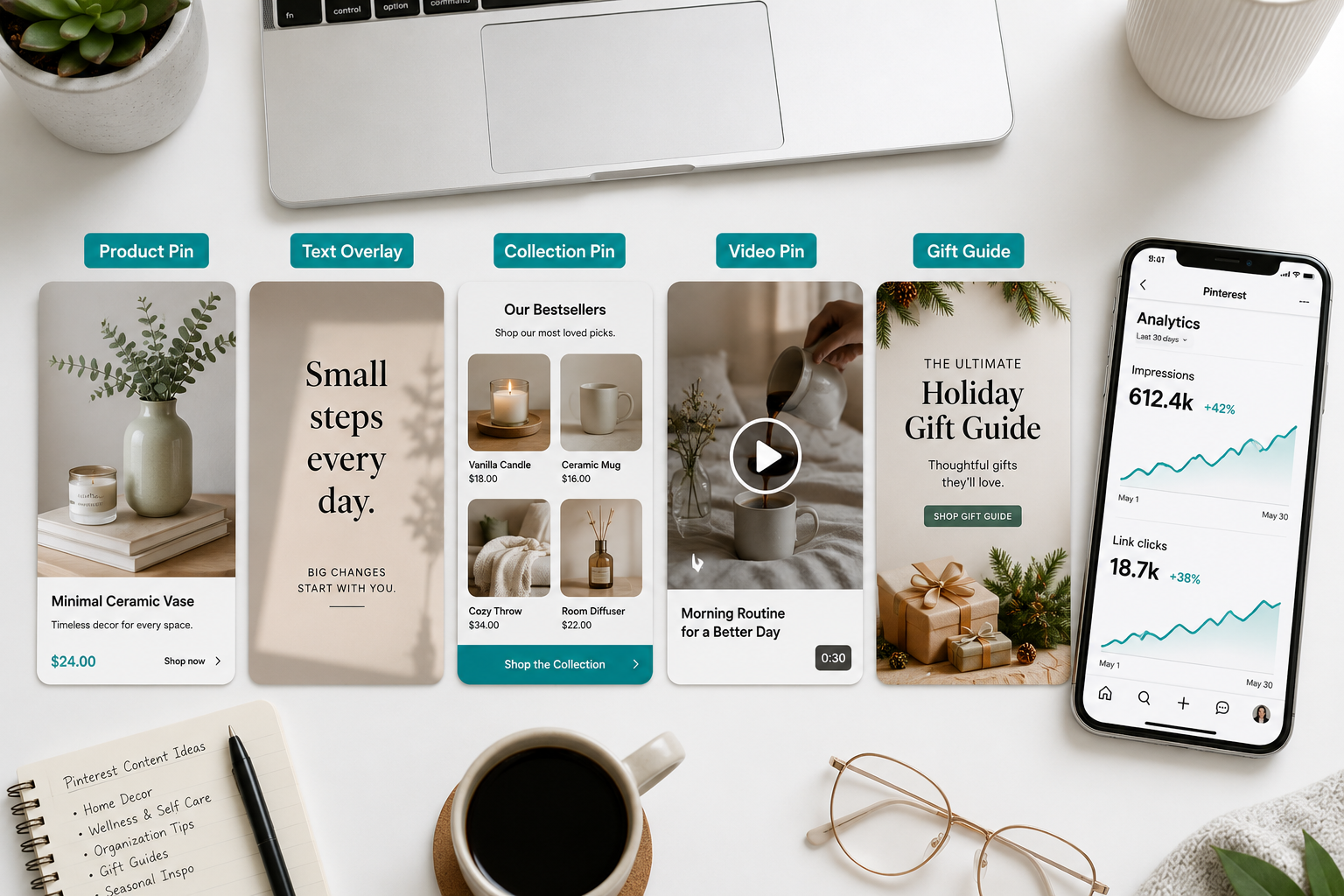
Add a text overlay to your pin images. A short headline in large, readable font — "10 Small Space Storage Ideas That Actually Work" or "The Moisturizer That Changed My Skin in 30 Days" — gives the pin a clear value proposition that is visible in the feed before anyone taps to read the description. Text overlays increase click-through rates by communicating context instantly to users scrolling at speed.
The Five Pin Types That Drive Shopify Traffic
Standard product pins — a lifestyle image of your product with a keyword-optimized title and description linking directly to the product page — are the foundation of every Shopify Pinterest strategy. Every product in your catalog should have at least one standard pin in a relevant board.
Idea pins — Pinterest's multi-page format similar to Stories — do not include outbound links but dramatically increase profile reach and follower growth. Use idea pins to showcase how-to content, behind-the-scenes brand stories, and product demonstrations that attract new audiences to your profile. Pair every idea pin series with standard product pins in the same content calendar to convert the reach into traffic.
Collection pins group a primary lifestyle image with three to four product images beneath it, creating a shoppable grid. When a viewer taps on a collection pin, they see all four products with direct links to each product page. Collection pins work exceptionally well for outfits, room setups, gift guides, and any scenario where multiple products are shown together in context.
Video pins autoplay in the feed and consistently generate higher engagement rates than static image pins. A 15 to 30 second product demonstration, unboxing, or before-and-after transformation video — with captions for viewers watching without sound — drives significantly more profile visits and click-throughs than an equivalent static image.
Seasonal and gift guide pins are the highest-traffic content type on Pinterest in the months surrounding key shopping moments. Pinterest users plan purchases 30 to 45 days earlier than the equivalent shopper on other platforms — which means your Christmas gift guide pins should be published in October, your Valentine's Day gift guides in early January, and your summer content in late March. Seasonal pins aligned with Pinterest's shopping calendar generate traffic spikes that can be dramatic for stores in relevant product categories.
How the Pinterest Algorithm Works in 2026 and How to Optimize For It
Understanding what Pinterest's algorithm rewards helps you concentrate effort on the inputs that produce the most distribution.
Pinterest's algorithm evaluates pins on four primary signals: domain quality, pin quality, pinner quality, and relevance.
Domain quality is determined by how consistently your Shopify website produces content that Pinterest users engage with. Stores that regularly save pins from their own website, receive organic saves from visitors, and see engagement on their pins build domain authority over time that increases distribution for all their future pins. Installing a Pinterest Save button on your Shopify store — through Shopify's Pinterest integration or a dedicated social sharing app — makes it easy for customers to save your products directly from your product pages, building domain quality passively with every save.
Pin quality is determined by the engagement rate a pin receives relative to its impressions — saves, link clicks, comments, and carousel swipes. Pins that receive early engagement signal relevance and get distributed to broader audiences. The first 24 to 48 hours after publishing a pin are the most algorithmically significant — save new pins to your most active boards, share them across your other boards if relevant, and if you have an email list or social following, mention your new Pinterest content to seed initial engagement.
Pinner quality reflects your overall account activity, consistency, and engagement rate over time. Consistent pinning — five to ten high-quality pins per week on a regular schedule — builds pinner quality more effectively than sporadic bursts of activity. Accounts that pin consistently for three to six months see measurably higher distribution per pin than new accounts posting at the same volume.
Relevance is the keyword match between a user's search query and your pin's title, description, and the board it lives in. This is where Pinterest SEO does its work — the more precisely your pin's keywords match actual search queries, the more consistently it surfaces in relevant results.
Tuesday through Thursday at 10 AM consistently shows strong engagement based on Sprout Social's analysis of 2.7 billion Pinterest engagements. Schedule your primary pins for these windows using Pinterest's native scheduler or tools like Tailwind, which automates pinning at optimal times based on your specific audience's activity patterns.
Shopify-Specific Pinterest Strategies That Drive Revenue
Beyond standard content strategy, several Shopify-specific tactics consistently drive higher traffic and conversion from Pinterest.
Shop tab activation places your entire Shopify product catalog in a dedicated shopping tab on your Pinterest profile. Visitors who arrive on your profile from a search result or a saved pin can browse your complete product range without leaving Pinterest — and each product links directly to its Shopify product page. Activate the shop tab through your Pinterest business account settings after your catalog sync is live.
Seasonal shopping campaigns aligned with Pinterest's own marketing moments calendar generate significantly higher traffic than evergreen content alone. Pinterest publishes a yearly marketing moments guide that identifies the key shopping events and trending topics for each month. Brands that publish content two to four weeks before these moments — when Pinterest users are actively searching to plan their purchases — consistently see higher engagement and traffic than brands who publish during or after the moment.
Group boards — shared boards where multiple accounts contribute pins — multiply your content's reach by exposing your pins to the followers of every collaborator. Identify group boards in your product category with active contributors and engaged followers, and request to join as a collaborator. Contributing five to ten relevant pins per week to a high-quality group board in your niche can generate meaningful traffic lift without any additional content creation — your existing pins simply reach a wider audience.
Collaborative content with complementary Shopify brands — a skincare brand partnering with a wellness brand on a shared board, or a home decor brand partnering with a furniture brand — creates cross-audience exposure that neither brand could achieve alone. Both brands contribute pins to a shared board, both promote the collaboration to their respective audiences, and both benefit from the combined follower base and engagement.
Measuring Pinterest Traffic to Your Shopify Store
Pinterest Analytics — available free in your business account — shows impressions, engagements, link clicks, and saves for every pin and board in your account. Track these weekly to understand which content is generating the most traffic and replicate the patterns you find.
In Google Analytics 4 on your Shopify store, Pinterest traffic appears under Traffic Acquisition → Session Source / Medium as pinterest.com / referral. Compare the session quality metrics — pages per session, average session duration, and conversion rate — of Pinterest referral traffic against your other organic channels. Most stores find that Pinterest visitors have higher intent and longer sessions than equivalent traffic from other social platforms — because they arrived already planning a purchase.
Set up a UTM parameter system for your Pinterest links to track performance at the pin level rather than the platform level. Adding ?utm_source=pinterest&utm_medium=social&utm_campaign=product-pins to your product URLs in Pinterest allows you to see which specific pins are driving revenue in Shopify's analytics — giving you the data to double down on what works and stop creating what does not.
What Realistic Pinterest Traffic Looks Like and When to Expect It
Pinterest is a compounding channel, not an instant one. Understanding the realistic timeline prevents premature abandonment of a strategy that requires consistent investment before its returns become visible.
Weeks 1 to 4: Account setup, board creation, catalog sync, and initial pin publishing. Impressions will be low and traffic minimal. Pinterest is building a baseline understanding of your account's topical relevance. Focus on quality over quantity — ten excellent pins are more valuable than 50 mediocre ones at this stage.
Months 2 to 3: Pin distribution begins to grow as your account's domain and pinner quality scores improve. Some pins will begin appearing in search results for relevant queries. Traffic from Pinterest to your Shopify store becomes measurable in Google Analytics.
Months 4 to 6: The compounding effect becomes visible. Earlier pins continue generating traffic. New pins reach larger initial audiences because your account authority has grown. If you have published seasonal content at the right moments, traffic spikes coincide with those shopping windows.
Months 6 to 12: For stores in strong Pinterest categories — home decor, fashion, beauty, food, fitness, DIY — organic Pinterest traffic can reach several thousand sessions per month from a consistent pinning strategy with no paid promotion. The channel is now generating a meaningful percentage of total store traffic from zero ongoing ad spend.
The Pinterest Categories Where Shopify Stores Win Most
Not every product category performs equally on Pinterest. The platform's user base — predominantly female, primarily planning-oriented, concentrated in the 25 to 54 age range — means certain categories generate dramatically higher organic traffic than others.
Home decor and interior design is the highest-traffic category on Pinterest by volume. If your Shopify store sells anything a person would put in or around their home — furniture, art, lighting, textiles, organization, kitchen accessories, garden decor — Pinterest is likely your single highest-potential free traffic channel.
Fashion and personal style drives the second-highest volume of shopping searches. Outfit ideas, seasonal styling guides, and aesthetic moodboards that feature your products in lifestyle contexts consistently generate saves and click-throughs from users actively planning purchases.
Beauty and skincare — particularly content organized around routines, transformations, and specific skin concerns — attracts a highly engaged audience with strong purchase intent. Tutorial-style pins showing how products are used outperform straight product shots in this category.
Food and cooking content generates massive impression volume but lower direct purchase intent for most Shopify categories. It is most valuable for brands selling kitchen equipment, specialty ingredients, or food-adjacent lifestyle products.
Fitness, wellness, and self-care attract a planning-oriented audience with strong purchase intent for equipment, supplements, activewear, and related accessories.
If your product falls outside these categories, Pinterest can still be valuable — but expect a longer ramp-up period as you build an audience around a less naturally represented category.
Final Thoughts
Pinterest is the most underused free traffic channel in Shopify ecommerce — and the gap between its potential and how most merchants are using it represents one of the clearest organic growth opportunities available in 2026.
The platform's 631 million monthly active users are not scrolling for entertainment. They are searching for products, planning purchases, and looking for exactly what your Shopify store sells. The 96% unbranded search rate means new stores with zero brand recognition can appear in front of motivated buyers from their first week on the platform.
The traffic compounds over time rather than evaporating the moment you stop posting. The setup is free. The integration with Shopify takes under an hour. And the merchants already doing this consistently are generating thousands of monthly sessions from an audience that arrives pre-qualified with purchase intent baked in.
Your competitors are on Instagram. They are on TikTok. Most of them have not touched Pinterest in years — if ever.
That is exactly where the opportunity lives.
Need help setting up your Pinterest Sales Channel on Shopify, optimizing your product catalog for Pinterest search, or building a content strategy that drives consistent organic traffic? Get in touch with EcomFixify — we specialize in Shopify development and ecommerce growth strategy for brands building sustainable traffic.