
How to Use Google Shopping Ads for Shopify to Drive Traffic
If you are running Meta Ads for your Shopify store but not Google Shopping Ads, you are missing the highest-intent buyers in digital advertising. How to Use Google Shopping Ads for Shopify to Drive Traffic
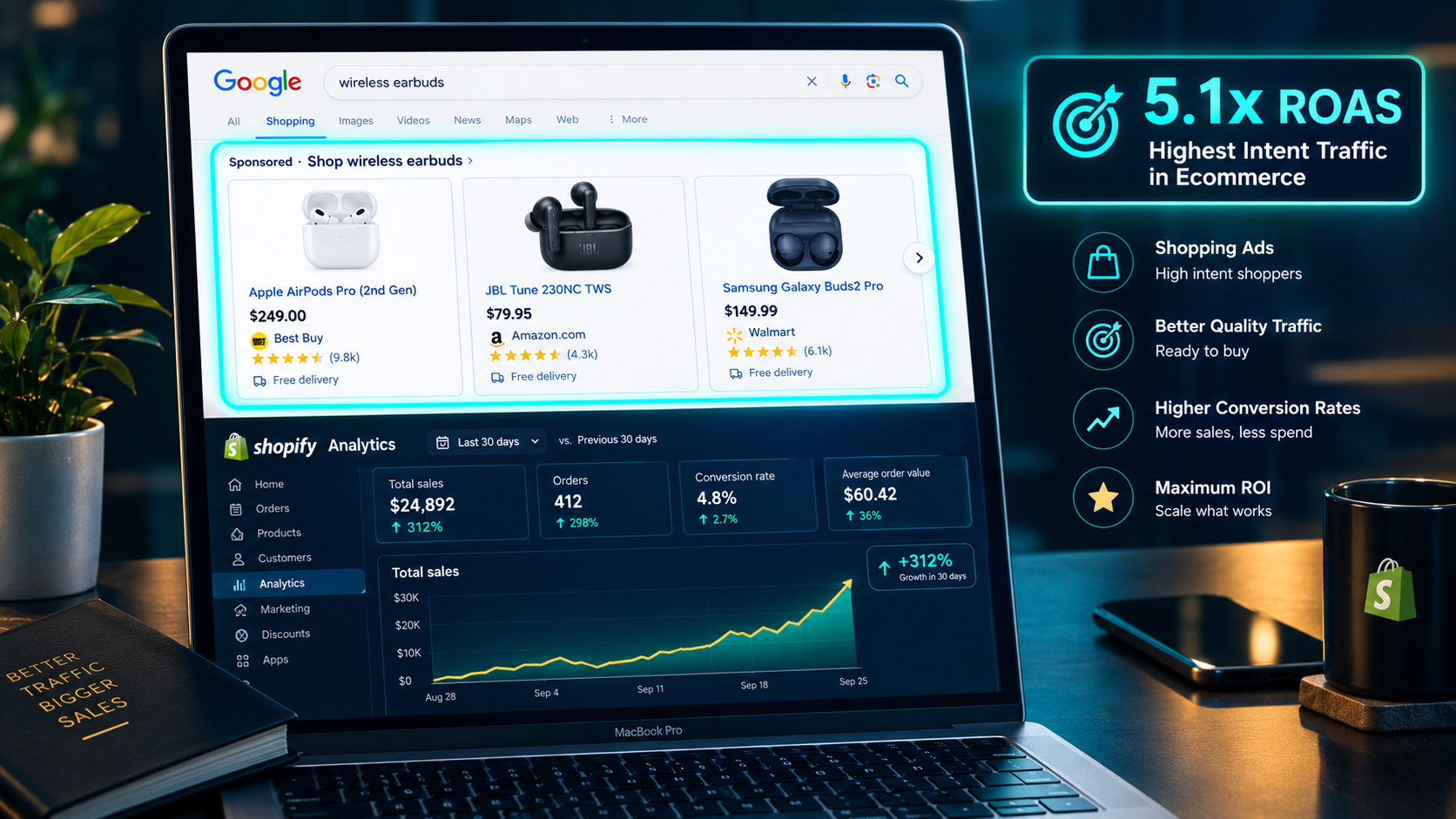
When someone searches "buy wireless earbuds under $80" on Google and your product appears as a Shopping result — with your product image, price, and store name visible before they click — that person is not browsing. They are not in discovery mode. They have made a purchase decision and are comparing specific products. The click they make after seeing your Shopping ad is fundamentally different in quality from a Meta ad click, because the buying intent was explicit in the search query itself.
That intent difference shows up directly in conversion rates. Standard Shopping campaigns average a 5.1x ROAS in 2026 — the highest of any Google Ads campaign type for ecommerce — because every visitor they send arrives with a declared purchase intent that no other traffic channel can replicate at scale.
Yet the majority of independent Shopify stores either run Google Shopping incorrectly — with poorly configured product feeds, wrong bidding strategies, and no campaign structure — or do not run it at all. This guide covers the complete Google Shopping setup and strategy for Shopify stores in 2026, from product feed to campaign structure, bidding strategy to optimization — so you can capture the high-intent buyers who are already searching for products like yours right now.
Why Google Shopping Ads Work Differently From Every Other Ad Channel
Understanding what makes Google Shopping structurally different from Meta Ads and other paid channels helps you design your campaigns with the right expectations and the right optimization focus.
Meta Ads interrupt. Your product appears in a user's feed while they are scrolling through content they chose to consume — videos from friends, content from accounts they follow. The best Meta ad creative interrupts that scroll compellingly enough to generate attention, interest, and eventually intent in a user who was not thinking about your product before they saw the ad.
Google Shopping responds. When a user types "best yoga mat for beginners" into Google, they have already formulated a need, decided to act on it, and chosen to search. Your Shopping ad appears in response to that explicitly declared intent. There is no interruption — the user wanted to find this type of product and your ad is the answer.
This structural difference explains why Shopping conversion rates are higher than Meta conversion rates for the same product. It also explains why Shopping and Meta serve complementary rather than competing roles in a full-funnel strategy — Meta builds awareness and generates demand from cold audiences, Shopping captures the demand that already exists and converts it into purchases.
Shopping ads also show your product image, title, price, and store name directly in the search results — before the user clicks. A user who clicks your Shopping ad after seeing your product, price, and brand has pre-qualified themselves as a buyer. They know what they are paying, they have seen the product, and they have chosen to explore further. The post-click conversion rate on Shopping traffic reflects this pre-qualification.
Step 1: Connect Your Shopify Store to Google Merchant Center
Google Shopping Ads run from your product feed — a structured data file that tells Google exactly what products you sell, at what price, with what attributes. Before any campaign can run, your product catalog needs to be in Google Merchant Center.
Shopify makes this connection native through the Google and YouTube channel app. Install the app from the Shopify App Store, connect your Google account, and select your Merchant Center account — or create a new one if you do not yet have one. The app syncs your Shopify product catalog automatically, including product titles, descriptions, prices, images, and inventory status. Any update you make to a product in Shopify reflects in Merchant Center within 24 to 48 hours.
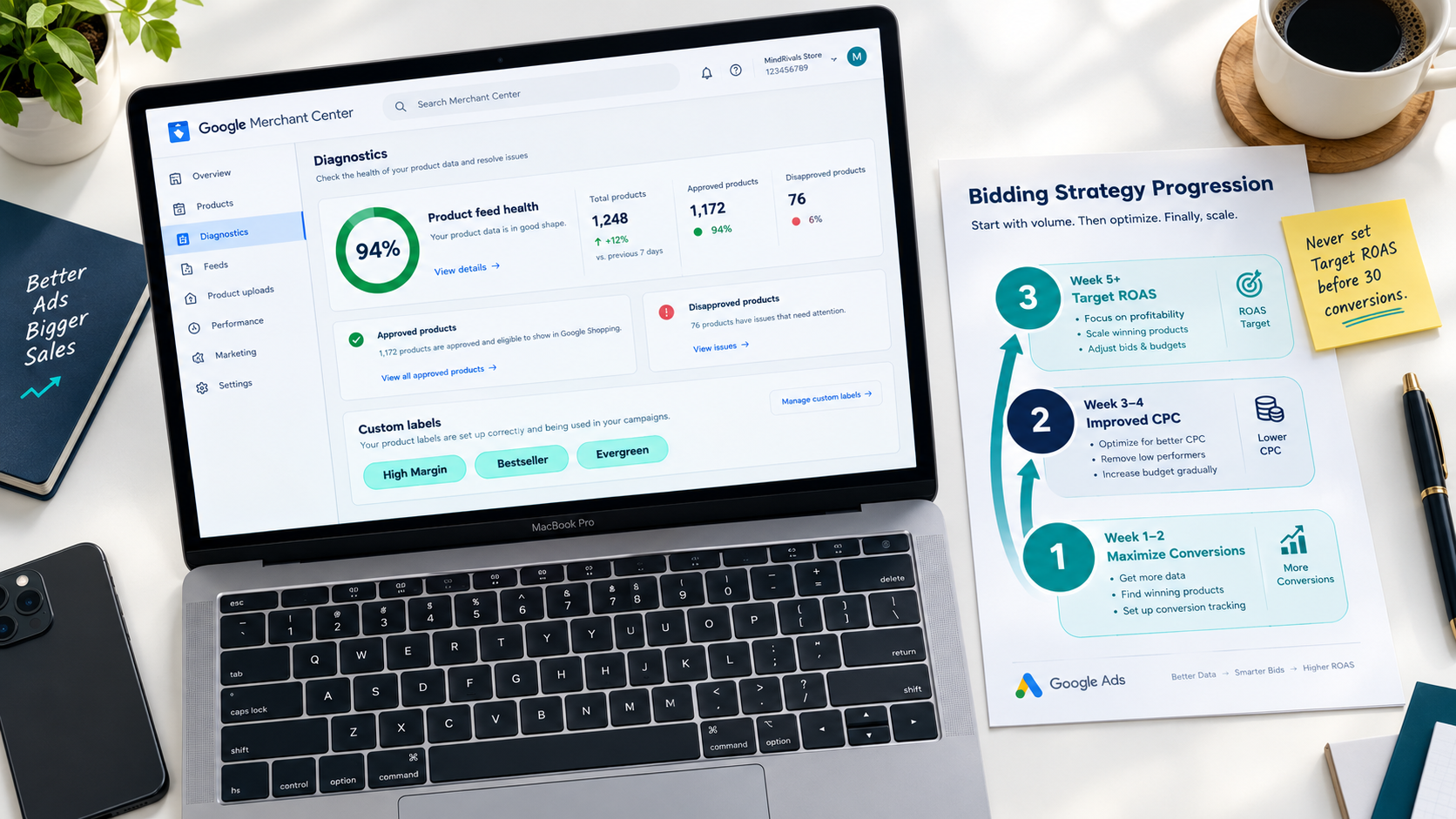
Once your feed is syncing, open Merchant Center and navigate to the Diagnostics section. This shows you every product that has been approved or disapproved for Shopping ads and the specific reason for any disapprovals. Common disapproval reasons in 2026 include missing GTINs for branded products, price mismatches between your Shopify store and the feed, and missing required attributes for specific product categories.
Fix every disapproval before launching any campaign. Campaigns running with partially disapproved feeds waste budget on a limited product selection and produce misleading performance data because the approved products are not representative of your full catalog.
Step 2: Optimize Your Product Feed — The Most Important Lever
Your product feed is the foundation of every Google Shopping campaign. Feed quality drives 15% lower CPC and meaningfully higher ROAS compared to unoptimized feeds across the same product categories. No bidding strategy, campaign structure, or audience signal compensates for a poor product feed.
The three feed elements that have the greatest impact on Shopping performance are product titles, product descriptions, and custom labels.
Product titles are the most critical field in your entire feed. Google uses product titles to match your products to relevant search queries — and the match quality determines which searches trigger your ads, how prominently they appear, and how relevant they are to the searcher. The optimal title structure for Shopping in 2026 is Brand plus Product Name plus Key Attribute plus Secondary Attribute plus Size or Variant where relevant.
For a running shoe: "Nike Air Zoom Pegasus 40 — Men's Road Running Shoe — Grey/Blue — Size 10.5" ranks more precisely for specific search queries than "Nike Running Shoe" and more relevantly than a generic title that omits the key attributes buyers search on. The first 70 characters of your title are the most important because they display fully in Shopping results on most devices. Front-load your most important keywords in those first 70 characters rather than beginning with brand name or filler words.
Product descriptions are less critical for Shopping ad placement than titles but matter for Performance Max campaigns that extend beyond Shopping into Search and other Google channels. Write descriptions that answer the specific questions a buyer would ask before purchasing — materials, dimensions, compatibility, care instructions, who the product is for, and what differentiates it from alternatives. Include natural-language versions of your target search queries in the description rather than keyword-stuffing.
Custom labels are attributes you define yourself to segment your product catalog for campaign management purposes. The most valuable custom label structure for Shopify stores segments by margin tier (high, medium, low), bestseller status (top seller, regular), inventory status (in stock, low stock, clearance), and seasonality (seasonal, evergreen). These labels allow you to set different ROAS targets for different product groups — running high-margin bestsellers at an aggressive ROAS target while keeping clearance stock in a maximize-conversions campaign with a low CPA cap.
Step 3: Understand the Campaign Types Available in 2026
Google has significantly consolidated its Shopping campaign types over the past three years. In 2026, Shopify merchants have three primary campaign types to understand.
Standard Shopping campaigns give you maximum control over product-level bidding and search term visibility. You set bids per product group, see the exact search terms triggering your ads in the Search Terms Report, and can exclude irrelevant queries with negative keywords. Standard Shopping has the highest average ROAS of any campaign type — 5.1x — because the control it provides allows experienced advertisers to optimize precisely. Standard Shopping requires more active management than automated campaign types and performs best for accounts with established conversion history.
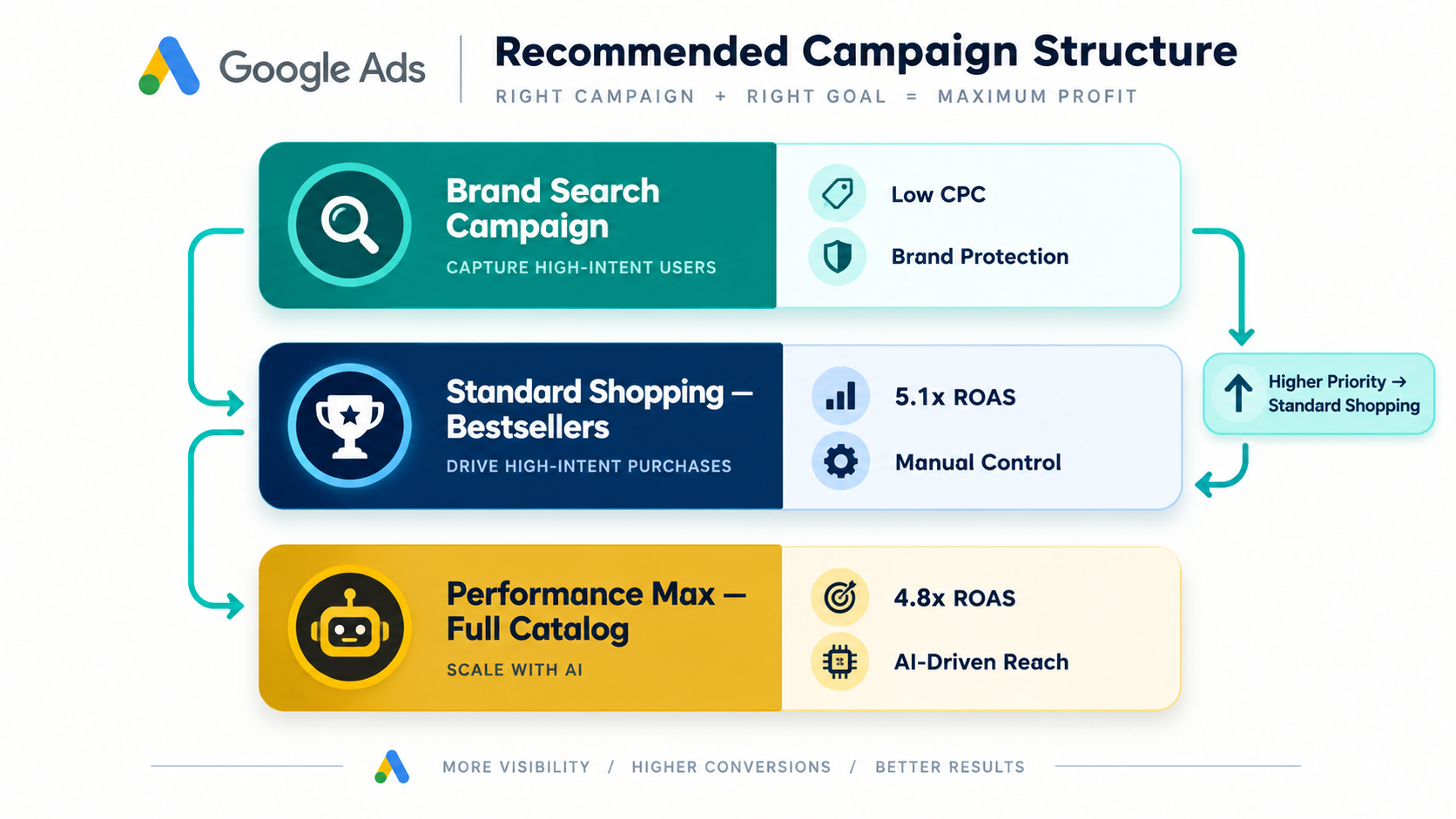
Performance Max campaigns use Google's AI to serve your products across the entire Google inventory — Search, Shopping, Display, YouTube, Discover, Gmail, and Maps — from a single campaign. You provide asset groups containing headlines, descriptions, images, and videos, plus audience signals to guide the algorithm. Google's AI handles bidding, placement, and audience targeting automatically. Performance Max averages 4.8x ROAS across ecommerce in 2026 — slightly below well-optimized Standard Shopping but significantly easier to manage and capable of reaching audiences that Shopping alone cannot access.
Free Listings are not paid ads but are worth enabling immediately alongside any paid campaign. Products in your Merchant Center automatically qualify for free appearance in the Shopping tab on Google at no cost. Free Listings generate additional impressions and clicks from organic Shopping placement — separate from your paid campaigns — at zero incremental cost. Enable them in Merchant Center under Growth and then Manage Programs.
Step 4: Build Your Campaign Structure
The recommended Google Shopping campaign structure for most Shopify stores in 2026 is one Standard Shopping campaign plus one or more Performance Max campaigns, run simultaneously with clear separation to prevent cannibalization.
For stores generating fewer than 50 purchase conversions per month, start with a single Standard Shopping campaign covering your entire catalog. At this conversion volume, automated bidding does not have enough data to optimize reliably, and Standard Shopping's manual control gives you better performance while you accumulate the conversion history that Performance Max requires to work well.
For stores generating 50 to 100 conversions per month, run one Performance Max campaign alongside your Standard Shopping campaign, segmented by product role. Your Standard Shopping campaign covers bestsellers and high-margin products where you want precise bidding control. Your Performance Max campaign covers the rest of the catalog for broader prospecting and reach.
For stores generating more than 100 conversions per month, the recommended structure from leading Shopify Google Ads practitioners in 2026 is one Brand Search campaign to capture branded queries at low cost, three Performance Max campaigns segmented by product role — bestsellers, mid-performers, and testing — and a Standard Shopping campaign for product-level control on your highest-value SKUs.
The most important structural rule regardless of your stage: never let your campaigns cannibalize each other. Give your Standard Shopping campaigns higher campaign priority than Performance Max in Merchant Center's campaign priority settings. Add your branded terms as negative keywords in Performance Max to prevent it from spending money on searches your brand campaign should handle at lower cost.
Step 5: Set the Right Bidding Strategy for Your Stage
Bidding strategy is the most consequential campaign configuration decision for a new Shopify Google Shopping account, and the most common source of wasted spend when set incorrectly for the account's current conversion volume.
For new campaigns with zero conversion history, Maximize Conversion Value is the correct starting bid strategy. This tells Google to generate as much revenue as possible from your budget without a specific ROAS constraint. Running Maximize Conversion Value for the first 30 days allows Google's algorithm to collect real purchase data across a range of placements, audiences, and queries — data it needs to optimize any more constrained strategy reliably.
Resist the temptation to set a Target ROAS on a new campaign before 30 days of data and at least 30 purchase conversions have accumulated. A Target ROAS constraint on an account with limited conversion data starves the campaign — Google's algorithm cannot identify how to hit your ROAS target because it has not seen enough purchase patterns to model effectively. The result is low traffic volume at poor performance, not the high-efficiency outcome the Target ROAS setting promises.
After 30 days and 30 or more purchase conversions, switch to Target ROAS bidding. Set your initial target at approximately 10 to 20% below your actual achieved ROAS from the Maximize Conversion Value phase — this gives the algorithm room to optimize without immediately constraining traffic. Increase your Target ROAS gradually in 10% increments as performance data confirms you can achieve it consistently.
The bidding sequence that generates the most reliable performance across all stages is: Maximize Conversions for the first two weeks to generate initial purchase data, then Improved CPC in weeks three and four for moderate control, then Target ROAS once the data threshold is reached. This three-phase progression matches Google's own recommended onboarding sequence for ecommerce campaigns.
Step 6: Configure Audience Signals for Performance Max
Performance Max campaigns run on Google's AI — but the AI's quality depends heavily on the audience signals you provide as its starting point. Audience signals tell Google's algorithm which types of users to prioritize in the learning phase, dramatically accelerating the time to efficient performance.
The four highest-value audience signals for Shopify Performance Max campaigns are your customer list, your website visitors, your cart abandoners, and a custom intent segment built around the search terms buyers use in your category.
Upload your Shopify customer email list to Google Ads as a Customer Match audience. This is your highest-value signal — users who have already purchased from you share purchase intent characteristics that Google's algorithm uses to find similar buyers. The more purchase history in your customer list, the stronger the signal.
Add your Shopify website visitor audiences — broken into product page viewers, cart abandoners, and checkout abandoners — as separate audience signals. Cart abandoners and checkout abandoners are particularly powerful signals because they have demonstrated the strongest purchase intent of any non-purchasing audience segment.
Create a custom intent audience built from the specific search terms buyers use when purchasing in your category. In Google Ads, navigate to Audience Manager, create a Custom Segment, select "People who searched for any of these terms on Google," and enter the 20 to 30 most commercially relevant search queries for your product category. This custom intent segment gives Performance Max a search-behavior signal alongside the behavioral signals from your customer and visitor lists.
Step 7: Negative Keywords — The Most Underused Optimization Tool
Negative keywords prevent your Shopping ads from appearing for searches that are unlikely to generate purchases. In Standard Shopping campaigns, negative keywords are applied directly. In Performance Max campaigns, negative keywords are added through a support request or through the campaign-level exclusions available in the Google Ads interface.
The negative keyword categories that save the most wasted spend for Shopify Shopping campaigns are competitor brand names when you do not want to appear for competitor searches, informational queries that indicate research rather than purchase intent — words like "how to," "what is," "DIY," and "free" — and irrelevant product attributes that suggest a different product category than yours.
Review your Search Terms Report in Standard Shopping weekly for the first month and monthly thereafter. Any term generating clicks without conversions after meaningful spend deserves investigation — if it is genuinely irrelevant, add it as a negative. If it is relevant but not converting, investigate whether your landing page is correctly matching the search intent rather than immediately adding it as a negative.
For Performance Max, access the Search Terms Insights report in the campaign overview. This shows aggregate search category data rather than individual queries — a transparency limitation of PMax that led many practitioners to recommend running Standard Shopping in parallel specifically to maintain search term visibility.
Step 8: Product Feed Enrichment With Third-Party Tools
Shopify's native Google integration syncs your catalog accurately but not always optimally for Shopping performance. Third-party feed management tools allow you to enrich and transform your feed data in ways that significantly improve campaign performance without changing your Shopify product listings.
DataFeedWatch and Feedonomics are the two most widely used Shopify feed management tools in 2026. Both allow you to rewrite product titles to match Shopping best practices without changing your Shopify listings — so your store displays the product name you want customers to see while Google receives the keyword-rich title format that Shopping campaigns require.
These tools also handle GTIN enrichment — adding barcode numbers to products that are missing them in your Shopify catalog — which is increasingly important as Google uses GTINs to match your products against manufacturer catalog data and serve your ads in competitive Shopping auctions for known branded products.
Custom label population is another major benefit of feed management tools. Rather than manually tagging products with custom labels in Shopify, DataFeedWatch and Feedonomics allow you to define rules — "label all products with margin above 40% as high-margin" — that apply automatically across your entire catalog based on Shopify metafield or price data.
For stores spending under $5,000 per month on Google Shopping, the native Shopify Google integration is sufficient for most needs. Above $5,000 per month, the ROAS improvement from optimized feed titles and complete attribute coverage typically justifies the $50 to $150 per month cost of a dedicated feed management tool within the first billing cycle.
Step 9: Tracking Setup — Ensuring Accurate Conversion Data
Google Shopping campaigns optimize toward purchase conversions — but only when those conversions are accurately tracked. Incorrect or incomplete conversion tracking is one of the most common causes of poor Shopping campaign performance, because the algorithm is optimizing toward an incomplete or misleading signal.
The correct conversion tracking setup for Shopify Google Shopping in 2026 requires two parallel tracking methods: Google tag-based tracking through Shopify's Google channel integration, and Google Ads conversion import from Google Analytics 4.
Shopify's Google channel integration places the Google Ads conversion tag on your thank-you page automatically when configured correctly. Verify this is firing by completing a test purchase and confirming the conversion registers in your Google Ads account under Tools and then Conversions. A conversion that is not registering after a completed purchase indicates a tag configuration error that will silently prevent your campaigns from receiving the data they need to optimize.
Google Analytics 4 conversion import provides a secondary, more complete conversion signal — particularly valuable for capturing purchases from users whose browser blocks the Google Ads tag directly. In GA4, mark the purchase event as a conversion and import it into Google Ads as a secondary conversion action. Use the Google Ads tag conversion as your primary bidding signal and the GA4 import as a secondary verification layer.
Step 10: Scaling What Works — The Optimization Cadence
Once your Shopping campaigns are generating consistent conversions at or above your Target ROAS, scaling requires a different discipline than initial setup. The optimization cadence that maintains efficiency while increasing volume follows specific rules.
Budget increases should never exceed 20 to 30% in a single adjustment on Performance Max campaigns. Google's algorithm treats a budget increase as a signal to explore new placements and audiences — a sudden doubling of budget triggers an extended exploration phase that temporarily reduces ROAS while the algorithm learns the expanded traffic landscape. Incremental increases of 20 to 30% every three to five days scale volume while preserving algorithmic stability.
Product-level performance analysis reveals which SKUs in your catalog are generating the most efficient Shopping revenue. In Standard Shopping, the Product Listing Ads report shows conversion rate, conversion value, and ROAS per product. Products generating below-benchmark ROAS despite meaningful spend should either be excluded from the campaign or moved to a lower-priority campaign with a lower ROAS target — preventing them from consuming budget that higher-performers could use more efficiently.
Seasonal budget planning matters more for Shopping than for any other Google campaign type because Shopping ROAS fluctuates significantly with commercial calendar events. Q4 — October through December — sees average Shopping ROAS increase 30 to 50% above annual averages as consumer purchase intent peaks. Budget aggressively in Q4 and plan your product feed to highlight gift-relevant products with titles and descriptions that include seasonal search terms.
The Benchmarks to Measure Against in 2026
Knowing what good Shopping performance looks like helps you evaluate your own campaigns honestly rather than optimistically.
The average ecommerce Google Shopping campaign in 2026 delivers a CPC of $0.68, a click-through rate of 1.2%, a conversion rate of 1.4%, and an average ROAS of 5.1x across all product categories. Standard Shopping consistently outperforms Performance Max on ROAS for accounts with sufficient conversion history and active optimization, while Performance Max reaches broader audiences and requires less manual management.
Performance varies significantly by category. Apparel and fashion average lower ROAS than electronics and home goods because the purchase consideration cycle is longer and competition is higher. Health and beauty tends toward higher conversion rates because purchase intent at the search query level is very specific. Tools and home improvement benefit from Shopping's visual format because buyers are evaluating specific physical products rather than abstract categories.
Measure your campaign performance against these benchmarks quarterly — not weekly, where normal fluctuation makes trend identification difficult — and investigate systematically when your metrics diverge significantly from benchmarks rather than making reactive bid adjustments in response to normal performance variability.
Final Thoughts
Google Shopping Ads represent the clearest available path to high-intent ecommerce traffic for Shopify stores in 2026. The buyers they capture are not being interrupted — they are actively searching for products to buy. That structural advantage shows up in every performance metric: higher conversion rates, higher ROAS, and lower customer acquisition costs than almost any other paid channel for matched product categories.
The merchants who get the most from Google Shopping are not the ones with the biggest budgets. They are the ones with the cleanest product feeds, the most systematic bidding progressions, the most disciplined negative keyword management, and the clearest understanding of how Standard Shopping and Performance Max work together rather than in competition.
Set up your product feed correctly. Give your campaigns enough time and conversion data before constraining bidding. Separate your high-margin bestsellers from your testing products with custom labels. Add the audience signals that help Performance Max find buyers efficiently. Review your search terms and optimize your feed titles regularly.
The buyers searching for your products right now are finding someone. Make sure it is you.
Need help setting up or optimizing Google Shopping Ads for your Shopify store, or want an expert to audit your current product feed and campaign structure for performance gaps? Get in touch with EcomFixify — we specialize in Shopify development and ecommerce growth strategy for brands ready to scale.