
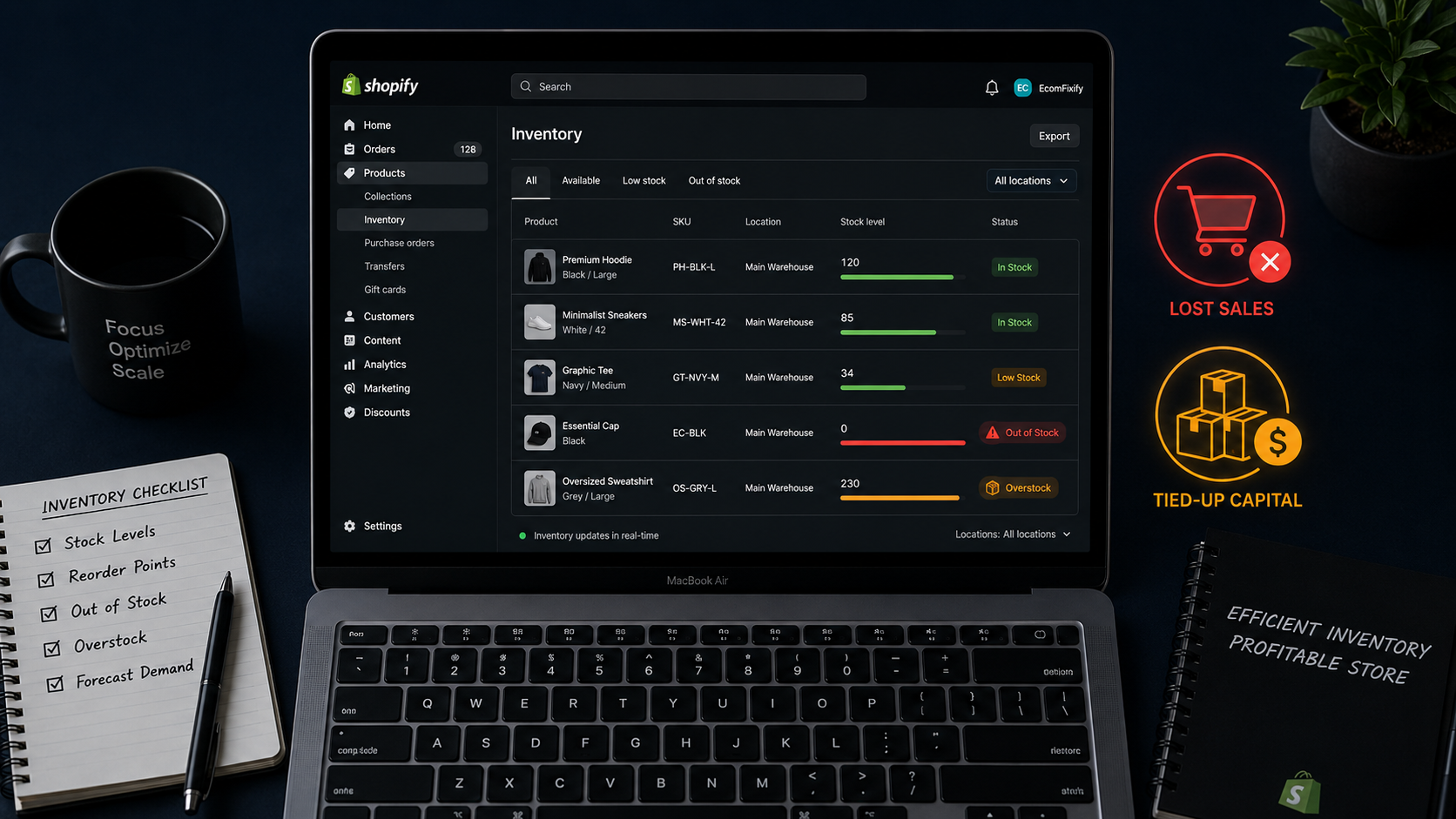
How to Stop Running Out of Stock and Overstocking in Shopify
Inventory mistakes are the silent profit killer in most Shopify stores. They do not show up as a line item in your ad spend. They do not trigger a notification in your dashboard. They just quietly drain revenue — through lost sales when customers find a product out of stock, through cash tied up in dead inventory sitting unsold for months, and through the markdown losses that come when you finally discount slow-moving stock to clear it out.
The numbers behind this problem are staggering. Inventory distortion — the gap between recorded and available retail stock — costs global retailers $1.73 trillion annually. Stockouts account for $1.2 trillion of that figure. Overstock accounts for the remaining $572 billion. Poor inventory control costs ecommerce businesses an estimated $1.1 trillion annually through overstocking, stockouts, and dead inventory. The average retailer marks down 30% of inventory before it sells, reducing overall margins by 10 to 15 percentage points in the process.
These are not enterprise-scale problems. They happen to Shopify stores doing $5,000 a month and stores doing $500,000 a month. The causes are the same regardless of size: no formal reorder system, no safety stock calculation, no demand forecasting discipline, and no automated alerts that trigger action before the problem becomes expensive.
This guide covers the complete Shopify inventory management framework for 2026 — the calculations, the systems, the apps, and the operational disciplines that keep your stock levels profitable on both ends.
The Real Cost of Getting Inventory Wrong
Most Shopify merchants think about inventory problems in terms of immediate lost sales — a product goes out of stock, a customer cannot buy it, revenue is lost. That is accurate but incomplete. The true cost of poor inventory management runs much deeper.
When a customer reaches your store and finds a product out of stock, they do not simply wait for it to come back. Research consistently shows that 68 to 72% of shoppers who encounter an out-of-stock product immediately switch to a competitor. You do not just lose the sale — you lose the customer to someone else, potentially permanently. The customer acquisition cost you paid to bring that person to your store is wasted completely.
On the other side of the equation, overstock is equally destructive but slower and less visible. Inventory sitting in a warehouse or storage unit ties up working capital that could be deployed into marketing, product development, or operations. It accumulates holding costs — storage fees, insurance, shrinkage risk. And when it eventually sells — if it sells — the margin is compressed by the markdown required to move it. A product bought at $12 to sell at $40 that sits for six months and eventually clears at $20 generates barely enough margin to cover the cost of holding it.
The goal of effective inventory management is not to have the most stock or the least stock. It is to have the right stock — enough to fulfill demand reliably without tying up capital unnecessarily. That balance is achieved through systems and formulas, not through intuition.
Step 1: Set Up Shopify's Native Inventory Tracking Correctly
Before adding any third-party app or formula, make sure Shopify's built-in inventory tracking is configured correctly. Most merchants set this up during product creation and never revisit it — which means many stores are running with incorrect or incomplete tracking settings.
For every product in your catalog, go to the product page in Shopify admin and check the Inventory section. Ensure "Track quantity" is enabled for every physical product. Set "Continue selling when out of stock" to OFF unless you are using a made-to-order or print-on-demand fulfillment model. Selling out-of-stock products through a standard fulfillment model generates customer complaints, delayed shipments, and negative reviews that damage long-term conversion rates.
Enable inventory tracking across multiple locations if you store or ship products from more than one place — a warehouse, a home studio, a third-party logistics provider, or a retail location. Shopify's multi-location inventory tracking lets you set stock levels per location and configure fulfillment priority — which location ships first when an order comes in. Without this configuration, orders may be routed to the wrong location, or inventory counts across locations may be inaccurate.
Set a low inventory threshold for each product. Inside the product's inventory settings, you can define the quantity at which you want to receive a low-stock alert. When the stock level drops below that number, Shopify sends a notification to your admin email and can trigger automations through Shopify Flow. This native alert system is free and requires no additional app — it just needs to be configured with a meaningful threshold rather than the default zero.
Step 2: Calculate Your Reorder Point for Every SKU
A reorder point is the stock level at which you need to place a new purchase order so the product does not go out of stock before the new shipment arrives. Without a calculated reorder point, restocking decisions are made reactively — you notice stock is low, you rush an order, and you either run out during the lead time or pay premium shipping to prevent it.
The reorder point formula is:
Reorder Point = (Average Daily Sales × Supplier Lead Time in Days) + Safety Stock
Each component requires real data from your store:
Average Daily Sales is the number of units you sell per day for that specific SKU. Pull this from Shopify Analytics → Products → Sales by Product. Look at the past 60 to 90 days for stable products, or the equivalent period from the previous year for seasonal products. Divide total units sold by the number of days in the period.
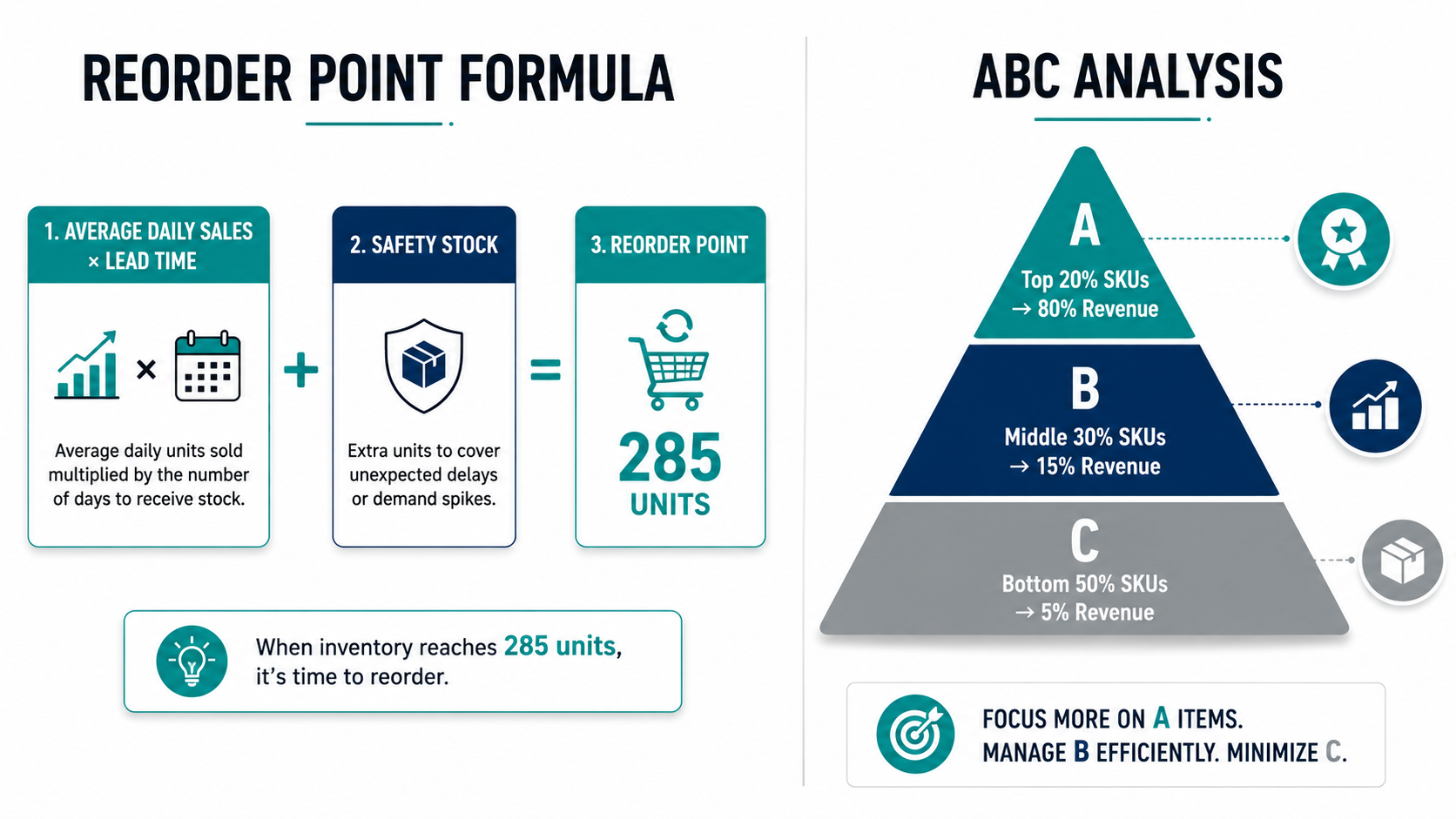
Supplier Lead Time is the number of days between placing a purchase order and receiving the shipment. This number varies by supplier and changes during peak seasons when suppliers are busier. Use your actual average lead time from historical orders — not the supplier's quoted lead time, which is often optimistic.
Safety Stock is a buffer of additional inventory held to absorb unexpected demand spikes or supply delays. The basic safety stock formula is Average Daily Sales × Maximum Lead Time Variance. If your supplier's lead time is normally 14 days but can stretch to 21 days during peak periods, your lead time variance is 7 days. Multiply your average daily sales by 7 to get your safety stock buffer.
A practical example: if you sell 15 units per day of a specific product, your supplier takes 14 days to ship, and your safety stock buffer is 5 days of sales, your reorder point is (15 × 14) + (15 × 5) = 210 + 75 = 285 units. When your stock level drops to 285 units, you place a new purchase order immediately.
Calculate this for every SKU in your catalog — not just your bestsellers. The products that go out of stock most expensively are often mid-catalog performers whose demand is overlooked because they are not at the top of the bestseller list.
Step 3: Implement ABC Analysis to Prioritize Management Effort
Not every product in your Shopify catalog deserves equal inventory management attention. ABC analysis is a prioritization framework that directs your monitoring and restocking effort toward the products where inventory mistakes are most costly.
Category A products are your top 10 to 20% of SKUs by revenue contribution — typically accounting for 70 to 80% of total revenue. These products warrant the tightest inventory controls, the most conservative safety stock levels, the most frequent stock reviews, and immediate reorder alerts. A stockout on a Category A product is a major revenue event that justifies premium shipping costs to prevent.
Category B products are the middle 30 to 40% of SKUs contributing 15 to 25% of revenue. These warrant regular stock reviews and standard reorder points but do not require the premium attention of Category A products.
Category C products are the bottom 40 to 50% of SKUs contributing 5 to 10% of revenue. These are slow-moving or low-value items where overstocking is a greater risk than stockouts. Hold minimal safety stock, extend reorder intervals, and review quarterly rather than weekly.
In Shopify admin, run the Sales by Product report filtered by the past 90 days and sort by revenue. Your Category A products will be immediately visible at the top. Tag them in Shopify with a "Priority-A" tag so any inventory app or Flow automation you set up later can treat them differently from the rest of your catalog.
Step 4: Demand Forecasting — Using Data Instead of Intuition
Demand forecasting is the practice of predicting future sales volume based on historical data, seasonality, promotional calendar, and external market signals. It is what separates inventory managers who run out of stock every peak season from those who arrive at peak season fully prepared.
The most important demand signals available in Shopify Analytics for forecasting:
Sales velocity by SKU — how many units per day each product is selling right now versus the equivalent period last year. Acceleration in velocity (selling faster than last year at the same time) signals you need more stock than your baseline reorder point suggests.
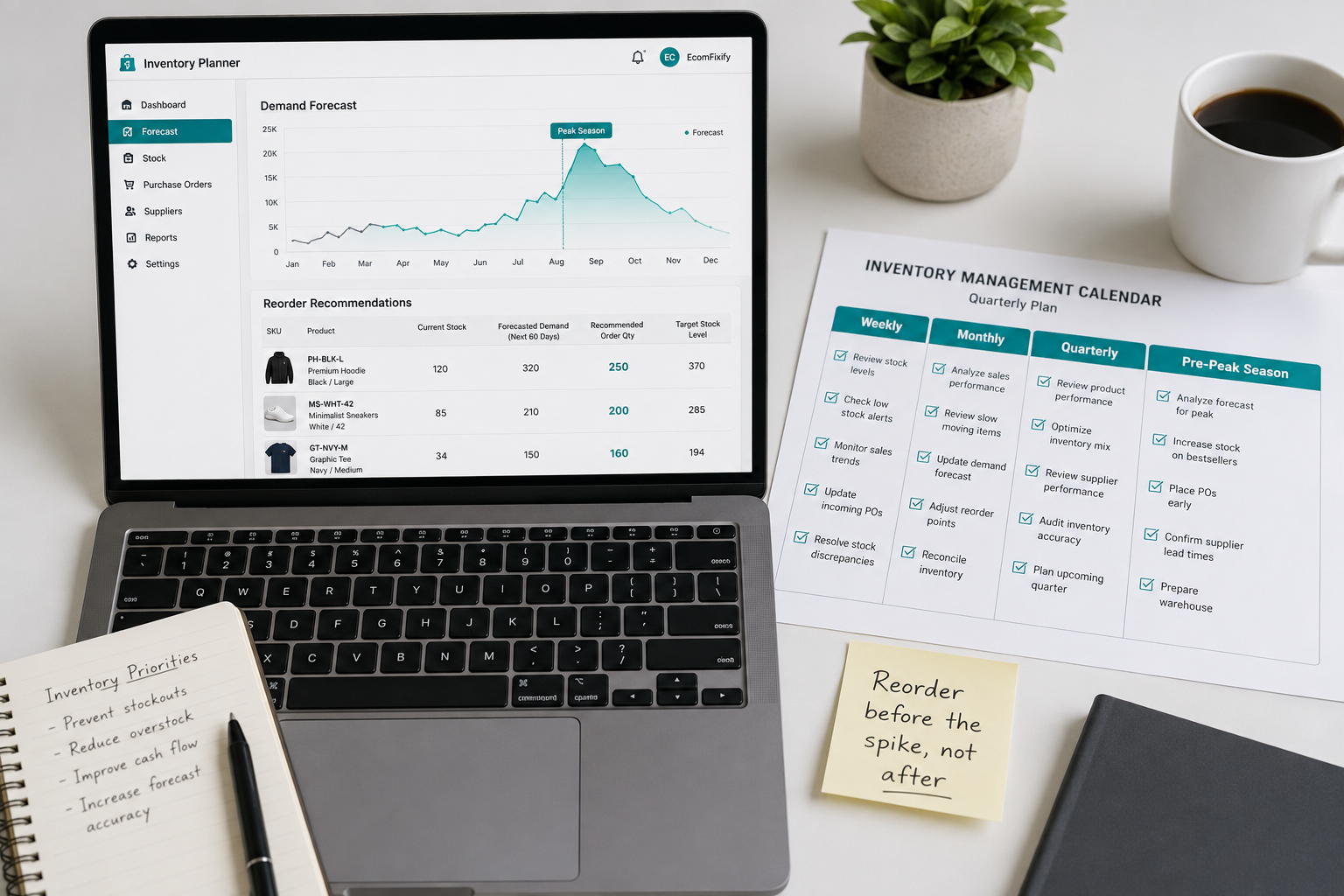
Seasonal patterns — Shopify's Compare periods feature lets you overlay this year's sales against last year's for the same date range. Products that spike in November and December, or in summer, or around specific holidays, should have their reorder points adjusted upward in the six to eight weeks before those peaks begin.
Sell-through rate — the percentage of purchased inventory that has been sold within a defined period. A product with a 90% sell-through rate in 30 days is moving very fast and needs frequent small reorders. A product with a 20% sell-through rate in 90 days is moving slowly and may be heading toward dead stock territory.
Traffic and conversion data from Shopify Analytics shows when increased ad spend or viral content is driving higher product page views — a leading indicator that sales velocity is about to increase before it shows up in order data.
For most Shopify merchants, manual forecasting using these Shopify native reports is sufficient up to approximately $50,000 in monthly revenue. Beyond that scale, or for stores with large catalogs and complex seasonality, AI-powered forecasting apps deliver forecasting accuracy that manual spreadsheet analysis cannot match.
Step 5: Automate Reorder Alerts and Purchase Orders With Shopify Flow
The single biggest operational gap in Shopify inventory management for most stores is the absence of automated triggers that connect falling stock levels to restocking actions. Most merchants rely on manually checking stock levels — which means stockouts happen because the check did not happen at the right time.
Shopify Flow allows you to build automated workflows that trigger when inventory levels hit specific thresholds. A practical Flow setup for inventory management:
Trigger: Product variant inventory quantity falls below your calculated reorder point for that SKU. Condition: Product is tagged "Priority-A" (your highest-value products). Action: Send an email to your purchasing contact with the product name, current stock level, calculated reorder quantity, and a direct link to your supplier's order page.
This automation runs continuously and silently in the background, alerting you to reorder the moment stock reaches the threshold — not days after you have already sold through your buffer.
For stores managing purchase orders formally, Stocky by Shopify is a free native app that handles purchase order creation, supplier management, and inventory receiving directly within your Shopify admin. It generates suggested purchase orders based on current stock levels and sales velocity — giving you a starting point for every reorder that takes minutes to review rather than hours to calculate manually.
Step 6: Solve the Overstock Problem — Dead Stock Prevention and Recovery
Overstock and dead stock are the inventory problems most guides underemphasize because they build slowly and invisibly. A product that was a strong seller six months ago and has since slowed down does not trigger any alert — it just sits there, tying up capital, until someone notices.
The proactive approach to dead stock prevention is a monthly inventory health review. For every SKU, calculate the days of inventory remaining at current sales velocity: Current Stock Level divided by Average Daily Sales. Products with more than 120 days of inventory remaining at current velocity are at dead stock risk. Products with more than 180 days of remaining inventory are already in dead stock territory by most industry definitions.
Once identified, dead stock requires active recovery rather than passive waiting. The strategies that work for Shopify stores:
Bundle the slow-moving product with a fast-moving one. A skincare store with excess stock of a vitamin C serum can bundle it with a bestselling moisturizer as a "Morning Routine Kit" at a slight discount. The bundle moves the slow-mover alongside the product customers already want.
Run a targeted email campaign to customers who previously bought a related product. A customer who bought your running shoes is the most likely audience for your slow-moving running socks. A targeted email to that segment — "We thought you might need these" — moves dead stock to the audience most likely to want it without discounting to your entire customer base.
Reduce reorder quantities before stopping orders entirely. If a product is slowing down, the instinct is to stop reordering completely. The more strategic approach is to reduce each reorder to the minimum viable quantity while monitoring sell-through. If velocity recovers, you have not created a stockout. If it continues declining, you have reduced the scale of your future dead stock problem.
Mark down proactively before the cost of holding exceeds the margin recovery value of the discount. A product that cost you $10 and was priced at $35 is better sold at $22 with $12 in margin than held for six more months at a $2 per month holding cost before eventually being donated or disposed of at zero recovery.
Step 7: Sync Inventory Across All Sales Channels in Real Time
Multi-channel selling — Shopify store, TikTok Shop, Amazon, Instagram Shopping, wholesale — creates the most dangerous inventory management scenario available: the same physical inventory being counted separately by multiple platforms that do not talk to each other in real time.
A product with 15 units can receive 8 orders from Shopify, 6 from TikTok Shop, and 4 from Amazon simultaneously — totaling 18 orders for 15 units. The overselling that results generates cancelled orders, negative reviews, platform penalties, and customer trust damage that far exceeds the revenue from the extra sales.
The solution is a single source of inventory truth that every sales channel pulls from in real time. Shopify can serve as that single source if every channel is connected through the official Shopify integrations — TikTok Shop through the Shopify TikTok app, Amazon through Shopify's Amazon sales channel, and so on. Each integration syncs inventory levels from Shopify in real time, meaning a sale on TikTok immediately deducts from the same inventory pool that Shopify and Amazon see.
For merchants who need more sophisticated multi-channel inventory management — multiple warehouses, complex bundling logic, or wholesale channel management alongside direct-to-consumer — dedicated inventory management platforms provide the real-time sync and channel management capabilities that Shopify's native integrations do not cover.
The Best Shopify Inventory Management Apps in 2026
Shopify's native inventory tools handle the basics well for stores up to a certain scale and catalog complexity. When you outgrow the native tools, these apps extend your capabilities without requiring a platform change.
Inventory Planner is the most widely used demand forecasting app for Shopify in 2026. It analyzes your historical sales data, seasonality patterns, and supplier lead times to generate AI-powered reorder recommendations. For stores with catalogs above 50 SKUs and clear seasonality, Inventory Planner consistently reduces stockouts by 20 to 30% and reduces overstock capital by 15 to 25% compared to manual spreadsheet management.
Skubana (now Extensiv) handles multi-warehouse inventory management, purchase order automation, and multi-channel inventory sync for high-volume Shopify stores. If you are managing inventory across multiple 3PL locations or selling aggressively across five or more channels, Skubana provides the operational control that Shopify's native multi-location tools do not.
ShipHero is a warehouse management system designed for Shopify merchants who fulfill from their own warehouse. It handles pick-and-pack workflows, receiving, cycle counting, and real-time inventory accuracy in a warehouse environment — capabilities beyond what Shopify's admin was designed to manage.
Stocky by Shopify — mentioned above — remains the most accessible free option for merchants who need basic purchase order management and reorder suggestions without committing to a paid app subscription. Its integration with Shopify admin is seamless, and for stores with straightforward single-location inventory, it handles the core management needs effectively.
Bundles by Shopify handles inventory tracking for product bundles — automatically deducting component SKU inventory when a bundle is sold. For stores that sell both individual products and bundled versions, this prevents the overselling that occurs when bundle sales are not automatically reflected in component inventory counts.
Building Your Inventory Management Calendar
The most underrated inventory management practice is scheduling — turning inventory reviews from reactive events into predictable operational rhythms.
Weekly: Review Category A product stock levels against calculated reorder points. Check for any low-stock alerts triggered by Shopify Flow. Review orders placed in the past week against expected delivery dates.
Monthly: Run the inventory health review — calculate days of remaining inventory for all SKUs at current velocity. Identify products trending toward dead stock. Update reorder points for any SKU whose average daily sales have changed significantly from the previous period.
Quarterly: Review all supplier lead times and update calculations. Adjust seasonal safety stock buffers for the upcoming quarter. Run a full ABC analysis to identify SKUs that have moved categories based on recent sales performance.
Pre-peak season (six to eight weeks before): Forecast peak season demand based on previous year data and current year velocity trends. Place larger-than-usual purchase orders for Category A products. Confirm supplier capacity and lead times for the peak period — many suppliers extend lead times during their own peak periods, which affects your reorder calculations.
What Good Inventory Management Looks Like at Scale
The brands running the most effective Shopify inventory management operations in 2026 share a consistent set of characteristics: they have a calculated reorder point for every SKU. They use AI-powered demand forecasting rather than intuition for purchase planning. Their inventory is synced in real time across every sales channel. They run monthly dead stock reviews and act on them proactively. And they treat inventory management as a scheduled operational discipline rather than a reactive crisis management function.
The compounding financial benefit of getting this right is significant. A store that reduces its stockout rate by 20% and its overstock capital by 15% simultaneously is improving revenue on one side and freeing up working capital on the other. That freed capital — no longer tied up in dead stock — can be deployed into marketing, product development, or operations that generate returns instead of storage fees.
Inventory management is not the most exciting part of running a Shopify store. But it is one of the most directly profitable improvements available — and unlike most growth strategies, the gains are permanent once the systems are in place.
Need help setting up inventory management systems for your Shopify store, or want an expert to audit your current catalog for stockout and overstock risk? Get in touch with EcomFixify — we specialize in Shopify development and ecommerce operations optimization for growing brands.