
How to Start a Shopify Store With No Money in 2026
The most common reason people never start their Shopify store is not lack of ambition, lack of ideas, or lack of time. It is the assumption that you need significant capital to begin. A product to stock. An ad budget to drive traffic. A developer to build the store. A photographer to shoot the products. How to Start a Shopify Store With No Money in 2026
None of that is true in 2026.
Shopify offers a three-day free trial with no credit card required, followed by the first month for just one dollar. Free themes that look genuinely professional are available in the Shopify Theme Store. Free product sourcing models — dropshipping, print on demand, and digital products — eliminate the need for any inventory investment before your first sale. And organic traffic channels — TikTok, Pinterest, Google SEO, and micro-influencer gifting — can drive real customers to a brand-new store without a single dollar of ad spend.
Zero budget does not mean zero results. It means zero upfront capital before revenue starts coming in. This guide covers exactly how to launch a Shopify store from absolute zero in 2026 — the business models, the setup steps, the free tools, and the realistic timeline for your first sale.
What "Zero Budget" Actually Means
Before diving into the how, it is worth being honest about what zero budget means in the context of a Shopify store launch — because guides that promise $0 forever are setting you up for disappointment.
Zero budget means no money required before your first sale. Shopify's free trial and the one-dollar first month give you approximately 33 days of operational runway before your first plan payment is due. If your first sale happens within that window — which is achievable with consistent organic content — that sale funds your ongoing subscription cost.
What you will eventually need, once you move past the trial period: a Shopify Basic plan at approximately $39 per month, a domain name at approximately $14 per year, and if you are dropshipping, a product sample at $20 to $30 to verify quality before selling to customers. These costs can typically be covered by your first three to five sales — which means the capital investment is effectively zero if you generate early revenue, or minimal if you choose to pay the first month before sales arrive.
The realistic framing is this: you can launch for free, validate your idea for free, make your first sales for free, and only invest money once the business has proved it can generate revenue. That is a fundamentally different and far lower-risk starting point than most businesses require.
Step 1: Choose the Right Business Model for Zero Budget
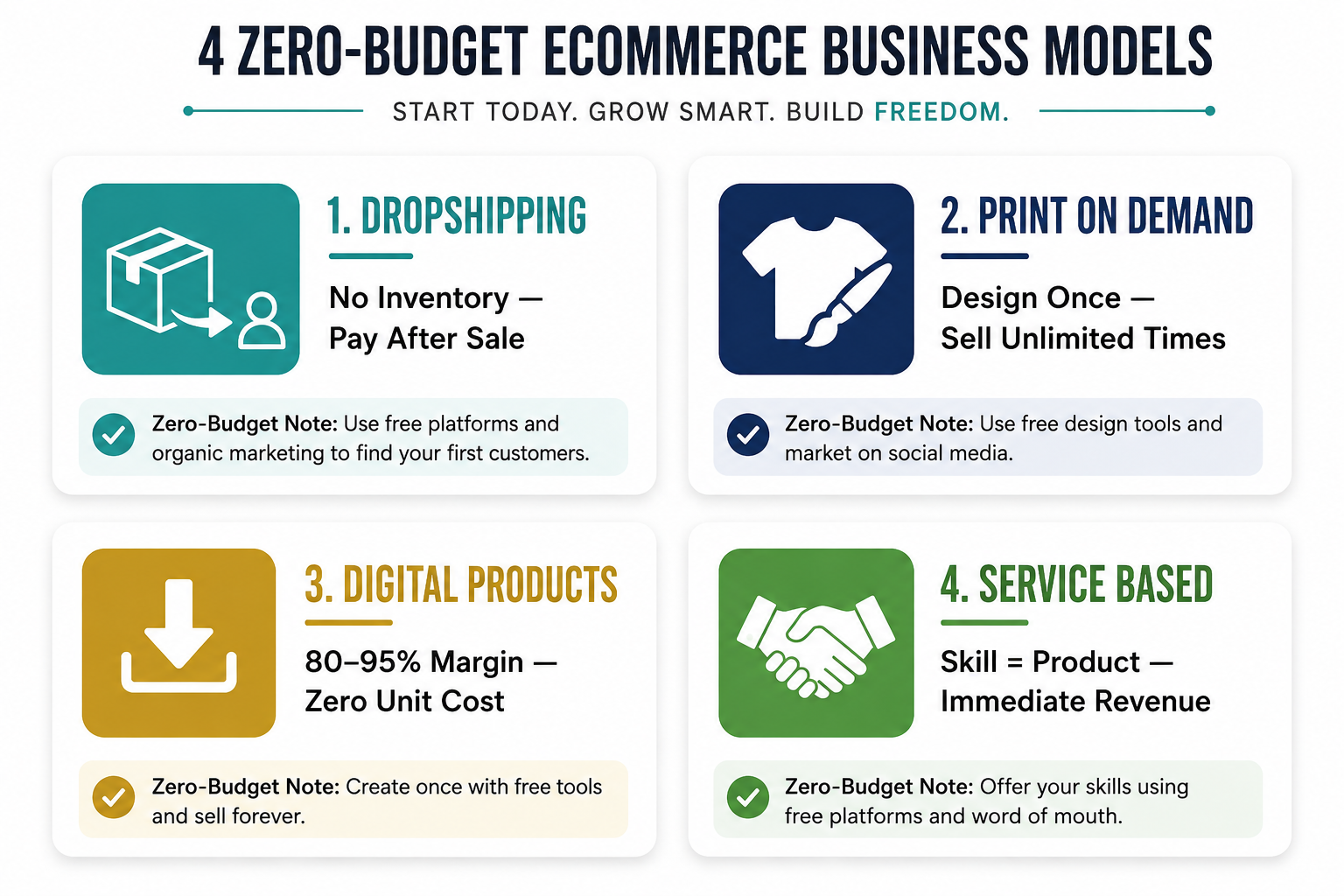
The business model you choose determines whether zero budget is genuinely feasible or whether you are underestimating the real costs. Four models work well with zero upfront capital on Shopify.
Dropshipping
Dropshipping is the most popular zero-budget Shopify model because it eliminates inventory cost entirely. You list a supplier's products on your Shopify store at a marked-up price. When a customer buys, the supplier ships the product directly to them. You pay the supplier's cost from the customer's payment and keep the margin. No inventory purchased before a sale. No warehouse. No packing or shipping.
The business model's appeal in 2026 is real, but so are its limitations. Margins are typically thin — 15 to 30% on most products. Shipping times from overseas suppliers remain a customer experience challenge unless you use domestic or regional suppliers. And product quality cannot be verified without ordering a sample, which is strongly recommended before listing any product.
The most successful zero-budget dropshippers in 2026 are not sourcing generic products from AliExpress and competing on price. They are finding specific sub-niches with genuine demand, sourcing from domestic suppliers through platforms like Shopify Collective, DropCommerce, or Syncee, and building branded stores around a specific customer identity rather than a generic product category.
TikTok remains the leading product discovery platform for dropshipping research in 2026. Searching for keywords like "Amazon finds" or "TikTok made me buy it" surfaces products with genuine consumer demand before they reach saturation on product research tools. Finding products with organic TikTok traction and building a branded store around them before the wave peaks is the dropshipping strategy that still works.
Print on Demand
Print on demand is dropshipping's creative cousin. You design custom artwork, patterns, or phrases and apply them to products — t-shirts, mugs, tote bags, phone cases, posters, candles — through a print-on-demand supplier like Printful, Printify, or Gelato. When a customer orders, the supplier prints the design on the product and ships it. No inventory. No upfront cost. No printing equipment.
The zero-budget case for print on demand is strong: Canva's free tier is sufficient for basic design work, Printful and Printify both offer free integration with Shopify and no minimum order requirements, and the model scales to any volume without additional capital commitment.
The differentiator in print on demand in 2026 is not printing capability — every competitor has access to the same suppliers. It is design quality and niche specificity. A generic "funny cat" mug competes with thousands of identical listings. A mug designed specifically for ICU nurses that references their specific daily experiences, language, and identity — that is a product with genuine community resonance and word-of-mouth potential that a generic design will never generate.
Digital Products
Digital products are the highest-margin, zero-inventory model available to anyone with knowledge, skills, or creative output. Ebooks, templates, presets, online courses, printables, planners, fonts, and software tools are all sold digitally through Shopify with zero unit cost — the product is created once and sold unlimited times.
Shopify's Digital Downloads app handles digital product delivery natively and for free. A customer buys, the download link is emailed automatically, and no physical fulfillment is required. Margin on digital products is typically 80 to 95% — dramatically higher than physical product models — which means even modest sales volume generates meaningful profit.
The creation cost for digital products is time, not money. A Notion template collection, a Lightroom preset pack, a budgeting spreadsheet, or a 30-page ebook on a specific topic that you know well can be created using free tools — Canva, Google Docs, Notion, Google Sheets — and sold at any price point the market supports.
Service-Based Selling
Service businesses — freelance writing, social media management, virtual assistance, graphic design, coaching, or consulting — can use Shopify as their storefront by listing services as products and charging for them at checkout. No inventory. No supplier. Shopify handles payment processing, and you deliver the service.
This model is most viable for people who have an existing skill that others will pay for. It is the fastest path to first revenue because there is no product creation or sourcing step between starting and earning. The limitation is that it does not scale passively — your time is the inventory — but it can fund the early stages of building a product-based business while generating immediate cash flow.
Step 2: Use Shopify's Free Trial and Choose a Free Theme
Go to Shopify.com and click Start Free Trial. No credit card is required for the initial three days. After three days, Shopify offers the first month for one dollar — giving you a total of approximately 33 days to build your store, launch your content strategy, and generate your first sales before your first real plan payment.
During the trial, select a free theme from the Shopify Theme Store. In 2026, Shopify's free themes — particularly Dawn, Craft, and Refresh — are professionally designed, fast-loading, and mobile-optimized out of the box. They look genuinely good without any customization and provide an excellent starting point that does not signal "beginner store" to first-time visitors.
Customize your chosen theme with your brand colors and fonts. Both can be selected for free using Coolors.co for color palette generation and Google Fonts for typography. Choose a maximum of two fonts — one for headings, one for body text — and two to three brand colors. Consistency in these elements creates a professional appearance without design expertise or paid design tools.
Your store's name is free to create. A matching domain name costs approximately $14 per year through Shopify — which is the one unavoidable cost in a genuine zero-budget launch, since selling on a myshopify.com subdomain creates a professional impression problem that limits organic growth and conversion rate. Consider this $14 your one genuine upfront cost.
Step 3: Source Products Without Spending Money
For dropshipping, install a free supplier app from the Shopify App Store. Shopify Collective — Shopify's own curated supplier network — gives you access to quality products from verified Shopify brands with reliable shipping and better margins than overseas suppliers, completely free to use. DSers, which connects to AliExpress suppliers, is free for its basic plan and handles product import, order routing, and inventory sync automatically.
For print on demand, install Printify or Printful — both free to install and use with no monthly fee. Browse their product catalog, select the items you want to sell, upload your designs, set your retail price, and connect the products to your Shopify store. The supplier handles production and shipping; you handle marketing.
For digital products, install the free Shopify Digital Downloads app. Create your digital product using free tools — Canva for visual products, Google Docs for written products, Notion for templates — export in the appropriate format, and upload to the app. Set your price, publish the product page, and the app handles automated delivery when orders arrive.
In all three models, never list a product without seeing it yourself first. For dropshipping, order one unit at your own cost before listing to verify quality, accurate measurements, and packaging standard. For print on demand, order a sample of each product type you plan to sell to verify print quality and color accuracy. For digital products, test the download experience as a customer to confirm the file opens correctly and delivers the expected value.
Step 4: Build a Brand Identity for Free
The visual identity elements that make a Shopify store look professional are all free to create in 2026.
Your logo can be created using Shopify's own free logo maker, Canva's free logo builder, or Looka's free tier. A simple wordmark logo in your brand font is sufficient for launch — simplicity beats complexity for new brands because it is easier to apply consistently across all platforms.
Product photography for dropshipping uses supplier-provided images supplemented by Canva mockup templates that place the product in lifestyle settings without a photoshoot. Shopify Magic's AI image editor — available free on all plans — generates background-replaced lifestyle images from a plain product photo, giving you professional-looking product imagery without photography equipment or a studio.
Your brand voice — how you write product descriptions, social captions, and email subject lines — is free to develop using AI. Write a brief description of your brand's personality, target customer, and product category, and use Shopify Magic or any AI writing tool to generate product descriptions that match that voice consistently.
Step 5: Drive Traffic Without Paying for Ads
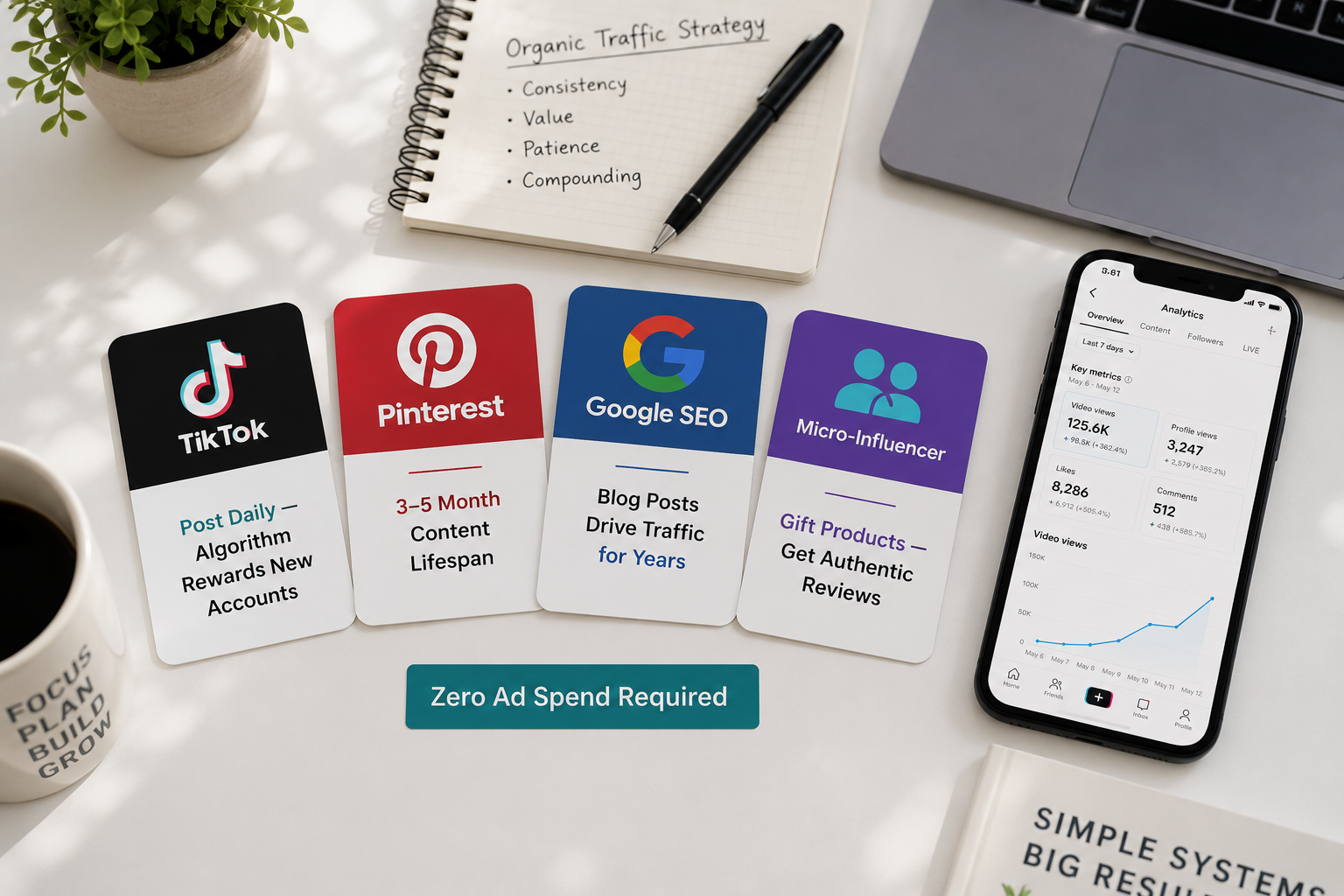
Free traffic is slower than paid traffic. It is also more durable, more trust-based, and available to anyone regardless of budget. These four channels generate real traffic to new Shopify stores in 2026 without a dollar of ad spend.
TikTok Organic
TikTok's algorithm surfaces content to non-followers based on relevance, not account size. A brand-new account with zero followers can post a product demonstration video and wake up to thousands of views if the content resonates. This makes TikTok the highest-upside free traffic channel for new Shopify stores — and the one most directly tied to purchase intent.
The content that drives Shopify traffic from TikTok is not polished advertising. It is authentic, specific, and problem-oriented. Show the product solving a real problem. Demonstrate a before-and-after. Explain who it is for and why you created or chose it. Use trending audio where it fits naturally. Post consistently — five to seven times per week — and treat the first 30 days as a data-gathering exercise rather than a revenue expectation.
Add your Shopify store link to your TikTok bio from day one. If you are in a supported region, connect TikTok Shop to your Shopify account to enable in-app product pins on your videos — turning organic views directly into purchase opportunities without requiring viewers to leave the platform.
Pinterest has a content lifespan of three to five months compared to 24 hours for TikTok or Instagram, making it the highest longevity free traffic channel available. A pin posted today can drive Shopify traffic consistently for the next six months — which means the effort invested in Pinterest compounds over time in a way that no other social platform replicates.
Create a Pinterest business account, claim your Shopify website, and enable Rich Pins — which pull product information including price and availability directly from your store into your pins. Create boards organized around the topics your target customer searches — not just your products, but the lifestyle, interests, and aspirations your products connect to. Each pin should link directly to the relevant product page or collection page on your store.
The Pinterest SEO approach that drives traffic treats keyword research as seriously as Google SEO. Research the specific phrases your target customer types into Pinterest search — "minimalist home decor ideas," "gifts for yoga lovers," "skincare routine for beginners" — and use those phrases in your board names, pin titles, and pin descriptions. Optimized Pinterest content surfaces in search results within weeks and continues driving traffic for months.
SEO and Blog Content
Writing blog posts that answer the specific questions your target customers are searching on Google is the most durable free traffic strategy available to any Shopify store. Unlike social media content that expires in hours or days, a well-optimized blog post continues attracting search traffic for years.
The blog posts that drive the most traffic for new Shopify stores are not generic brand content — they are specific, search-intent-matched answers to real questions your potential customers are already asking. A pet accessories store writing "how to stop a dog from pulling on the lead" attracts people in the market for training tools. A skincare store writing "why your moisturizer is pilling on your skin" attracts people experiencing exactly the problem your product solves.
Each blog post should target one specific question or keyword phrase, answer it thoroughly, and include natural references to relevant products in your store with internal links. Publish one to two posts per week consistently. Within three to six months of consistent publishing, organic search traffic begins contributing meaningfully to store revenue without any ongoing cost.
Micro-Influencer Gifting
Micro-influencers — creators with 1,000 to 50,000 followers in a specific niche — frequently accept product gifts in exchange for an honest review or mention, particularly for new brands with products that genuinely align with their content. A single post from a micro-influencer whose audience trusts their recommendations can drive more qualified traffic than a paid ad campaign at the same cost — which in this case is just the cost of the product and shipping.
Identify micro-influencers in your product niche by searching relevant hashtags on TikTok and Instagram. Look for accounts where the comments show genuine engagement — questions about the products reviewed, personal sharing, and actual responses from the creator rather than generic bot-looking replies. Send a brief, personalized outreach message explaining your product, why it is relevant to their audience, and offering to send a free unit with no obligation attached.
Not every outreach converts to coverage. Send twenty messages and expect two to five positive responses. Even two pieces of organic influencer content can meaningfully accelerate a new store's early traffic and social proof, and the cost is limited to a few product samples.
Step 6: Set Up the Essential Pages and Payment Processing
Before your store is ready to receive customers, three categories of pages need to be in place: legal pages, essential information pages, and a functional checkout.
Legal pages — Privacy Policy, Terms of Service, Refund Policy, and Shipping Policy — are required for legal compliance and for customer trust. Shopify generates template versions of all four in your admin under Settings → Policies. Review each template, customize it to reflect your actual shipping times, return policy terms, and business details, and publish all four. Link them from your footer — customers check these before purchasing from a brand they have not bought from before.
Essential information pages include your About page, Contact page, and FAQ page. Your About page is your most important trust-building page — it explains who you are, why you started the store, and what your brand stands for. A genuine, personal About page consistently outperforms a generic corporate description for new stores because it creates the human connection that makes a first-time buyer feel confident purchasing from a brand they have never heard of.
Payment processing through Shopify Payments — available in supported countries including the US, UK, Canada, and Australia — charges no transaction fees beyond the standard Shopify plan fee. Enable Shopify Payments in Settings → Payments, add Shop Pay and PayPal for customer payment method flexibility, and test the checkout with a real order using Shopify's order testing mode before your store goes live.
Step 7: Launch and Track Your First 30 Days
Your store is ready to launch when all product pages are complete, all legal pages are published, your checkout processes a test order correctly, your store loads in under three seconds on mobile, and you have at least ten pieces of content planned or created for your organic traffic channels.
Set a launch date and announce it across every platform where you have any existing presence — personal social accounts, any communities you participate in, and any existing email contacts who might be genuinely interested in what you are selling. Your first customers will almost always come from your existing network before they come from organic content.
In the first 30 days, track three numbers daily: store sessions (how many people are visiting), add-to-cart rate (what percentage are showing purchase intent), and conversion rate (what percentage are completing a purchase). These three numbers tell you where the problem is if sales are not arriving. Low sessions indicate a traffic problem. Good sessions but low add-to-cart rate indicate a product page problem. Good add-to-cart but low conversions indicate a checkout or trust problem.
Publish organic content every day in the first 30 days regardless of how early results look. The algorithm on every platform rewards consistent posting, and the data you accumulate in the first 30 days about which content types drive clicks and which drive purchases is the foundation for everything you will optimize in month two.
The Realistic Timeline for Your First Sale
Week one to two is setup and content creation. Your store is live, your products are listed, your legal pages are published, and your organic content is going out daily. Sales are unlikely in this phase and that is normal.
Week three to four is early traction. Consistent organic content is beginning to accumulate views. Your store is indexed by Google from the moment your domain goes live, though meaningful search traffic is months away. Your first sale typically arrives in this window — driven by either organic social content that resonated unexpectedly early, or from someone in your existing network who saw your launch announcement.
Month two to three is where patterns emerge. You have enough content performance data to understand which topics, formats, and products your audience engages with. Double down on what works and stop doing what does not. Pinterest content from month one is beginning to recirculate. If you have been blogging, early Google impressions are appearing in Search Console for specific queries.
Month three to six is compound growth. Organic traffic channels compound with time — each piece of content adds to the accumulated base, SEO rankings slowly improve, and the social proof from early customers begins attracting new ones. By month six, a store with consistent content output and a product with genuine product-market fit is generating enough revenue to fund marketing investment that accelerates the growth further.
Final Thoughts
The barrier to starting a Shopify store in 2026 is not money. It has not been for years. The barrier is the false belief that money is required — and the decision not to start until conditions feel more financially ready.
Conditions will not become more financially ready on their own. Revenue makes conditions more financially ready. And revenue comes from starting, testing, learning, and improving — not from waiting until you have a budget that feels safe enough to risk.
Use the free trial. Pick a model that requires no inventory investment. Post organic content daily. Publish the store on day one. Your first sale funds the next step. Your tenth sale funds the next investment. The store that is live and imperfect generates more than the store that is perfect and still being planned.
Start today. Everything else is optimization.
Need help setting up or optimizing your Shopify store as your business begins to grow? Get in touch with EcomFixify — we specialize in Shopify development and ecommerce growth strategy for brands at every stage, from first sale to full scale.