
How to Sell Internationally on Shopify Using Shopify Markets
How to Sell Internationally on Shopify Using Shopify Markets (Step-by-Step Guide)
Most Shopify store owners think international selling is complicated. Multiple stores, different currencies, separate tax registrations, translation agencies, international shipping logistics — the mental model of what it takes to sell globally feels overwhelming enough to put it off indefinitely.
That mental model is years out of date.
Shopify Markets has fundamentally changed what international expansion looks like for independent merchants. You manage everything — currencies, languages, local pricing, duties, and market-specific domains — from a single Shopify admin, with one product catalog and one theme. Cross-border ecommerce is projected to reach $7.9 trillion by 2030, growing at 25% annually and outpacing domestic ecommerce growth by 3x. Stores that sell internationally generate 30 to 50% more revenue on average than domestic-only stores.
Approximately 30% of any Shopify store's visitors already come from international locations. If you are only selling to your home country, you are converting a fraction of your actual potential audience and leaving the rest to find a competitor who will.
This guide walks you through everything you need to know about Shopify Markets in 2026 — what it is, how to set it up step by step, how to handle currencies and taxes correctly, and how to avoid the mistakes that silently kill international conversions.
What Is Shopify Markets and Why Does It Matter?
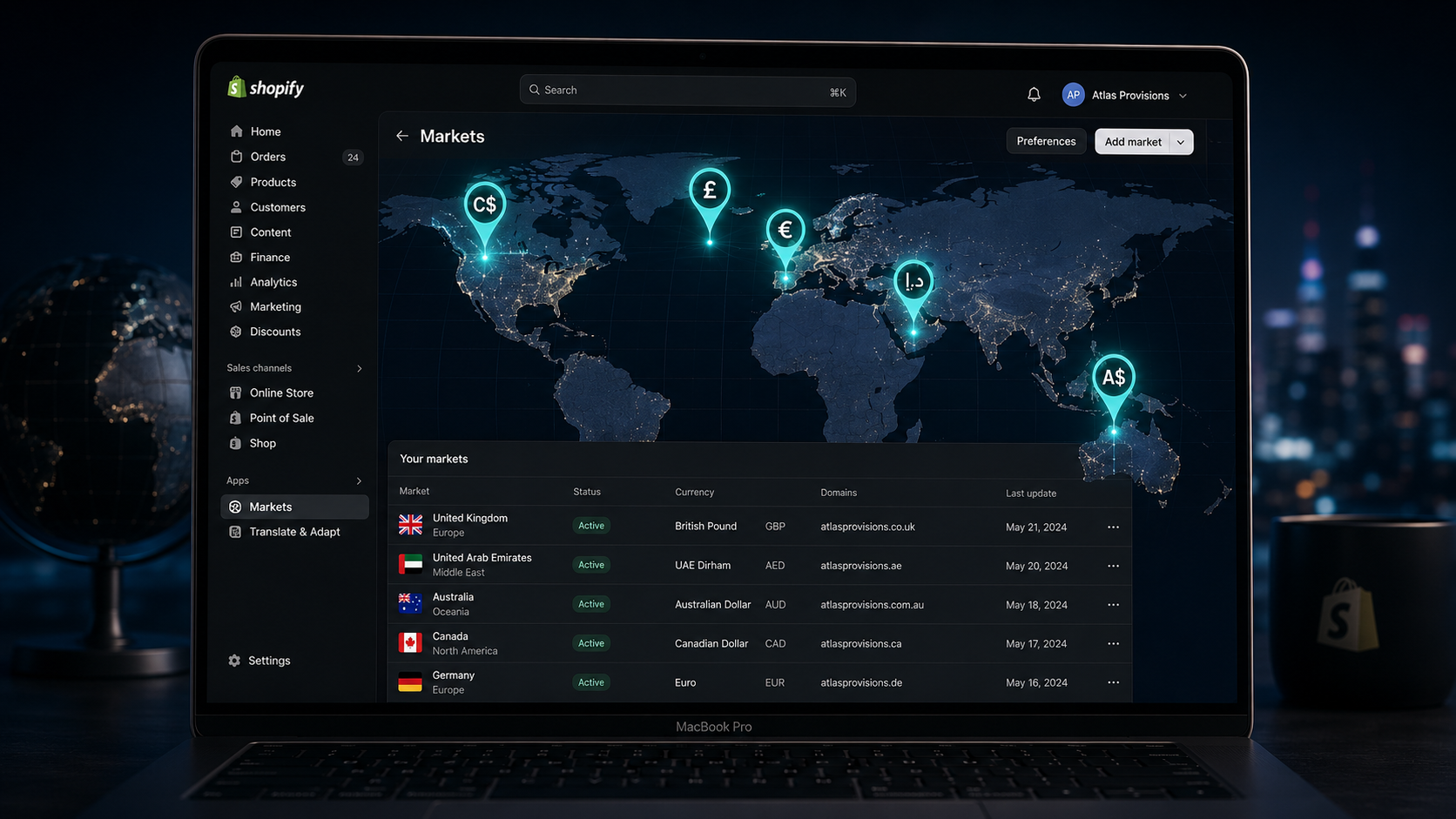
Shopify Markets is Shopify's native cross-border commerce management tool. It allows merchants to create distinct markets — individual countries or grouped regions — and configure unique settings for each one, all from a single store and a single admin.
Before Shopify Markets existed, selling internationally typically required either running completely separate Shopify stores for different countries — multiplying your operational overhead, app costs, and development complexity — or using expensive third-party solutions that bolted international functionality onto a platform not designed for it.
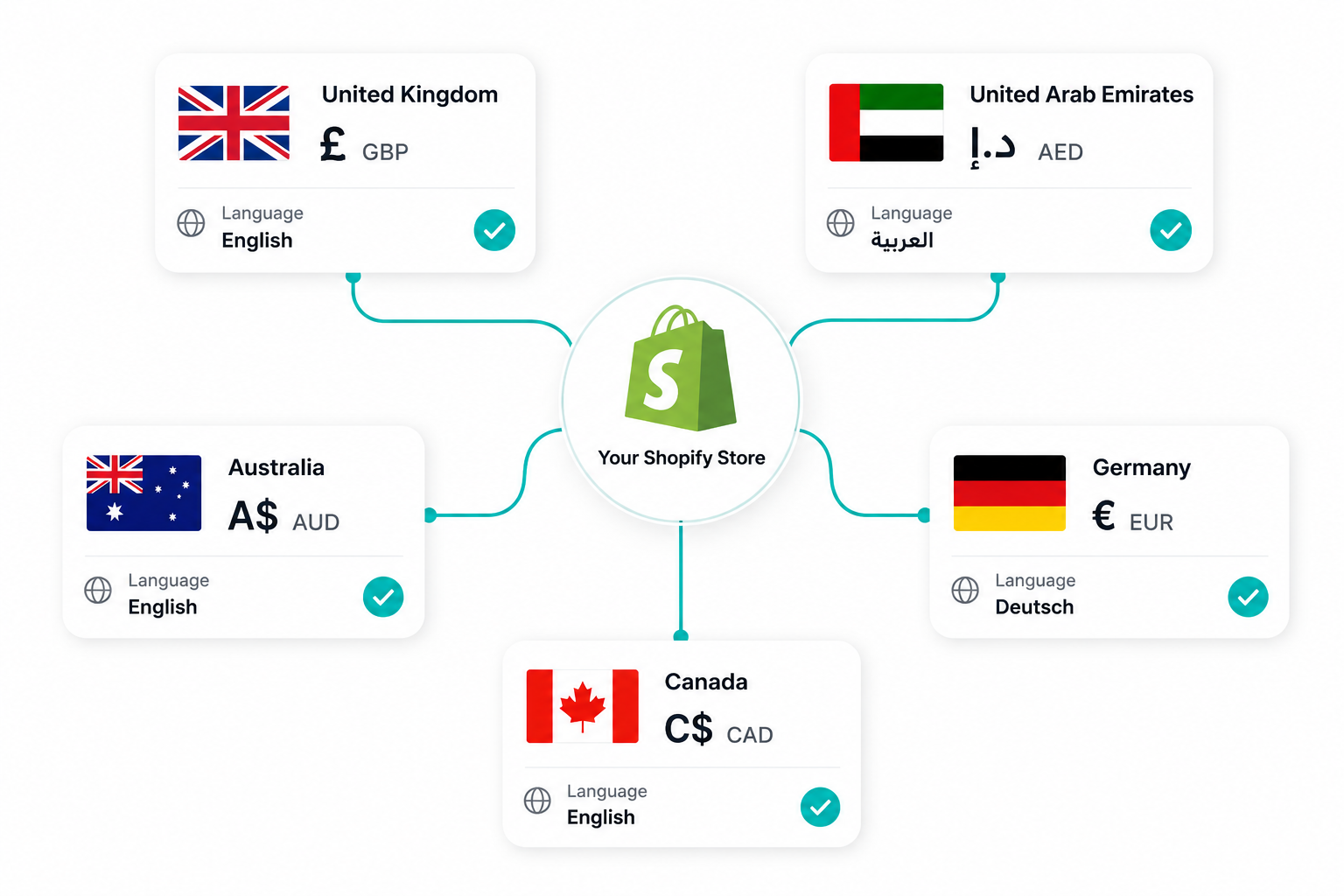
Shopify Markets eliminates both of those approaches. One store, one catalog, one team, and up to 50 markets configured independently. Each market gets its own currency, language, pricing rules, domain or subfolder, payment methods, and shipping zones. From the customer's perspective, they experience a store that feels built for their country. From your perspective, you manage it all in one place.
The business case for international expansion through Shopify Markets is straightforward. Displaying prices in local currency increases international conversion rates by 40%. Translating your store increases international conversion by 70%. 76% of online shoppers prefer buying in their native language. These are not marginal improvements — they are the difference between an international visitor converting and bouncing.
Most merchants who configure Shopify Markets correctly see initial international revenue within 30 to 60 days of launch and break even on setup costs within 90 days.
Before You Start: Choose Your First International Markets Wisely
The single most common mistake in international expansion is trying to sell everywhere at once. Start with two or three high-potential markets and build from there.
The fastest way to identify your best first markets is to check Shopify Analytics. Go to Analytics in your admin and look at the Sessions by Location report. If you are already receiving traffic from the UK, Canada, Australia, or Germany but those visitors are not converting, you have validated demand without a single dollar of market research spend. Localization — currency, language, and local payment methods — is almost certainly the missing piece.
If you have no significant international traffic yet, start with markets that share characteristics with your home country. For US merchants, the UK is the highest-ROI first international market in 2026 — shared language, similar consumer expectations, strong purchasing power, and relatively straightforward shipping logistics. Canada and Australia follow closely for the same reasons.
For Pakistani merchants selling globally, the UK, UAE, and Australia offer established South Asian diaspora communities with high familiarity and trust for products from the region, combined with strong currency conversion rates that make internationally priced products financially attractive.
Prioritize markets where your product category shows strong search demand, where shipping is feasible at a margin-positive cost, and where cultural or language barriers are manageable with your available resources.
Step-by-Step: How to Set Up Shopify Markets
Setting up Shopify Markets takes approximately 30 minutes for a basic configuration and a few hours for a fully optimized multi-market setup.
Step 1: Access Markets in Your Shopify Admin
Navigate to Settings, then Markets in your Shopify admin. You will see your primary market — your home country — already created. This is where your default customers are located and it cannot be deleted. Everything else you add is an international market layered on top.
Step 2: Add Your First International Market
Click Add market. You can create a market for a single country — which is recommended for high-volume targets like the UK, UAE, or Canada — or group multiple countries into a regional market, which works well for similar regions like Southeast Asia or the GCC. Name the market clearly and select the countries it covers.
Step 3: Enable Local Currency
Inside your new market settings, go to the Currency section and enable the local currency for that market. Shopify automatically converts prices using real-time exchange rates when Shopify Payments is enabled. This is a requirement — Shopify Payments must be active on your store for automatic currency conversion to work.
One detail that most guides overlook: configure your price rounding rules. A product priced at $49.99 USD converted to euros at a live exchange rate might display as €46.37 — a number that looks auto-generated and unprofessional. Configure rounding rules to display clean numbers like €46.99 or €47.00. Clean prices look intentional. Messy decimal conversions erode trust at the exact moment a customer is deciding whether to buy.
Step 4: Set Market-Specific Pricing Adjustments
Local currency conversion alone is not always enough. Some markets carry higher shipping costs, import duties, or operating overhead that need to be reflected in your pricing. Inside the market settings, you can apply a percentage adjustment to all prices in that market — typically 10 to 20% for markets with higher delivery costs.
Some premium markets also support higher pricing than your home market without reducing conversion — the UAE and Australia are examples where consumers expect and accept slight price premiums for international brands. Test your pricing assumptions rather than assuming home-market pricing translates directly.
Step 5: Configure Tax-Inclusive Pricing for the Right Markets
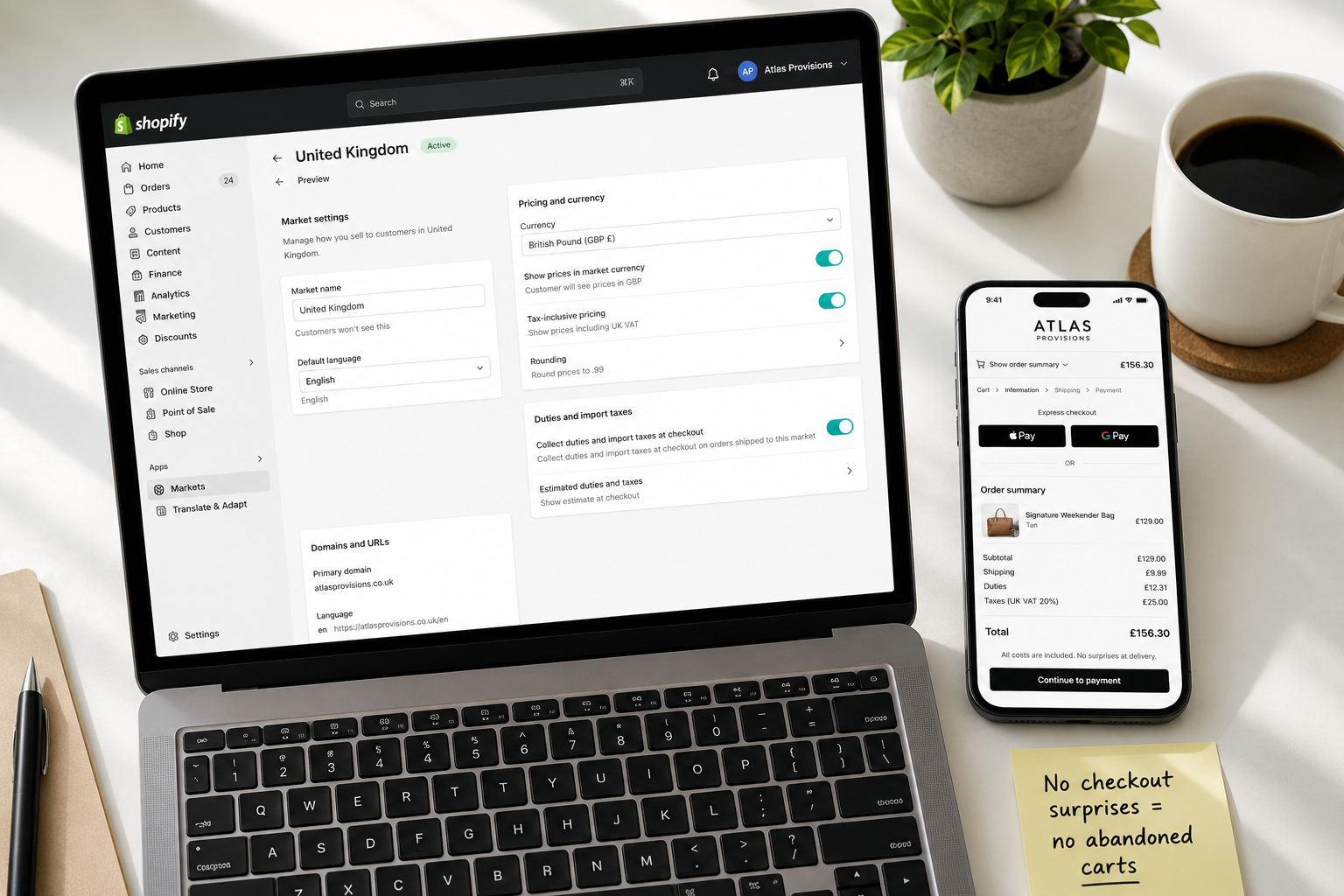
This is one of the most impactful and most overlooked configuration steps. In North America, it is standard practice to show prices excluding tax and add tax at checkout. In Europe, the UK, and Australia, consumers expect prices to include VAT or GST. Showing tax-exclusive prices to a UK shopper who expects tax-inclusive pricing creates sticker shock at checkout — the total appears to jump significantly at the payment step, and cart abandonment spikes.
In Shopify Markets, you can enable tax-inclusive pricing per market. For any market in the EU, UK, or Australia, enable this setting. Your prices will display with tax included in the price itself, matching the local expectation and eliminating the checkout surprise that drives abandonment.
Step 6: Set Up Languages for Each Market
76% of online shoppers prefer buying in their native language — and for non-English speaking markets, this preference translates directly into conversion rate differences. A French customer browsing a fully English store will convert at a fraction of the rate of the same customer browsing a French-language experience.
Shopify supports up to 20 languages natively. To add a language, go to Settings, then Languages in your admin and add the languages relevant to your target markets. For actual translation, you have two options: manual translation (higher quality, higher cost, slower) or automated translation apps.
The most efficient approach for most Shopify merchants in 2026 is an automated translation app for the core store content, combined with human review and editing for critical pages — homepage, product pages, and checkout-adjacent content. Apps including Weglot and EA Auto Language Translate connect to Shopify Markets natively and handle translation automatically once configured.
Step 7: Configure Market-Specific Domains
Giving each market its own URL is one of the most impactful things you can do for both conversion and international SEO. Shopify Markets supports three domain approaches:
Subfolders — for example yourstore.com/uk for the UK market — are the simplest to set up and consolidate your domain authority in a single place. This is the recommended approach for most merchants starting international expansion.
Subdomains — for example uk.yourstore.com — are slightly more complex to configure and split domain authority, but some brands prefer them for visual clarity.
Country-code top-level domains — for example yourstore.co.uk — create the strongest localization signal for both customers and search engines. They require purchasing and connecting separate domain names for each market and are best suited for markets where you have significant revenue and want to invest in long-term presence.
For markets where you create a subfolder or subdomain, Shopify automatically generates hreflang tags that tell Google which version of a page to show users in each country and language. This is essential for international SEO and prevents your market-specific pages from competing against each other in search results.
Step 8: Set Up International Shipping Zones
International shipping zones need to be configured in your shipping settings before orders from new markets can fulfill correctly. Go to Settings, then Shipping and Delivery, and add shipping zones for each of your new markets.
Configure realistic shipping rates for each zone. Offering flat-rate international shipping, weight-based rates, or free shipping above a threshold all work — the key is that shipping costs are accurate, clearly displayed before checkout begins, and not revealed as a surprise at the payment step. Unexpected shipping costs are the single most common cause of cart abandonment across all markets.
For merchants starting out with international shipping, partnering with a third-party logistics provider that has established international carrier relationships often delivers better rates and faster delivery times than negotiating directly with carriers as a small shipper.
Step 9: Handle Duties and Taxes at Checkout
This is where many international setups fail — not in the checkout experience itself, but in the customer experience that follows. When a customer in the UK orders from a US store and the package arrives with unexpected customs duties that they have to pay before the parcel is released, the result is almost always a negative review, a complaint, and never another purchase.
There are two approaches to duties: Delivered Duties Unpaid (DDU), where the customer pays import fees on delivery, and Delivered Duties Paid (DDP), where duties are calculated and collected at checkout so there are no surprises on delivery.
DDP is the strongly recommended approach for markets where you have significant volume. Use Shopify Markets to calculate and collect duties at checkout. Customers see the full landed cost upfront, there are no delivery surprises, and your return rate from duty-related refusals drops significantly.
For merchants on standard Shopify plans, the native duty calculation covers the basics. Shopify Markets Pro — Shopify's fully managed international solution powered by Global-e — handles merchant-of-record responsibilities, guaranteed duty and tax calculations, and localized checkout experiences at a per-transaction cost. It is worth evaluating when your international GMV exceeds approximately $100,000 per month and the operational complexity of managing compliance across multiple markets justifies the additional fee.
Step 10: Add Local Payment Methods
A customer who reaches your checkout and cannot find their preferred payment method will abandon. In the UK and Europe, PayPal and major card networks are standard. In the UAE and GCC, cash-on-delivery and installment payment options including Tabby and Tamara are expected. In Germany, bank transfer payment methods like SOFORT are widely preferred over card payment.
Review the payment preferences for each of your target markets and enable the relevant options. Shopify Payments supports multiple payment methods natively, and the Shopify App Store covers regional payment methods for most major markets through verified payment provider apps.
International SEO: How to Rank in Multiple Countries
Setting up Shopify Markets correctly handles most of the technical SEO requirements automatically — hreflang tags, market-specific URLs, and localized content. But there are additional steps that meaningfully improve how quickly and how well your international pages rank.
Create market-specific content where search intent differs by country. A blog post targeting "best winter coats UK 2026" reaches a different audience with different purchasing context than "best winter coats USA 2026." Local keywords, local seasonal references, and local product naming conventions all contribute to ranking relevance in each market's search results.
Build local backlinks for your highest-priority markets. A link from a UK lifestyle publication carries significantly more weight for your UK subfolder's rankings than a link from a US site. Even a handful of locally relevant backlinks accelerates ranking in a new market substantially.
Verify your international pages are indexed in Google Search Console by adding your market-specific URL patterns as separate properties. Monitor impressions and click-through rates by country to understand which markets are gaining search traction and which need additional content investment.
Common Mistakes That Kill International Conversions
Showing tax-exclusive prices in tax-inclusive markets. As covered in the setup steps, EU, UK, and Australian shoppers expect to see prices that include tax. Not configuring this setting creates checkout sticker shock that dramatically increases abandonment in those markets.
Leaving prices as unrounded currency conversions. The $49.99 becoming €46.37 problem is real and easily fixed with rounding rules. Take five minutes to configure clean price rounding for every market.
Not translating at all and expecting English to be sufficient. For English-speaking markets — UK, Australia, Canada — this is acceptable. For Germany, France, the Netherlands, Japan, or any other non-English speaking market, an untranslated store will convert at a fraction of its potential. Even automated translation is dramatically better than none.
Using DDU shipping without warning customers about duties. The single fastest way to generate negative international reviews is to send packages to customers who are then surprised by a customs bill at the door. Either switch to DDP and collect duties at checkout, or clearly warn customers during the checkout process that import duties may apply on delivery.
Starting with too many markets simultaneously. The appeal of "going global" is real, but spreading configuration effort across ten markets produces ten mediocre experiences instead of two or three excellent ones. Get your first two markets genuinely optimized before expanding further.
Ignoring geo-redirect behavior. Automatic geo-redirects that force visitors to a localized version of your store without giving them a choice are widely disliked and can harm SEO by preventing search engines from properly crawling market-specific pages. The best practice is to show a non-disruptive banner or popup suggesting the localized version and letting the visitor choose, rather than redirecting automatically.
Shopify Markets vs. Shopify Markets Pro: Which Do You Need?
Standard Shopify Markets — available on all plans at no additional cost — handles currencies, languages, domains, pricing adjustments, and basic duty collection. For the vast majority of merchants starting international expansion, this is all you need. One Shopify partner agency reports that standard Markets delivers approximately 90% of the value of Markets Pro at a fraction of the cost for most merchants.
Shopify Markets Pro, powered by Global-e, adds merchant-of-record services where Global-e handles international transaction compliance, guaranteed duty and tax calculations with no surprises, discounted international shipping rates, and localized checkout experiences including region-specific payment methods managed automatically.
The additional cost — a per-transaction fee on international orders — is justified once international revenue volume makes the operational complexity of managing multi-country compliance significant. The practical threshold where most merchants find Markets Pro cost-effective is approximately $100,000 or more in monthly international gross merchandise value.
Start with standard Markets. When your international operation has grown to the point where compliance management is consuming meaningful operational time and the per-transaction fee becomes economically rational relative to the time saved, evaluate Markets Pro.
What Realistic Results Look Like
Most Shopify merchants see measurable international revenue within 30 to 60 days of properly configuring Shopify Markets for their first one or two new markets. The pattern typically looks like this:
Week 1 to 2: Markets configured, currencies and languages live, shipping zones active, geo-targeting showing local currency to international visitors.
Week 3 to 4: First international orders begin flowing. Early conversion data emerges. International visitors who previously bounced without purchasing begin converting because they see local currency, their language, and familiar payment methods.
Week 5 to 8: Patterns emerge around which products convert well internationally and which categories need localized marketing. Shipping logistics settle into a rhythm.
Week 9 to 12: Full picture of international ROI is visible. For most stores with genuine product-market fit in their new markets, international revenue reaches 15 to 25% of total store revenue within three months.
The setup investment is primarily time — configuration, translation, and shipping logistics. For an established store, the total configuration work runs 20 to 40 hours. Once configured, ongoing maintenance is minimal. The infrastructure runs largely automatically, with currencies updating in real time and order routing flowing naturally through your existing fulfillment process.
Final Thoughts
International selling on Shopify in 2026 is not the complex, multi-store, expensive undertaking it was three or four years ago. Shopify Markets has compressed what used to require months of development work and separate platform configurations into a setup process that takes hours and delivers results within weeks.
The merchants who will look back in twelve months and be glad they moved early are the ones who recognize that 30% of their existing traffic is already international — and that traffic is currently bouncing because the experience is not built for them.
Fix the currency. Add the language. Configure the shipping. Handle the duties transparently. And meet the customers who are already trying to buy from you.
Need help configuring Shopify Markets for international expansion, or want an expert to audit your current international setup for conversion issues? Get in touch with EcomFixify — we specialize in Shopify development and global ecommerce strategy.