

How to Build a Shopify Store That Sells While You Sleep
Every Shopify merchant has imagined it. Waking up to a screen full of overnight orders, revenue accumulating while they slept, a store running itself while they focused on strategy, creativity, or simply living their life outside the business. How to Build a Shopify Store That Sells While You Sleep
The good news: approximately 90% of day-to-day Shopify store operations can run on autopilot with the right automation stack in place. Email sequences send themselves. Inventory alerts trigger automatically. Customer support handles routine questions without human involvement. Orders route to the right fulfillment partner without manual intervention. Social media content publishes on schedule.
The honest caveat — because no guide worth reading glosses over this — is that a fully automated store generating passive income with zero human oversight is a myth. Strategy, creative decisions, supplier relationships, and complex customer situations always require a human. What automation eliminates is the repetitive, time-consuming, low-judgment work that currently consumes the majority of most merchants' operational hours. When that work runs itself, the hours that remain go toward the high-judgment decisions that actually grow the business.
This guide covers every major area of Shopify automation in 2026 — what to automate, which tools handle each job, how to build the stack systematically, and the sequence that delivers the fastest time-to-value.
Why Most Shopify Stores Are Still Operating Manually
The gap between what Shopify automation can do and what most stores are actually doing with it is significant. The majority of Shopify merchants are manually performing tasks that tools running on their store right now could execute automatically — abandoning email sequences being the most common example, but extending into inventory management, customer segmentation, review collection, fraud flagging, and accounting reconciliation.
The reason is usually not lack of awareness that automation exists. It is the activation energy required to set it up. Building a seven-email Klaviyo abandoned cart sequence, configuring Shopify Flow triggers for inventory management, setting up Gorgias AI for support deflection, and connecting ShipStation to your fulfillment partners requires a focused setup investment — typically two to four weeks of dedicated configuration work for a complete automation stack.
That investment, made once, then runs indefinitely. An abandoned cart sequence built in January is still recovering carts in December with no additional work. A Shopify Flow automation that tags VIP customers when they cross a purchase threshold is still tagging them two years later. The setup cost is a one-time event. The operational benefit is permanent and compounding.
Implementing automation reduces human error by up to 90% while accelerating order fulfillment and response times. The stores that automate first build an operational leverage advantage that compounds over time — they can scale revenue without scaling headcount proportionally, which is the defining characteristic of a healthy ecommerce business.
The Seven Areas of Shopify Store Automation
Every area of a Shopify store worth automating falls into one of seven categories. Building your automation stack systematically across these seven areas produces a store that genuinely runs itself for the majority of its daily operations.
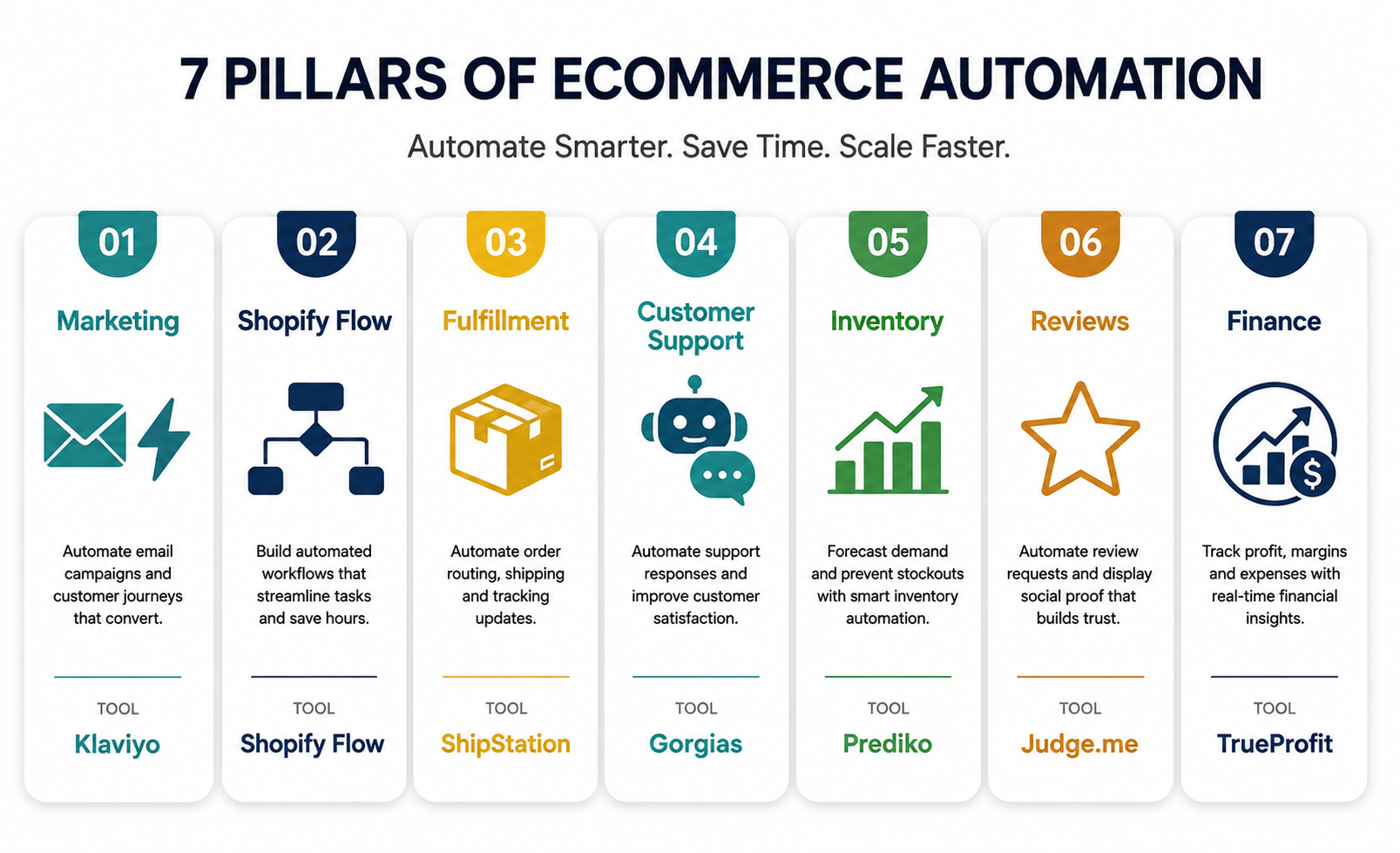
1. Marketing Automation — The Revenue Engine That Never Sleeps
Marketing automation is where the commercial impact of Shopify automation is most direct and most measurable. Email and SMS flows triggered by customer behavior generate revenue 24 hours a day without any manual campaign management.
The core principle is behavioral triggering — every automated marketing message fires because a specific customer did a specific thing, not because it is Tuesday at 10am and you scheduled a blast. A customer who abandons a cart triggers an abandoned cart sequence. A customer who views a product three times triggers a browse abandonment flow. A customer who has not purchased in 90 days triggers a win-back sequence. The timing and relevance of these messages — reaching the right customer at the exact moment of highest intent — is what drives the performance differential between automated flows and manual campaigns.
Klaviyo is the automation platform that powers this for the majority of scaling Shopify stores. As of March 2026, Shopify moved its native marketing automations into a new Shopify Messaging app that handles basic welcome series and abandoned cart flows adequately for stores under $500,000 in annual revenue. Above that threshold — and especially above $1 million — Klaviyo's flow builder provides the conditional logic, A/B testing capability, dynamic product feeds, and granular revenue attribution that Shopify's native tools cannot replicate.
The automations to build first, in priority order:
Welcome series — four emails over seven days to new subscribers. This generates 8 to 12% of total email revenue and should be the first automation any new store builds. The sequence introduces the brand, delivers any promised lead magnet or discount, provides social proof, and creates urgency for first-time purchase.
Abandoned cart recovery — three emails over 48 hours. The highest revenue-per-recipient of any automated flow. A customer who added to cart and left is a warm buyer who needs a nudge, not a conversion from cold. The sequence reminds, provides social proof, and eventually introduces a modest incentive for customers who have not returned.
Browse abandonment — one to two emails to customers who viewed a product multiple times without adding to cart. These trigger four to six hours after the browse session and consistently generate positive ROI with minimal configuration effort.
Post-purchase — three emails over 14 days. Deepens the relationship, drives cross-sell, and collects reviews at the moment of highest customer satisfaction.
Win-back — two emails to customers inactive for 60 to 90 days. Acquiring a new customer costs five to seven times more than retaining an existing one, making win-back flows one of the highest-ROI automations available to any store at any stage.
Birthday emails — configured once, fired annually on each subscriber's birthday with a personalized discount or offer. Birthday emails achieved a 16% conversion rate in 2025 with an average order value higher than any other automated email type — because a customer receiving a birthday offer feels genuinely recognized rather than marketed to.
SMS automation layered alongside email flows — particularly for abandoned cart and back-in-stock notifications — amplifies the reach of each trigger. Automated SMS earned an average of $0.74 per send in 2025, compared to $0.15 for campaign sends, because behavioral trigger timing captures intent that campaign messages cannot replicate.
2. Shopify Flow — Operational Automation Built Into Your Store
Shopify Flow is the native no-code automation platform available on every current Shopify plan. It handles internal operational workflows through a trigger-condition-action structure: when something happens in your store, if certain conditions are met, then take a specified action.
The most commercially valuable Shopify Flow automations for most stores:
Customer tagging based on purchase behavior — automatically tag customers as VIP when their lifetime spend crosses a threshold, as "at-risk" when they approach your win-back trigger window, or as "wholesale prospect" when order quantities exceed a defined level. These tags feed directly into Klaviyo segmentation, enabling personalized flows that respond to customer status without any manual list management.
Inventory management triggers — automatically hide out-of-stock products from your storefront when inventory hits zero, re-enable them when stock is replenished, and send Slack or email alerts to your team when inventory falls below reorder point thresholds. This prevents the worst-case scenario of customers adding out-of-stock items to their cart and completing checkout, and ensures reorder decisions happen at the right time without manual stock monitoring.
High-risk order flagging — automatically tag orders that trigger Shopify's fraud risk signals and route them to manual review rather than automatic fulfillment. A single fraudulent order that ships before being caught typically costs more than the fulfillment cost to recover.
Flash sale and launch scheduling — available on Shopify Plus through the Launchpad feature — enables scheduling of product launches, price changes, and promotional campaigns well in advance. A product launch planned for a specific date and time executes automatically without requiring someone to be at a computer at that exact moment.
Order routing rules — automatically assign orders to specific fulfillment locations, 3PL partners, or warehouses based on product type, shipping region, or order value. Stores with multiple fulfillment options benefit significantly from automated routing that eliminates the manual decision about which facility should handle each order.
3. Fulfillment Automation — From Order to Doorstep Without Manual Intervention
Fulfillment is the operational area where manual processes most directly limit how fast a Shopify store can scale. When order volume outpaces the team's ability to pick, pack, and ship manually, you either hire proportionally — which caps margin — or you automate the process.
ShipStation is the most widely used shipping automation platform for Shopify stores that manage their own fulfillment. It pulls orders automatically from Shopify, applies preset shipping rules — carrier selection, service level, package type — based on order parameters, generates and prints labels in batch, and pushes tracking information back to Shopify and to the customer's email automatically. The manual version of this process — logging into Shopify, looking up each order, generating a label, copying the tracking number, sending a notification — takes minutes per order. ShipStation handles the same workflow in seconds per order at scale.
For stores that want to remove fulfillment from their operations entirely, third-party logistics providers — ShipBob, Deliverr, and Fulfillment by Amazon — connect to Shopify and handle the pick-pack-ship process automatically when orders come in. The merchant manages products, marketing, and customer experience. The 3PL manages physical inventory, packaging, and carrier relationships. Orders that come in overnight ship the following morning without anyone on the merchant's team touching them.
4. Customer Support Automation — Handling Inquiries Without Increasing Headcount
Customer support is one of the highest-volume manual tasks in most Shopify stores — and the one with the clearest automation opportunity. The majority of incoming support volume in ecommerce consists of a small number of question types that repeat constantly: where is my order, how do I return this, what is your sizing, is this product in stock.
AI-powered support tools in 2026 handle these Tier 1 inquiries automatically with response quality comparable to human agents on routine question types. Gorgias AI — integrated natively with Shopify — resolves order status questions by pulling real-time order data and providing the answer automatically. Return eligibility questions are answered based on your policy without agent involvement. Product availability is checked against live inventory. The customer gets an immediate, accurate response. The agent handles only the complex, judgment-requiring cases that genuinely need a human.
The deflection rate for well-configured Gorgias AI implementations in 2026 runs between 50 and 80% of total ticket volume — meaning the majority of your support queue resolves without any agent time. For a store receiving 200 support tickets per week, 80% deflection means 160 tickets resolve automatically and 40 require human attention. The agent time previously spent on 200 tickets is now available for proactive support, pre-purchase chat that drives conversions, and complex cases that retain customers who would otherwise churn.
Shopify Inbox at lower volumes — available free with every Shopify plan — handles basic live chat with automated responses for common questions and order status lookups. It is the entry point for support automation before the volume or complexity justifies Gorgias.
5. Inventory and Purchasing Automation — Never Running Out, Never Overstocking
Inventory management without automation is a constant cycle of manual stock checks, reactive reorder decisions, and occasional stockout crises when demand outpaces replenishment timing. With automation, inventory management runs in the background — monitoring stock levels, triggering alerts at reorder points, and in advanced implementations, generating purchase order recommendations automatically.
Prediko and Inventory Planner both integrate with Shopify to provide AI-powered demand forecasting and automated reorder recommendations. When a SKU's inventory falls to its reorder point — calculated based on your sales velocity and supplier lead time — the app surfaces a purchase order recommendation or, in automated configurations, sends the purchase order to the supplier directly.
Shopify Flow handles the storefront-facing side of inventory automation: hiding out-of-stock products, enabling back-in-stock notification capture, and alerting the operations team when specific products need attention. The combination of a forecasting app and Shopify Flow automations creates an inventory system that manages itself for the majority of SKUs without daily manual oversight.
6. Review and UGC Collection Automation — Social Proof That Builds Itself
Customer reviews are one of the most powerful conversion assets a Shopify store can have — and one of the most passive to collect once the automation is correctly configured. A review request flow built once and connected to your post-purchase email sequence collects reviews from every customer, on every order, indefinitely.
Judge.me and Okendo are the two most widely deployed review platforms for Shopify in 2026. Both send automated review request emails a defined number of days after confirmed delivery — typically 7 to 14 days depending on the product's usage cycle — and handle the submission, moderation, and display of reviews automatically. Photo and video review submissions are supported on both platforms, and the resulting UGC displays on product pages without any manual curation required.
Automating review collection is not just a convenience — it is a compounding commercial asset. A store that automatically collects reviews from every order accumulates social proof at the rate of its order volume. A store that manually requests reviews — or does not request them at all — accumulates social proof at a fraction of that rate.
7. Finance and Analytics Automation — Real Numbers Without Manual Reconciliation
The financial reporting and analytics that enable good business decisions are, for most Shopify merchants, either not tracked at all or tracked through time-consuming manual processes involving exported spreadsheets and manual calculations.
TrueProfit and Bloom are the two most used profit tracking apps for Shopify in 2026. Both pull revenue data from Shopify, COGS from your product cost settings, shipping costs from your fulfillment accounts, and ad spend from Meta and Google — calculating true profit margin in real time without any manual data entry. The dashboard shows your actual profit per order, per product, and per channel, updated continuously as new orders come in.
QuickBooks Online with the Shopify Connector automates accounting reconciliation — syncing Shopify sales data, refunds, and fees to your accounting system without manual journal entries. For stores managing tax compliance across multiple regions, automation here is not optional at any meaningful scale — the manual version becomes a compliance risk before the operational cost becomes prohibitive.
The Complete Shopify Automation Stack for 2026
The recommended automation stack for a direct-to-consumer Shopify store in 2026, organized by function:
Workflow automation: Shopify Flow for internal operational rules and triggers. Order Automator for more complex order-level rules that Flow cannot handle natively.
Marketing automation: Klaviyo for email and SMS flows at stores above $500,000 in annual revenue. Shopify Messaging for stores below that threshold.
Review collection: Judge.me for value-focused implementations, Okendo for brands that want advanced multimedia reviews and deeper Klaviyo integration.
Post-purchase upsell: ReConvert for one-click post-purchase offers that appear on the thank-you page immediately after order confirmation.
Customer support: Gorgias for stores with meaningful support volume, Shopify Inbox for early-stage stores.
Shipping and fulfillment: ShipStation for self-fulfilled stores, ShipBob or a comparable 3PL for stores that want to outsource fulfillment entirely.
Inventory forecasting: Prediko or Inventory Planner for stores with more than 50 active SKUs or seasonal demand patterns.
Finance and profit tracking: TrueProfit or Bloom for real-time profit visibility, QuickBooks Online with the Shopify Connector for accounting.
Multi-platform integration: Zapier or Make for connecting systems that do not have native integrations — for example, sending Shopify customer data to a CRM, or triggering Slack notifications based on specific order events.
How to Build Your Automation Stack: The Right Sequence
The most common mistake in building a Shopify automation stack is trying to implement everything simultaneously. Configuring eight tools at once creates overwhelm, increases the likelihood of misconfiguration, and makes it difficult to isolate which automation is driving which result.
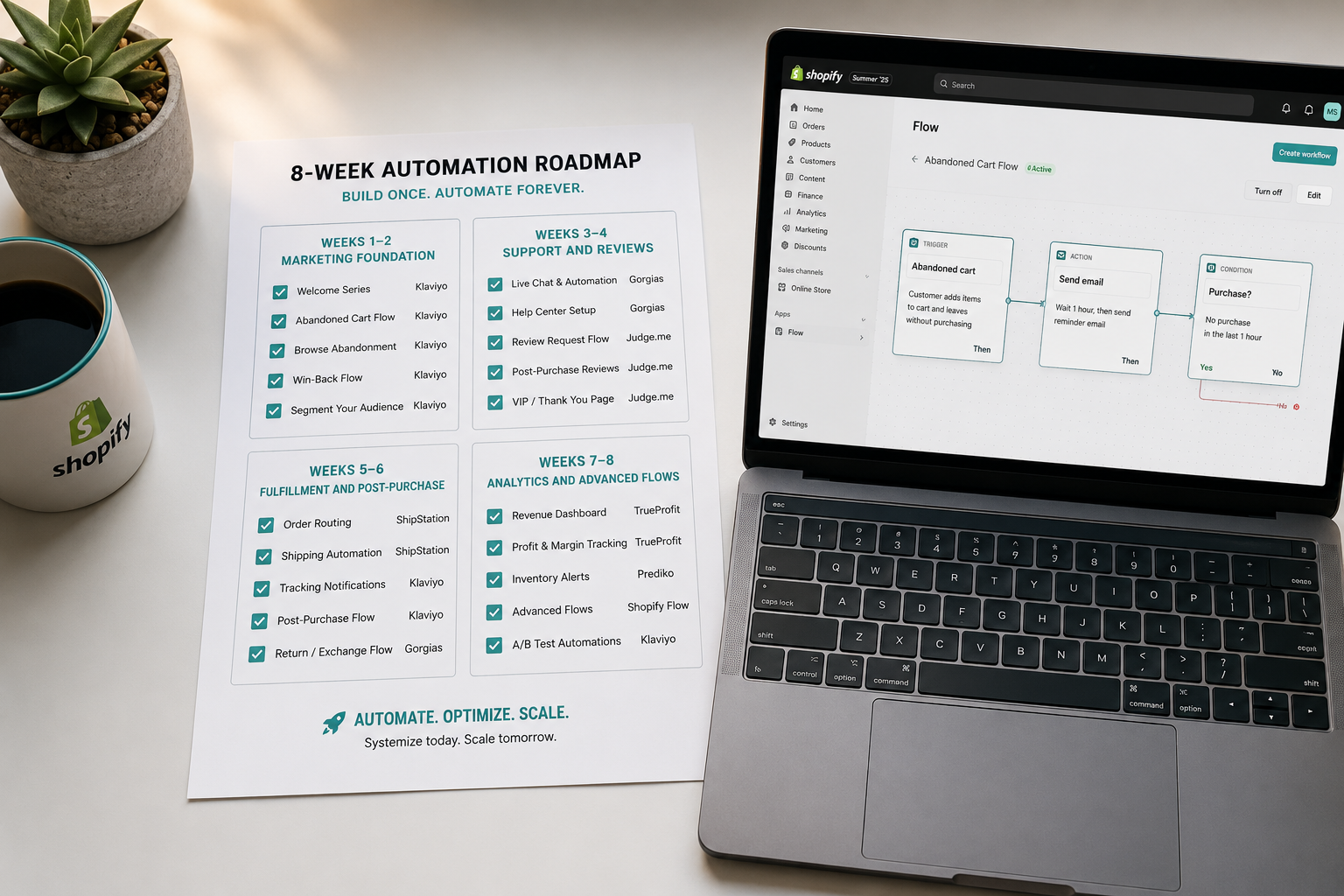
The sequence that delivers the fastest revenue impact with the lowest implementation risk builds automation in layers, starting with the highest-ROI touchpoints:
Week one to two — Marketing foundation: Install Klaviyo and build your welcome series and abandoned cart flow. These two automations together drive 25 to 30% of total email revenue and should be live before anything else. Connect Shopify Flow and configure your first three operational automations — customer VIP tagging, low-stock alerts, and high-risk order flagging.
Week three to four — Support and reviews: Install Gorgias and configure the AI auto-responders for your top five most common support inquiries. Install Judge.me and configure the automated review request sequence timed to your product's typical usage cycle.
Week five to six — Fulfillment and post-purchase: Connect ShipStation and configure your shipping rules and label generation workflow. Install ReConvert and set up a post-purchase upsell on your thank-you page for a complementary product to your bestseller.
Week seven to eight — Analytics and advanced marketing: Install TrueProfit or Bloom for real-time profit visibility. Build your browse abandonment, post-purchase cross-sell, win-back, and birthday email flows in Klaviyo. Connect QuickBooks for accounting automation.
By week eight, 90% of your store's daily operational work is running automatically. The hours previously spent on manual tasks are available for the high-judgment work that actually moves the business forward — product development, supplier relationships, creative strategy, and the customer interactions that require genuine human attention.
What Automation Cannot Replace
The honest accounting of what automation cannot do is as important as what it can.
Strategy cannot be automated. Deciding which products to add to your catalog, which markets to expand into, how to position your brand against competitors, and when to change course based on what the data is showing — these decisions require human judgment that no workflow can replicate.
Creative direction cannot be automated. The visual identity of your brand, the voice of your product descriptions, the stories you tell in your email content — AI tools can assist with execution, but the creative decisions that differentiate a memorable brand from a generic store require a human perspective.
Supplier and partner relationships cannot be automated. The trust built over time with a reliable manufacturer, the negotiation that improves your cost structure, the conversation with a logistics partner about improving delivery performance — these relationships determine the operational reality of your business in ways that no software integration can address.
Complex customer situations cannot be automated. A customer who received a damaged product before their wedding, a loyal customer who is frustrated after a series of shipping delays, a wholesale prospect evaluating a large first order — these interactions require the kind of genuine human engagement that builds or destroys long-term relationships.
Automation handles the 90% that is repetitive, predictable, and rule-based. The 10% that remains is where the business is actually built.
The Automation Mistakes That Cost Merchants Time and Money
Installing two tools that do the same job is the most common and most damaging automation mistake. Two email platforms, two review apps, or two customer tagging systems create conflicting automations, duplicate customer messages, and data inconsistencies that are difficult and time-consuming to untangle. Audit your existing app list before adding any automation tool and remove anything that overlaps with new functionality.
Turning automations on without testing produces expensive consequences. A misconfigured Klaviyo flow can email your entire list with a placeholder variable where the customer's name should be. A Shopify Flow rule with an incorrect condition can tag every order as high-risk, triggering manual review for orders that do not need it. Test every automation with real but controlled scenarios before enabling it for live traffic.
Building complex automation before the underlying data is clean produces inaccurate results. An inventory forecasting app that runs on incomplete product cost data generates margin calculations that are wrong. A customer segmentation system that runs on incomplete purchase history creates segments that misrepresent actual customer behavior. Clean your data — product costs, customer profiles, order histories — before building automations that depend on it.
Neglecting to review automation performance quarterly allows poorly configured or outdated automations to run indefinitely with degraded results. An abandoned cart sequence built 18 months ago may have subject lines that no longer match your current brand voice, offers that are no longer competitive, or timing that does not reflect how your current customers behave. Review each automation quarterly and refresh what the data shows is underperforming.
Final Thoughts
A Shopify store that sells while you sleep is not a fantasy — it is an operational reality that the right automation stack makes achievable for merchants at any scale. The 90% of daily operations that automation handles frees the mental bandwidth and working hours that strategy, creativity, and genuine customer relationships require.
The path to that operational state is not complicated but it is sequential. Start with the automations closest to revenue — welcome emails, abandoned cart recovery, Shopify Flow operational rules — and build outward from there. Layer in support automation, review collection, fulfillment automation, and analytics tools as the manual version of each job starts consuming hours that should be spent elsewhere.
The stack described in this guide is not aspirational. It is the working configuration of thousands of Shopify stores generating revenue tonight while their owners sleep. Building it is an investment of weeks. The return is measured in years.
Need help setting up a Shopify automation stack for your store, or want an expert to audit your current operations for automation opportunities? Get in touch with EcomFixify — we specialize in Shopify development and ecommerce operations for brands building for scale.