
15 Apps You Are Paying For That Are Killing Your Store Speed
There is a number most Shopify merchants have never checked that would alarm them if they did.
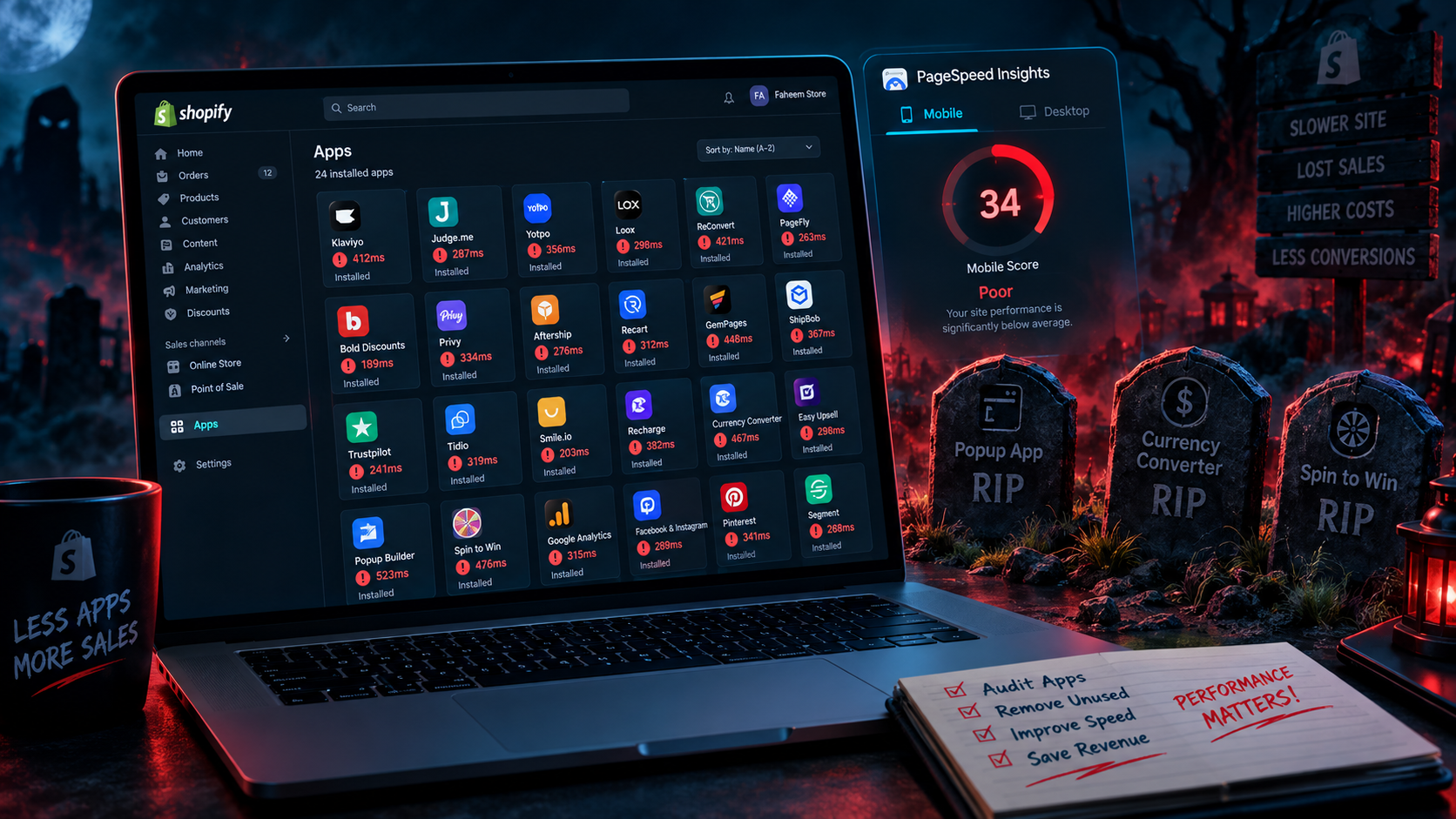
Open your Shopify admin, go to Apps, and count how many you have installed. Now open Google PageSpeed Insights and run your homepage. Look at the score. Then look at how many of those apps are injecting JavaScript into every single page your customers load — whether those pages use the app's features or not.
The average Shopify store runs between 15 and 25 apps. Each one adds scripts, API calls, and code to your storefront. Each one increases load time. And unlike a slow product image that only affects one page, most app scripts load globally — on your homepage, your product pages, your cart page, and your checkout — regardless of whether the app does anything useful on that specific page.
74% of Shopify stores lose customers due to slow loading times. Every additional second of mobile load time reduces conversion rates by 7 to 12%. And the single largest cause of slow Shopify stores in 2026 is not image size or theme complexity — it is app bloat. Scripts stacking on scripts, slowing every page load, costing you conversions on every visit.
This post identifies the 15 most common app categories that silently kill Shopify store speed — with the native Shopify alternative or the lightweight replacement that gives you the same functionality at a fraction of the performance cost.
Why Apps Slow Down Your Store: The Technical Reality
Understanding why apps create speed problems helps you make better decisions about which ones are worth keeping.
Every Shopify app that adds functionality to your storefront does so by injecting JavaScript into your theme. This JavaScript must be downloaded, parsed, and executed by the visitor's browser before or during page load. The more scripts your page loads, the longer that process takes — and on mobile devices with slower processors and variable connection speeds, the cost of each additional script is amplified significantly.
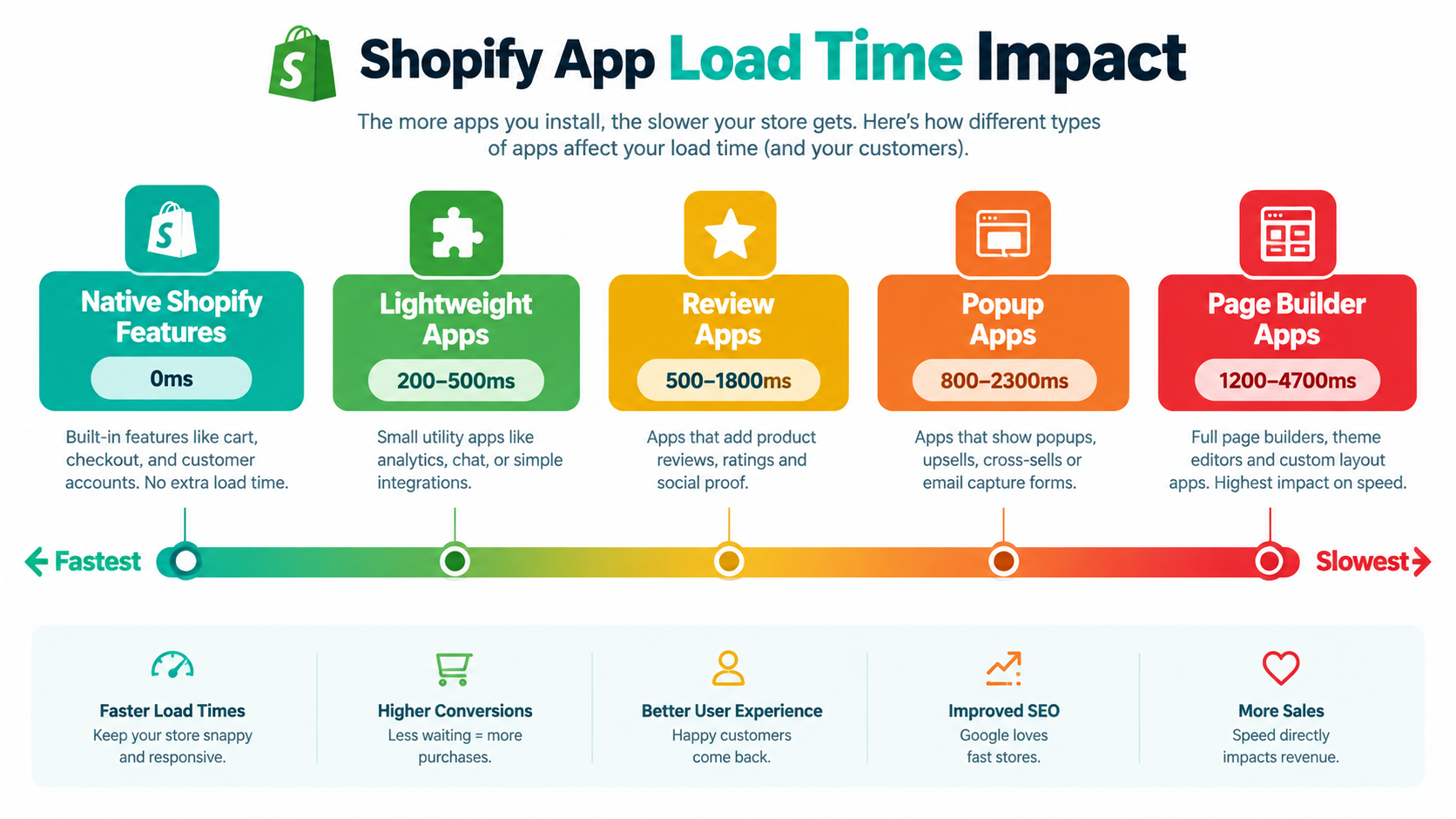
Legacy Shopify apps built before Online Store 2.0 used the ScriptTag API — a method that injects JavaScript globally across every page of your store regardless of whether the app is being used on that page. A review widget app using ScriptTag loads its code on your About page, your Blog page, and your Contact page — pages where it does nothing — adding load time with zero benefit.
Modern apps built with Theme App Extensions and App Blocks for Online Store 2.0 are significantly better — they only load on the specific pages and sections where they are placed. But a large portion of the apps installed on most Shopify stores were built before these standards existed, and many popular legacy apps have not been rebuilt to modern architecture.
The compounding problem is ghost code — the JavaScript left behind by apps you have already uninstalled. Uninstalling a Shopify app removes it from your admin but does not automatically clean up every piece of code it injected into your theme. Scripts from apps you stopped using six months ago are frequently still loading on every page visit, adding load time for zero functional value.
Shopify's own site speed analysis identifies plug-in and script bloat as one of the top factors slowing down Shopify store load times. Third-party apps account for 60 to 80% of additional load time in most stores with bloated app stacks — making app auditing the highest-leverage single action for store speed improvement.
The 15 App Categories That Most Commonly Kill Shopify Speed
1. Dedicated Popup and Email Capture Apps
Apps including OptinMonster, Privy, Justuno, and Wheelio each add between 800 milliseconds and 2.3 seconds to page load time — making them among the heaviest JavaScript loads in the entire Shopify App Store. Most of these apps were built before Online Store 2.0 and inject their code globally, meaning they slow every single page even when the popup only appears on the homepage.
The native replacement: Shopify Email includes built-in signup forms that work without additional JavaScript. Klaviyo's native Shopify integration handles email capture through lightweight embeds that load asynchronously. For most Shopify stores, removing a dedicated popup app and replacing it with Klaviyo's native form or Shopify's built-in form builder eliminates 800 milliseconds to 2 seconds from every page load.
If you genuinely need advanced popup functionality — exit intent, gamification, complex targeting rules — consider Privy's newer App Block version, which loads significantly lighter than the legacy ScriptTag version, or evaluate whether the conversion lift from your popup actually justifies the speed cost it imposes across your entire store.
2. Heavy Product Review Apps
Apps including Yotpo, Stamped.io, and Loox add between 500 milliseconds and 1.8 seconds per page load. Review apps are among the most commonly installed on Shopify stores and among the most commonly over-provisioned — merchants pay for enterprise review platforms when a lightweight alternative would serve their actual review volume and display needs identically.
The native replacement: Shopify Product Reviews is the free native option that loads essentially zero additional JavaScript because it uses native Liquid rendering rather than JavaScript injection. For merchants who need photo reviews, video reviews, or review request automation, Judge.me is consistently the highest-rated lightweight review app — significantly faster than Yotpo or Stamped.io while providing comparable functionality at a lower price point.
If you currently use a heavy review app, export your existing reviews first, then migrate to the lightweight alternative. Most migration tools are available directly in the app you are moving to.
3. Currency Converter Apps
Standalone currency conversion apps make real-time API calls to fetch exchange rates and frequently reload pricing elements across your entire page — adding 400 milliseconds to 1.5 seconds per load and creating visible price flickering that damages trust.
The native replacement: Shopify Markets native multi-currency handles currency conversion natively with no additional app required for most Shopify stores. It converts prices server-side before the page renders — meaning the customer sees the local currency immediately without the JavaScript overhead or the price flickering that app-based conversion creates. If you are paying a monthly fee for a currency converter app and you are on a standard Shopify plan, check whether Shopify Markets covers your needs before your next billing cycle.
4. Page Builder Apps
Apps including PageFly, GemPages, and Shogun are among the heaviest performers in the Shopify ecosystem — adding between 1.2 and 4.7 seconds to page load time. These apps build pages by rendering proprietary component structures that require loading their entire JavaScript framework on every page built with the tool.
The replacement: Shopify's native section-based theme editor in Online Store 2.0 covers the vast majority of landing page customization needs without any additional JavaScript. The Dawn theme — Shopify's free reference theme — includes native sections for testimonials, rich text, image with text, video, and collapsible content that handle 80% of what most merchants use page builders for. For merchants who need complex landing pages beyond native theme capabilities, a one-time custom Liquid development by a Shopify developer is typically faster long-term than paying monthly for an app that permanently slows every page it touches.
5. Multiple Analytics and Tracking Apps
The average Shopify store has between four and seven tracking scripts running simultaneously — Google Analytics 4, Meta Pixel, TikTok Pixel, Klaviyo tracking, an attribution tool, a heatmap tool, and potentially an affiliate tracking script. Each script adds load time individually. Stacked together, multiple analytics scripts can add one to three seconds to page load time and create JavaScript conflicts that produce inaccurate tracking data alongside the performance cost.
The replacement: consolidate tracking through Google Tag Manager — a single container tag that loads all your tracking scripts through one JavaScript file, allowing them to be managed centrally and loaded more efficiently than individual app-based script injection. For heatmaps, Microsoft Clarity is free, lightweight, and provides session recording and heatmap functionality at near-zero performance cost compared to paid heatmap tools. Consolidating five separate tracking scripts into a single GTM container typically recovers 500 milliseconds to 1.5 seconds of load time.
6. Live Chat Widgets
Live chat apps including Tidio, Intercom, Drift, and similar tools load persistent JavaScript connections that maintain communication channels between the visitor's browser and the chat server throughout their entire session. This continuous connection adds 300 milliseconds to 1.2 seconds to initial load time and creates ongoing processing overhead that affects mobile devices particularly significantly.
The replacement for stores with low chat volume: Shopify Inbox is the native Shopify live chat solution that loads significantly lighter than third-party chat apps because it is integrated at the platform level. For stores that do not receive high volumes of chat inquiries, replacing a heavy third-party chat app with Shopify Inbox recovers meaningful load time at zero additional cost.
For stores with high chat volume that genuinely benefit from AI-powered chat features, evaluate whether loading the chat widget only on specific high-intent pages — product pages and cart — rather than globally across the entire store is viable. Loading a chat widget on your blog posts and About page adds load time where it generates zero chat conversations.
7. Social Proof and Urgency Apps
Apps that display recent purchase notifications, visitor counts, low stock alerts, and countdown timers add between 200 milliseconds and 800 milliseconds each — and these features are frequently stacked, with two or three running simultaneously on the same page.
The replacement: Shopify's native inventory display system shows low stock counts natively through Liquid without additional JavaScript. Many Online Store 2.0 themes include countdown timer sections natively. For stores using urgency apps primarily for low stock and countdown features, switching to native theme-level implementations of these elements eliminates the app overhead entirely.
If you genuinely need the social proof notification format — the "Sarah from Manchester just bought this" notification style — evaluate whether that feature is generating measurable conversion lift in your specific store before accepting the load time cost. Several Shopify developers report that these notifications are widely recognized by experienced online shoppers and their conversion impact has declined significantly since 2022.
8. Standalone SEO Apps
Apps labeled as SEO tools frequently promise to improve rankings but often add JavaScript overhead that actually hurts SEO by degrading the Core Web Vitals scores that Google uses as ranking signals. The irony of an SEO app reducing your Google rankings through speed degradation is more common than most merchants realize.
The native replacement: Shopify handles the most critical SEO elements natively — sitemap generation, canonical tag management, structured data for products, and meta title and description fields on every page. For most Shopify stores the foundational SEO work requires no app at all — just correct completion of the native SEO fields, a clean URL structure, and quality blog content. Schema Plus for SEO and JSON-LD for SEO are the lightweight options for merchants who specifically need extended structured data support beyond Shopify's native output.
9. Wishlist Apps
Wishlist apps frequently use global ScriptTag injection that adds their code to every page of your store, even pages where no wishlist functionality appears. For most Shopify stores, a wishlist feature generates minimal revenue impact relative to the load time it adds across every page.
The replacement: most Online Store 2.0 themes include native wishlist or save-for-later functionality through the theme's heart icon feature that requires no app. Swym Wishlist Plus is the most lightweight third-party option for stores where wishlist genuinely drives meaningful revenue — it uses App Blocks rather than ScriptTag injection, limiting its load to pages where it is specifically placed.
Before reinstalling any wishlist app, check whether your current theme provides native wishlist functionality. The majority of premium Shopify themes released since 2022 include it built in.
10. Spin-to-Win and Gamified Popup Apps
Apps including Wheelio, WooHoo, and similar spin-to-win wheel apps are among the worst performers in the Shopify ecosystem — loading between 1 and 3 seconds of additional JavaScript including animation libraries, game logic, and marketing automation connections. They also consistently generate the lowest quality email subscribers because customers who enter their email to spin a wheel have demonstrated price-motivation, not brand affinity.
The replacement: a standard email capture popup built on Klaviyo's native form handles the same email capture function at a fraction of the performance cost and typically generates subscribers who convert at higher rates because they were motivated by genuine brand interest rather than a discount gamble. The email list quality improvement frequently offsets any reduction in raw signup volume.
11. Multiple Upsell and Cross-Sell Apps
Many Shopify stores have two, three, or more upsell apps installed simultaneously — a cart upsell app, a post-purchase upsell app, and a product recommendation app — each injecting their own JavaScript and making their own API calls to your store's product catalog. The combined load time impact of multiple upsell apps frequently exceeds one to two seconds per page.
The replacement: Rebuy Engine consolidates cart upsells, post-purchase offers, and product recommendations into a single app — replacing three separate app scripts with one. For stores not yet ready for Rebuy's pricing, Shopify's native complement features in Online Store 2.0 — Frequently Bought Together sections and product recommendation sections — provide basic upsell functionality at zero additional JavaScript cost.
12. Abandoned Cart Apps That Duplicate Klaviyo
Merchants using Klaviyo for email marketing frequently also have a separate abandoned cart recovery app installed — paying for two systems that do the same job and running two sets of JavaScript tracking scripts simultaneously to monitor cart behavior. This duplication adds load time and creates tracking conflicts that produce inaccurate attribution data.
The replacement: Klaviyo handles abandoned cart recovery natively through its Shopify integration — including cart abandonment tracking, the automated email sequence, and push notification recovery on plans that include it. If you are paying for Klaviyo and a separate abandoned cart app, the abandoned cart app is redundant and its removal eliminates its JavaScript overhead at zero loss of functionality.
13. Loyalty Points Apps With Heavy Widget Loads
Loyalty apps including some configurations of Smile.io, LoyaltyLion, and similar platforms load persistent widget scripts that display points balances, tier status, and reward notifications across your entire store — regardless of whether the customer is logged in or even has an account. An anonymous visitor who will never interact with the loyalty program is still loading the loyalty widget's JavaScript on every page.
The optimization: configure your loyalty app to load only for logged-in customers rather than globally for all visitors. Most loyalty platforms support this configuration in their display settings. This single change eliminates the loyalty widget's load time for anonymous visitors — who represent the majority of your traffic — while maintaining full functionality for the customers the feature is designed for.
14. Social Media Feed Apps
Apps that display Instagram feeds, TikTok feeds, or Pinterest boards on your store make external API calls to social media platforms and load third-party JavaScript libraries to render the feed — adding 400 milliseconds to 1.5 seconds per load. These feeds also frequently break when social media platforms change their API terms, leaving a broken widget loading failed requests in the background.
The replacement: embed social media content as static images updated manually rather than live API-fed widgets. A curated selection of five to ten product photos from your Instagram account, updated monthly as static images, delivers the same visual social proof at zero JavaScript cost. For brands where live feed updates are genuinely important, limit social media feeds to a single page — your homepage or a dedicated social proof page — rather than loading them globally.
15. Redundant Speed Booster Apps
The final category is the most ironic: apps specifically marketed as speed optimization tools that frequently add more JavaScript than they save. These apps promise to lazy-load images, minify scripts, and boost PageSpeed scores — then load their own minification and optimization scripts to do so, adding overhead in the process of trying to remove it.
Shopify already handles image CDN delivery, automatic image compression, and many performance optimizations natively at the infrastructure level. The genuine speed improvements available to most Shopify stores come from removing apps rather than adding optimization apps on top of existing ones. Before installing any speed optimization app, run PageSpeed Insights before and after a one-week trial and measure whether the score actually improved — accounting for variability in Lighthouse scores that can occur between tests.
How to Audit Your Current App Stack
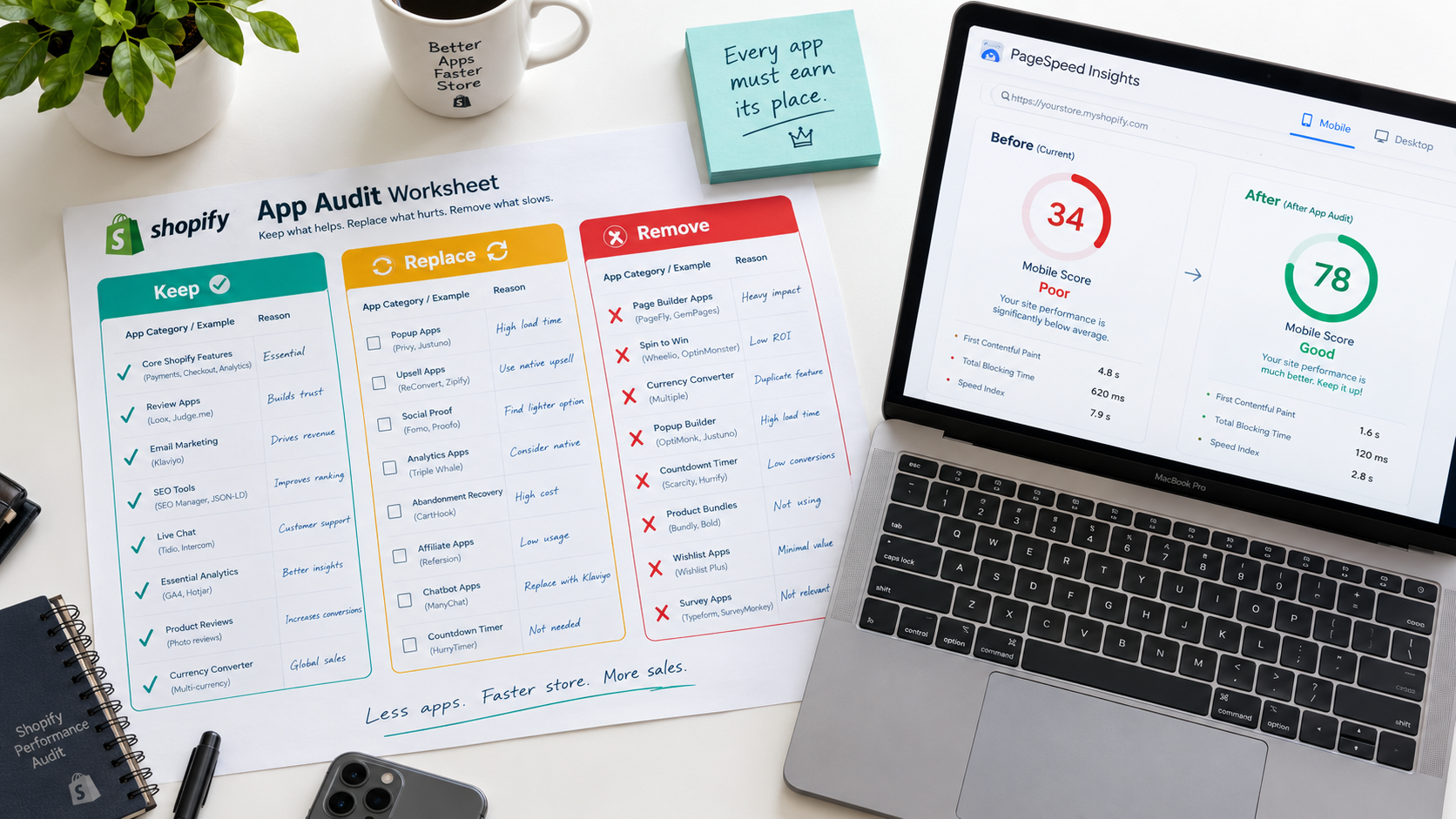
The Keep, Replace, Remove framework gives you a systematic way to evaluate every app in your store against its actual performance cost.
For each installed app, ask three questions: Is this app generating measurable revenue or fulfilling a non-negotiable operational function? Is there a native Shopify alternative or a lighter-weight third-party option that provides the same functionality? And is the revenue generated by this app proportionate to the conversion cost its load time imposes on every visitor to my store?
An app that adds 1.5 seconds of load time and generates $200 per month in upsell revenue while costing you 7 to 12% of conversions across 50,000 monthly visitors may be costing you significantly more than it generates. The load time cost is applied to every visitor. The revenue benefit is captured from a small subset.
Run your store through Google PageSpeed Insights and Shopify's built-in speed score before the audit and again after completing it. Most merchants who complete a thorough app audit recover 15 to 40 points on their mobile PageSpeed score — which translates directly into faster load times, better Core Web Vitals scores, improved Google rankings, and measurably higher mobile conversion rates.
The Ghost Code Problem: Cleaning Up What Is Already Gone
Before addressing active apps, address the ghost code from apps you have already removed. Uninstalling a Shopify app removes its admin entry and stops future charges but does not automatically remove every piece of code it injected into your theme.
To find and remove ghost code, open your Shopify theme code editor and search for JavaScript files, script tags, and CSS files associated with apps you no longer use. These typically appear in your theme.liquid file, your checkout.liquid file if on Shopify Plus, and potentially in individual section files where legacy apps inserted their blocks.
If you are not comfortable editing theme code directly, Shopify's Theme Inspector for Chrome identifies which scripts are loading on any page and which apps injected them — including scripts from uninstalled apps. A Shopify developer can typically clean ghost code from a theme in one to three hours, and the speed improvement from removing years of accumulated orphaned scripts frequently rivals the improvement from removing active apps.
What a Clean App Stack Looks Like
The highest-performing Shopify stores in 2026 operate with lean, intentional app stacks — typically eight to twelve actively used apps rather than twenty-five, with each app filling a genuine gap that native Shopify functionality cannot cover.
A typical lean but fully functional Shopify app stack covers email and SMS marketing through one platform — Klaviyo — rather than separate tools for each. Product reviews through one lightweight app rather than an enterprise platform. Subscription management if relevant to the product category. Returns management. A loyalty program if the repeat purchase model supports it. And specific operational tools that address genuine gaps — inventory forecasting, multi-channel sync, or B2B functionality — where native Shopify cannot reach.
Every app beyond that core stack should earn its place by generating measurable revenue that demonstrably exceeds the conversion cost of the load time it adds. If it cannot clear that bar on a monthly revenue-per-visitor analysis, the graveyard is where it belongs.
Need help auditing your Shopify app stack for speed and performance, or want an expert to clean up ghost code and optimize your store's Core Web Vitals? Get in touch with EcomFixify — we specialize in Shopify development and performance optimization for brands ready to convert more of the traffic they already have.